web
You’re offline. This is a read only version of the page.
close
Skip to main content

Announcements

No record found.

News and Announcements icon
Community site session details

Community site session details

Session Id :
Finance | Project Operations, Human Resources, ...
Suggested Answer

PSTL account combiner error

(0) ShareShare
ReportReport
Posted on by 74

Using GP 18.4 and PSTL 18.2.5


When rebuilding the procs in PSTL, I get an error:
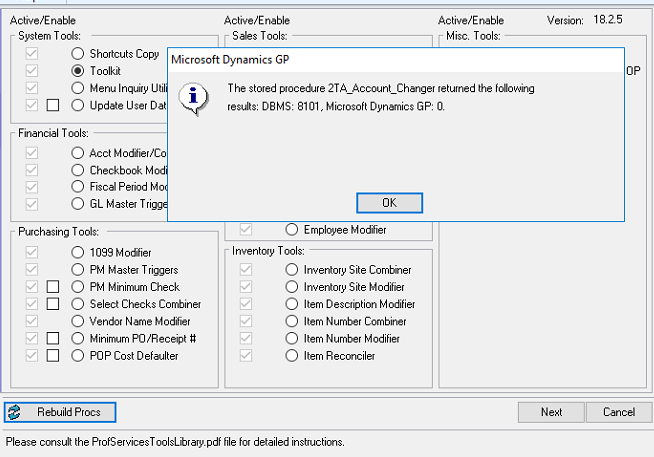
pastedimage1676433205018v1.png

Eventually the rebuild finishes and you can run the account combiner, but it fails with this error:
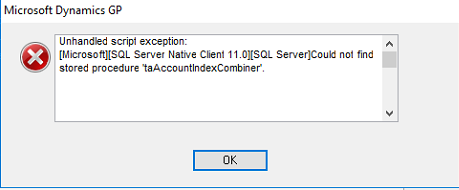
pastedimage1676433241163v2.png

I've verified that the stored procedure does not exist in the database.

It doesn't appear that I can script out that sproc from another company as it appears to be locked/encrypted.

I've grabbed the latest download for PSTL 18.2.5 and dropped the CNK into the root directory to rebuild the dictionary, but same errors.

Any insigh/help with this would be appreciated!

Categories:
I have the same question (0)
  • Suggested answer
    Derek Albaugh Profile Picture
    Microsoft Employee on at

    Against the company database, do you see the procedure present?

       select * from sysobjects where name = 'taAccountIndexCombiner'

    If not, then the 'Rebuild Procs' button in PSTL would be the next step, which should drop and re-create the procedures used.

      I tested deleting my proc and using the Rebuild Procs and it put it back.

    Otherwise, you may need to manually remove PSTL from the company database and re-add it back in.

    Thanks

  • JBurgess Profile Picture
    74 on at

    Thanks for the suggestion here.

    I ran the script you provided and confirmed that the proc is not in the company database.

    I run the rebuild procs button in that database, but that is the original issue and presents the errors above, it does not put the proc back. It seems like the process hangs for a bit at around 24% finished if that helps troubleshooting.

    Do you have a recommendation to remove PSTL from just the one company database? This client has multiple companies, and those all appear to be working as intended.

  • Suggested answer
    Derek Albaugh Profile Picture
    Microsoft Employee on at
    1. Close out of Dynamics GP again for all users on a machine that GP is installed onto.

            2. In Control Panel > Programs and Features, uninstall PSTL from Dynamics GP.

            3. In this GP's directory, verify the TAUTIL.DIC file is gone and then in the Dynamics.set file, we also shouldn't see the following: 

       1838
       Technical Service Tools

       :C:Program Files (x86)/Microsoft Dynamics/GP/TAUTIL.dic
       :C:Program Files (x86)/Microsoft Dynamics/GP/Data/F1838.DIC
       :C:Program Files (x86)/Microsoft Dynamics/GP/Data/R1838.DIC

           4. Here is a text file which has scripts to remove PSTL objects from both the GP company and system databases. Run them at least against the GP system database and the one company database you're testing PSTL on.

    Drop-PSTL-Objects-GP-18_5F00_x.txt

           5. Reinstall PSTL via Control Panel > Programs and Features again and see if this doesn't help resolve the missing stored procedure.

    Thanks

  • JBurgess Profile Picture
    74 on at

    Derek, I followed the instructions above.

    I uninstalled via control panel and confirmed the dictionary was removed and not in the DYNAMICS.SET file.

    I then ran the Drop scripts against the company and then DYNAMICS.

    After that, I re-added PSTL via the GP install.

    When loading PSTL for the first time I experienced the same issue as before.

    Something else to note, is that it seems to hang at this point for a few seconds before moving on:

    pastedimage1676522103585v1.png

    I checked the event viewer logs to see if anything might have shown up there, but I don't see any errors or warnings related to GP.

    Thanks again for your continued help in resolving this.

  • Suggested answer
    Derek Albaugh Profile Picture
    Microsoft Employee on at

    I'm curious if you once had Analytical Accounting installed in the company(s) seeing this DBMS 8101/2TA_Account_Changer error, and then not upgraded AA to the current GP version you're on?

    I ask because we've seen this error caused by tables that have Account Index data in them, but they're at the wrong structure for the GP version you're on.

    Similar to GP upgrades, if it sees AAG tables at all, it expects them to be upgraded to the current version, otherwise it'll cause errors.

    If you did have AAG installed but it isn't used and hasn't been updated to the current GP version you're on, you can remove it via this article and scripts:

    learn.microsoft.com/.../remove-analytical-accounting-from-computer-with-dynamics-gp-installed

    Thanks

  • Suggested answer
    JBurgess Profile Picture
    74 on at

    Derek, using the remove AA scripts worked. The client does not use AA, and it does appear that those tables existed from a previous install. Once I ran the scripts the rebuild procs process went through with no issues, and I was able to use the account combiner as intended. Thank you for your help!

  • Suggested answer
    Derek Albaugh Profile Picture
    Microsoft Employee on at

    I'm glad it worked. Thanks for the confirmation, have a great day.

Under review

Thank you for your reply! To ensure a great experience for everyone, your content is awaiting approval by our Community Managers. Please check back later.

Helpful resources

Quick Links

Introducing the 2026 Season 1 community Super Users

Congratulations to our 2026 Super Stars!

Meet the Microsoft Dynamics 365 Contact Center Champions

We are thrilled to have these Champions in our Community!

Congratulations to the April Top 10 Community Leaders

These are the community rock stars!

Leaderboard > Finance | Project Operations, Human Resources, AX, GP, SL

#1
Giorgio Bonacorsi Profile Picture

Giorgio Bonacorsi 722

#2
André Arnaud de Calavon Profile Picture

André Arnaud de Cal... 605 Super User 2026 Season 1

#3
Subra Profile Picture

Subra 547

Last 30 days Overall leaderboard

Product updates

Dynamics 365 release plans
