web
You’re offline. This is a read only version of the page.
close
Skip to main content

Announcements

No record found.

News and Announcements icon
Community site session details

Community site session details

Session Id :
Microsoft Dynamics NAV (Archived)

DataItem Link - Value Entry and Customer Tables

(0) ShareShare
ReportReport
Posted on by 2

I want to add Document No. into the Customer/Item Statistics report in a similar manner that I did for posting date. Even though Posting Date is found in the Value Entry table, it was not showing up in the visual studio report designer so I couldn't add it to the report.

I had to specify Posting Date in the DataItem Link section and line it up with the Date Filter in the Reference Field. 

Adding Document No. is proving to be more difficult as every type of Reference Field I try to match up with it ends up giving me an error that they are not the same.
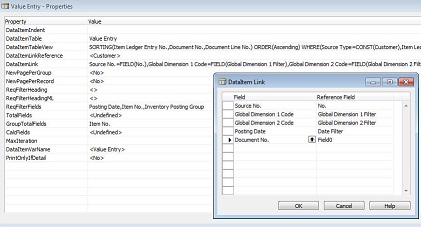
valueentry.jpg

The two tables are Customer and Value Entry and I want Document No. because I believe it will give me a unique value with which I can use to find that particular purchase.

*This post is locked for comments

I have the same question (0)
  • Verified answer
    Suresh Kulla Profile Picture
    50,278 Super User 2026 Season 1 on at

    Edward,

    The fields where you are adding now is providing the relationship between the tables and to provide results matching between those values in the respective tables, the document no. on Value Entry table stores respective order no. based on the transaction whether it is a purchase or sales, you cannot find the document no. on customer no.  You cannot link that field between customer and value entry.

    You can get customer related entries from the Value Entry but you need to link that to Source No. and Item Ledger Entry Type on the value Entry in that case will be Sales.

    If you want to add the field to show on the report then you need to get to the main screen which is Report Dataset Designer and there you can add the fields which you want to show on the report.

  • Verified answer
    edwardl Profile Picture
    2 on at

    reportdesigner.jpg

    You mean add additional tables in here? Or is the Report Dataset Designer somewhere else?

  • Verified answer
    Suresh Kulla Profile Picture
    50,278 Super User 2026 Season 1 on at

    Edward,

    Sorry i was thinking about NAV 2013, for 2009 version to see the field in RDLC you need to add that field on the classic report section designer. As show in the figure you can just add one more textbox from the View->ToolBox in the Value Entry Group Footer and change the source expression for that accordingly i.e. Document No. and for that textbox properties the last property which is DataSetFieldName you can rename it if you want, but that is what which will showup on RDLC after adding.

    5_2D00_26_2D00_2015-12_2D00_06_2D00_37-PM.png

Under review

Thank you for your reply! To ensure a great experience for everyone, your content is awaiting approval by our Community Managers. Please check back later.

Helpful resources

Quick Links

Introducing the 2026 Season 1 community Super Users

Congratulations to our 2026 Super Stars!

Meet the Microsoft Dynamics 365 Contact Center Champions

We are thrilled to have these Champions in our Community!

Congratulations to the April Top 10 Community Leaders

These are the community rock stars!

Leaderboard > 🔒一 Microsoft Dynamics NAV (Archived)

#1
TAHER_El_Mehdi Profile Picture

TAHER_El_Mehdi 2

#1
sliderxb Profile Picture

sliderxb 2

#1
broberts Profile Picture

broberts 2

Last 30 days Overall leaderboard

Featured topics

Product updates

Dynamics 365 release plans
