web
You’re offline. This is a read only version of the page.
close
Skip to main content

Announcements

News and Announcements icon
Community site session details

Community site session details

Session Id :
Microsoft Dynamics CRM (Archived)
Answered

Case entity workflow email sending error when customer is a contact

(0) ShareShare
ReportReport
Posted on by 44

Hi Everyone,

I'm trying to create a Case Management - Service Desk solution for internal use, where the customer entry is a contact type, trying to use the built in features as much as i can.

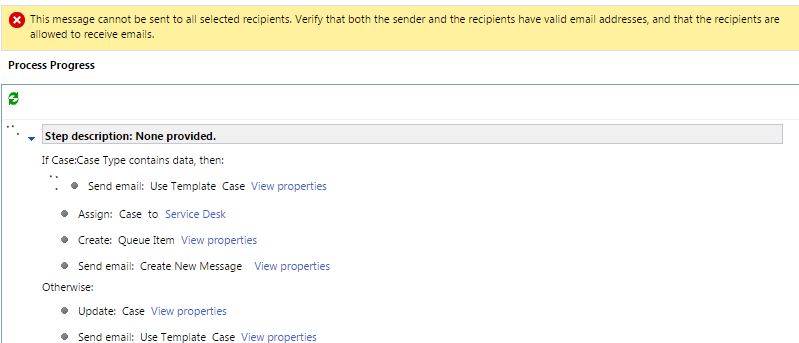
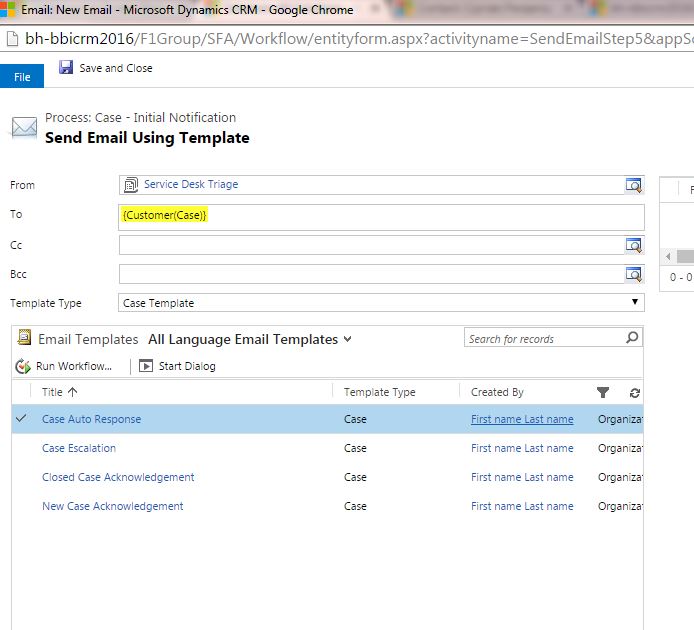
The problem i got is when sending an email to the customer using a workflow.
6840.1.JPG

The error message:

8015.3.JPG

Object address not found on party or party is marked as non-emailable

Plugin Trace:

[Microsoft.Xrm.Sdk.Workflow: Microsoft.Xrm.Sdk.Workflow.Activities.SendEmailFromTemplate]
[SendEmailStep5]


Error Message:

Unhandled Exception: System.ServiceModel.FaultException`1[[Microsoft.Xrm.Sdk.OrganizationServiceFault, Microsoft.Xrm.Sdk, Version=8.0.0.0, Culture=neutral, PublicKeyToken=31bf3856ad364e35]]: Object address not found on party or party is marked as non-emailableDetail: 
<OrganizationServiceFault xmlns:i="www.w3.org/.../XMLSchema-instance" xmlns="schemas.microsoft.com/.../Contracts">
  <ErrorCode>-2147218688</ErrorCode>
  <ErrorDetails xmlns:d2p1="schemas.datacontract.org/.../System.Collections.Generic" />
  <Message>Object address not found on party or party is marked as non-emailable</Message>
  <Timestamp>2016-06-20T11:44:24.6437914Z</Timestamp>
  <InnerFault>
    <ErrorCode>-2147218688</ErrorCode>
    <ErrorDetails xmlns:d3p1="schemas.datacontract.org/.../System.Collections.Generic" />
    <Message>Object address not found on party or party is marked as non-emailable</Message>
    <Timestamp>2016-06-20T11:44:24.6437914Z</Timestamp>
    <InnerFault i:nil="true" />
    <TraceText i:nil="true" />
  </InnerFault>
  <TraceText>[Microsoft.Xrm.Sdk.Workflow: Microsoft.Xrm.Sdk.Workflow.Activities.SendEmailFromTemplate]
[SendEmailStep5]
</TraceText>
</OrganizationServiceFault>
   at Microsoft.Crm.Workflow.Services.SendEmailFromTemplateActivityService.Execute(ActivityContext executionContext, SendEmailFromTemplate sendEmailFromTemplate)
   at System.Activities.CodeActivity.InternalExecute(ActivityInstance instance, ActivityExecutor executor, BookmarkManager bookmarkManager)
   at System.Activities.Runtime.ActivityExecutor.ExecuteActivityWorkItem.ExecuteBody(ActivityExecutor executor, BookmarkManager bookmarkManager, Location resultLocation)


I did noticed that the Case entity has a "contactid" field, but this is always null, i did not find any documentation about its use.

Any ideas?

Thanks!

*This post is locked for comments

I have the same question (0)
  • Suggested answer
    Varsha deshpande Profile Picture
    140 on at

    Hi Ciprian P,

        Change the from address to any of the user account i.e. use the user lookup field instead of giving queue lookup field.

    Hope this helps,

    Regards,

    Varsha Deshpande

  • Ciprian  P Profile Picture
    44 on at

    Hi Varsha Deshpande,

    If i insert a fixed recipient the email is sent correctly, is the lookup action that is not working, {Customer(Case)} ...

    Thanks.

  • Verified answer
    Varsha deshpande Profile Picture
    140 on at

    Ciprian, try to use fixed value in "from" field i.e. instead of "Service Desk". Send a mail from a user of your system and let the "to" field be the same {Customer(Case)}. Don't insert a fixed recipient in "to" field. It will be something like a mail is sent from particular user who ever you mention in the "from" field and the mail is sent to the customers primary contact. Let me know if I'm wrong. If your problem is solved mark it as verified.

    Hope this helps,

    Regards,

    Varsha Deshpande.

  • Ciprian  P Profile Picture
    44 on at

    Hi Varsha Deshpande,

    Yes, you are right, the emails are working now, but i'm still puzzled why, i mean if i left the "from" field as it was and use a static email address, everything was working fine.

    Thank you for your help, much appreciated !

  • Verified answer
    Varsha deshpande Profile Picture
    140 on at

    Hi Ciprian P,

    Sorry for delay. May I know what were your steps in sending the mail by inserting static email address in "to" field because in your workflow in "from" field (Service desk) is a queue and to send email from a queue we need to create a queue with valid email address. Generally default queues are automatically created by crm for users and business units. We can even create queues. Are you using the default one or created a queue with a valid address.This address is visible to the customers who ever receives the mail. So as there is no valid address it was throwing the exception. The thing is I want to know how did it work with static value in the "to" field.

    Thanks & Regards,

    Varsha Deshpande

  • Ciprian  P Profile Picture
    44 on at

    Hi Varsha Deshpande,

    Well is not important anyway, since now it is all working fine thanks to your help, but as a reference the queue is used for the automatic case creation feature, in my case automatic case creation from a email, meaning it has a valid mailbox.d.JPGb.JPGc.JPGd.JPG

    Thank You!

Under review

Thank you for your reply! To ensure a great experience for everyone, your content is awaiting approval by our Community Managers. Please check back later.

Helpful resources

Quick Links

Season of Sharing Community Challenge Launch!

Jump in, show your community spirit, and win prizes!

Women in Power Builds Momentum

Expanding mentorship, skilling, and AI innovation

Congratulations to the May Top 10 Community Leaders

These are the community rock stars!

Leaderboard > 🔒一 Microsoft Dynamics CRM (Archived)

Last 30 days Overall leaderboard

Featured topics

Product updates

Dynamics 365 release plans