web
You’re offline. This is a read only version of the page.
close
Skip to main content

Notifications

Announcements

No record found.

Community site session details

Community site session details

Session Id :
Microsoft Dynamics CRM (Archived)

CRM case reopens

(0) ShareShare
ReportReport
Posted on by 115

Hello,

We just upgrade to online CRM Dynamic 2016. This was not an issue in CRM Dynamic 2015.


The issue is the auto save is reopening “resolved cases” or inactive cases.

The process to close all cases is shown below:
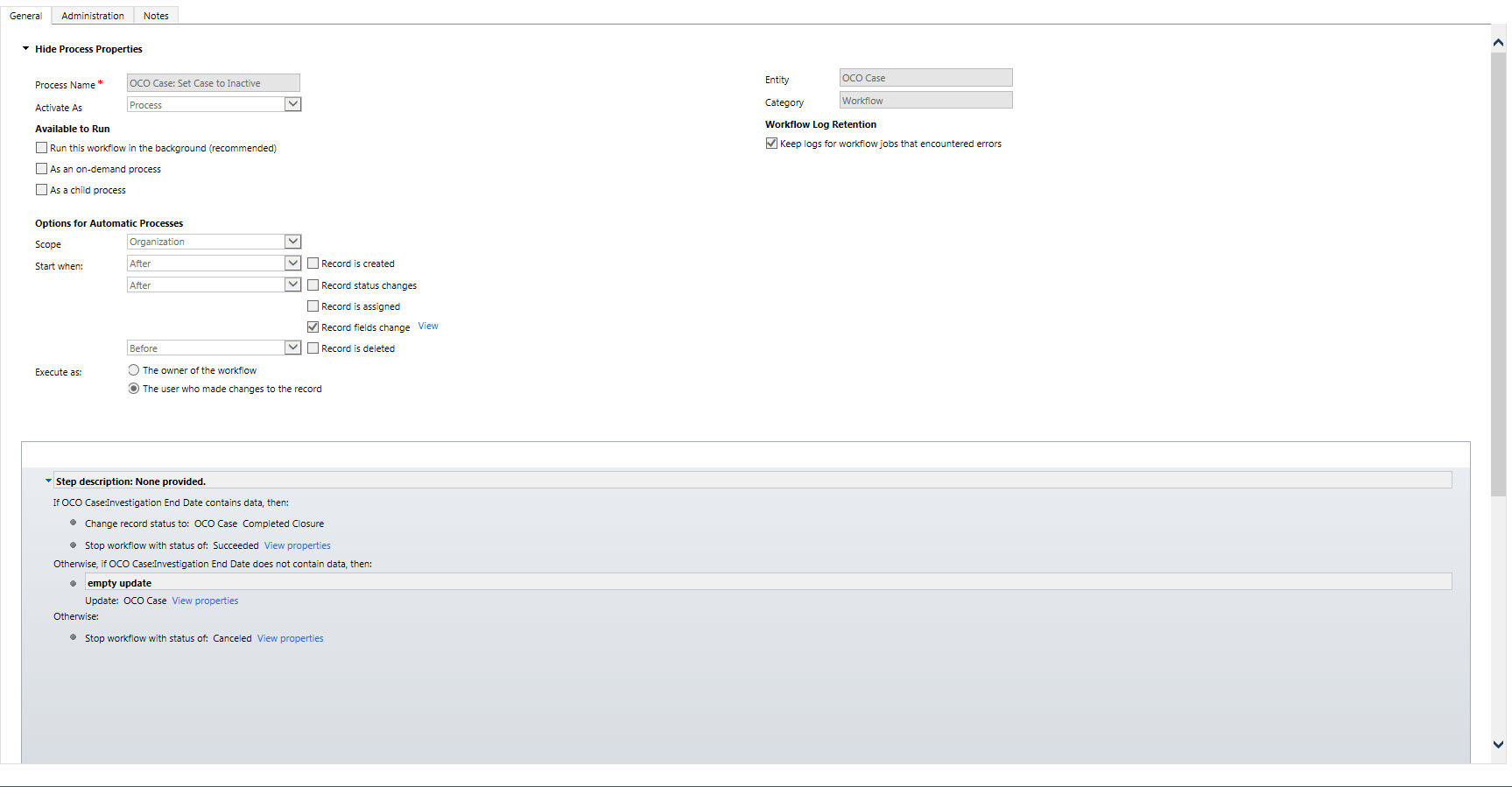
Set-Case-to-Inactive.jpg

This is how the case looks before closing:

OCOCaseBeforeClosing.jpg

After entering the date into the OCO Investigation Complete field this is what it looks like for a moment.

OCOCaseRightAfterClosing.jpg

As you see, the case is now inactive and the case is set to Resolved.

The case will revert to Active after a few moments. Also, if I try to leave the case quickly to avoid the auto save, the case still reopens.

I turn off Auto Save and the cases stay closed.


The odd thing, is my client has a process to close cases before being investigated and this is quite common. Still, the closure process is the same, and the Case Business process flow for closure is the same on both intake closures & complete OCO closures. In this case, it sets the status reason to complete closure (which is what the process should change the status reason to.)

Any suggestions? Any other info you need?


*This post is locked for comments

I have the same question (0)
  • Community Member Profile Picture
    on at

    I am interested in the resolution to this case, was hoping someone came up with a solution by now. What happens if you simply close the case? Have you tried running the WF as async?

  • Verified answer
    Huguelet Profile Picture
    115 on at

    The issue was in the Business Rules in the forms.  The code was open ended and reactivate the case in the 2016 Version. 

  • Community Member Profile Picture
    on at

    We experienced same behaviour during upgrade from CRM2011 to CRM2016. Was glad to find this post, it helped :-)

    We also created a tracking solution in CRM 2016 (seeing the Audit Log didn't clarify) - the tracking solution then provided clear information regarding field updates. This way, we could easily see that a Business Rule was causing the issue. I added a condition to the Business Rule (only run if Case Status = Active), which solved the problem :-)

Under review

Thank you for your reply! To ensure a great experience for everyone, your content is awaiting approval by our Community Managers. Please check back later.

Helpful resources

Quick Links

Responsible AI policies

As AI tools become more common, we’re introducing a Responsible AI Use…

Neeraj Kumar – Community Spotlight

We are honored to recognize Neeraj Kumar as our Community Spotlight honoree for…

Leaderboard > 🔒一 Microsoft Dynamics CRM (Archived)

#1
SA-08121319-0 Profile Picture

SA-08121319-0 4

#1
Calum MacFarlane Profile Picture

Calum MacFarlane 4

#3
Alex Fun Wei Jie Profile Picture

Alex Fun Wei Jie 2

Last 30 days Overall leaderboard

Featured topics

Product updates

Dynamics 365 release plans



