web
You’re offline. This is a read only version of the page.
close
Skip to main content

Notifications

Announcements

No record found.

Community site session details

Community site session details

Session Id :
Finance | Project Operations, Human Resources, ...
Answered

SmartList Builder

(0) ShareShare
ReportReport
Posted on by 125

Hello!

I am attempting to create a SmartList for Items showing their lot numbers and their AVAILABLE quantities of each lot number currently in stock.  Needless to say I am struggling to find a Qty Available field to pull into my list so I suspect there is a calculation involved that I could use some assistance on. In the image below I have 2 receipts into GP with different lot numbers and different quantity available.  Is there an out of the box way to pull the Qty Available into my SmartList? Does anyone know what the correct calculation for this would be, if not?

Any help is always appreciate. Thanks in advance for your time. Not sure why the image becomes so small and blurry, could use some advice there as well.
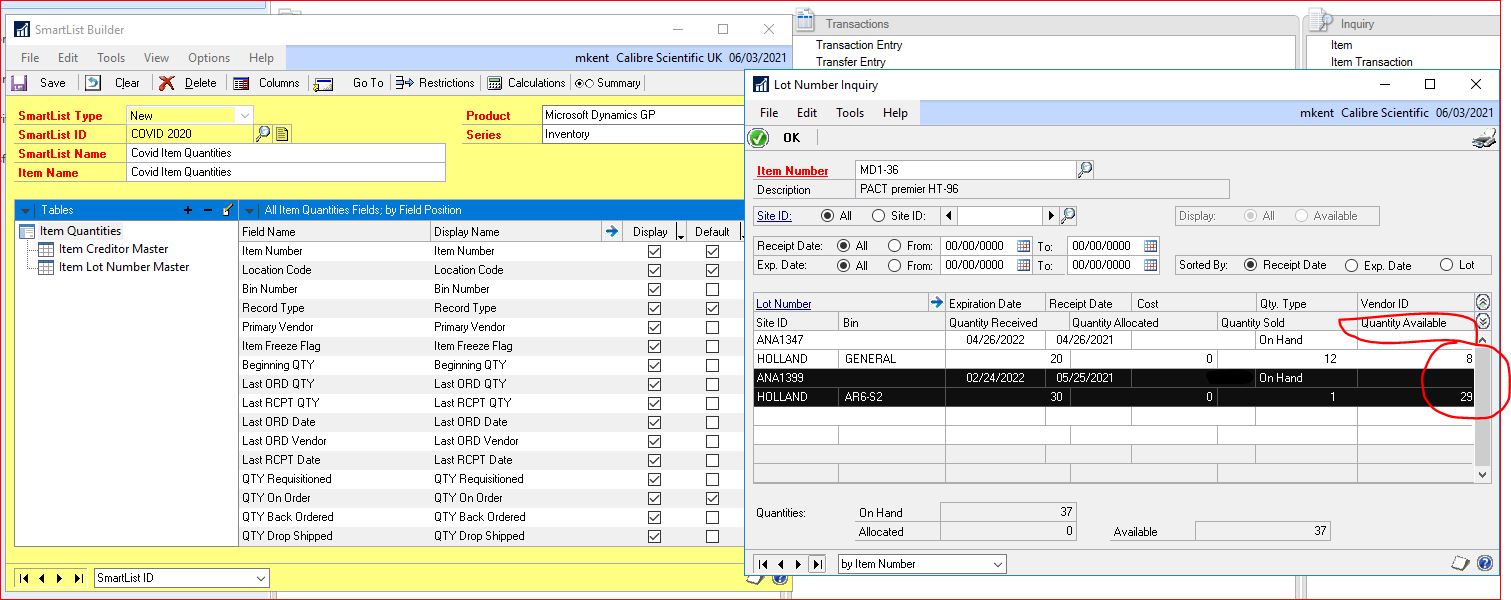
CaptureGP.JPG

Tables used in the above image

Item Quantities

   Item Lot Number Master

   Item Creditor Master

Categories:
I have the same question (0)
  • Verified answer
    Joseph Markovich Profile Picture
    3,976 on at

    Hi Melissa-

    You could just use the Item Lot Master and Creditor Master tables to get this information (unless you need other information from the Item Creditor Master table too).

    The calculation for On Hand is using the Qty Received and Qty Sold fields in Item Lot Master: Qty Received - Qty Sold = Qty On Hand.

    If you want to know the actual quantity available (taking allocations into account in the math), it would be the Qty Received, Qty Sold and Qty Allocated in the Item Lot Master fields: Qty Received - Qty Sold - Qty Allocated = Qty Available.

    I hope this helps.

    Joe

  • Moises Pinto Profile Picture
    35 on at

    Buenos dias,

    Melissa, puedes agregar al SmartList el campo Qty Available(Cant Disponible) que se encuentra en la misma tabla que muestras en la imagen (Item Quantities).

  • MelissaK6201 Profile Picture
    125 on at

    Joseph this was great.  I was able to create my SmartList and it is working well.

    Thanks so much for your help!

Under review

Thank you for your reply! To ensure a great experience for everyone, your content is awaiting approval by our Community Managers. Please check back later.

Helpful resources

Quick Links

Responsible AI policies

As AI tools become more common, we’re introducing a Responsible AI Use…

Neeraj Kumar – Community Spotlight

We are honored to recognize Neeraj Kumar as our Community Spotlight honoree for…

Leaderboard > Finance | Project Operations, Human Resources, AX, GP, SL

#1
Martin Dráb Profile Picture

Martin Dráb 584 Most Valuable Professional

#2
André Arnaud de Calavon Profile Picture

André Arnaud de Cal... 499 Super User 2025 Season 2

#3
Sohaib Cheema Profile Picture

Sohaib Cheema 254 User Group Leader

Last 30 days Overall leaderboard

Product updates

Dynamics 365 release plans
