web
You’re offline. This is a read only version of the page.
close
Skip to main content

Notifications

Announcements

Community site session details

Community site session details

Session Id :
Service | Customer Service, Contact Center, Fie...
Answered

Is it possible to set a resource to automatically observe business closures by default when creating new working hours schedule?

(1) ShareShare
ReportReport
Posted on by 85

Hello All,

I would like to know if it is possible to set up resources and/or working hours so that the business closures are automatically observed by default. As an example, the following shows what I mean (ie, I would like the Observe Business Closures slider to be enabled as default behaviour as it is currently disabled by default):
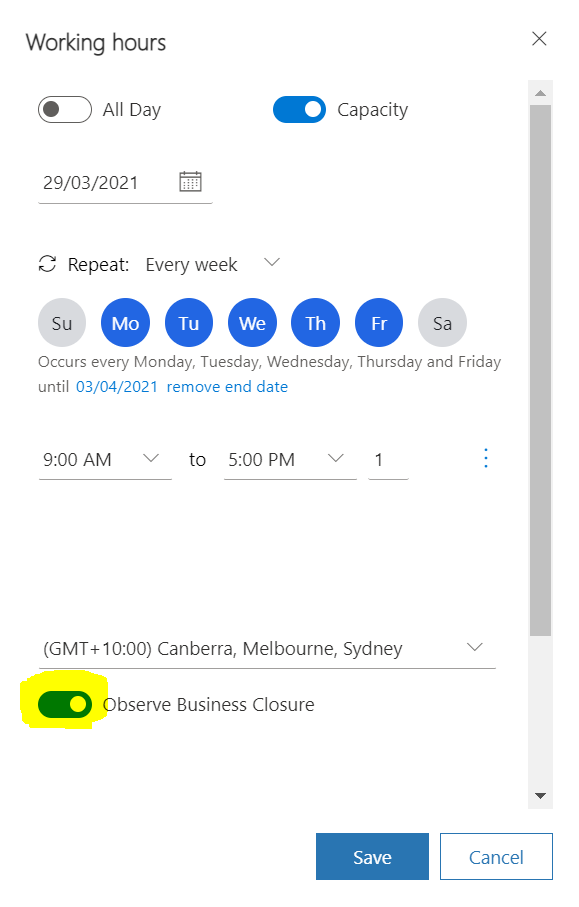
pastedimage1618953979111v1.png

Our D365 instance has been heavily customised so I am open to the possibility that one/more options have been hidden by developers but since I don't have the ability to look under the hood to see whether it is the case, I would like to ask about the various ways that business closures can be set to be automatically observed by default.

Also, from https://blog.magnetismsolutions.com/blog/12-02-14/Scheduling_Work_Hours_and_Business_Closure_Dynamics_CRM_2011.aspx, the "If we open our Resources that are enabled to observe business closures we will be able to see this holiday appear on their work calendar" sentence picked my interest in that it suggests that it is possible to enable resources to observe business closures by default.

Thank you in advance.

Michael

I have the same question (0)
  • Verified answer
    Nya Profile Picture
    29,060 on at

    Hi,

    It cannot be set as Yes by default.

    The “Work Hours” tab in Bookable Resource form is actually a view of Calendar entity, which is an entity not shown in the list of the entities and not able to be customized.

     pastedimage1618998317022v1.png

    pastedimage1618998335162v2.png

    pastedimage1618998341835v3.png


    The creation of the working hours is mostly a quick create form of the entity. So you cannot change its default option.


    The phrase you refer to should mean that the record that has changed this option manually is being opened again.


    If this helped you, I'd appreciate it if you'd mark this as a Verified Answer, which may in turn help others as well.

    Best Regards,

    Nya

  • M Jacquin Profile Picture
    85 on at

    Thank you Nya. Much appreciated.

Under review

Thank you for your reply! To ensure a great experience for everyone, your content is awaiting approval by our Community Managers. Please check back later.

Helpful resources

Quick Links

Responsible AI policies

As AI tools become more common, we’re introducing a Responsible AI Use…

Congratulations to our 2025 Community Spotlights

Thanks to all of our 2025 Community Spotlight stars!

Leaderboard > Service | Customer Service, Contact Center, Field Service, Guides

#1
Suriyanarayanan V Profile Picture

Suriyanarayanan V 15

#2
Tom_Gioielli Profile Picture

Tom_Gioielli 13 Super User 2025 Season 2

#3
CU19070926-0 Profile Picture

CU19070926-0 10

Last 30 days Overall leaderboard

Featured topics

Product updates

Dynamics 365 release plans
