web
You’re offline. This is a read only version of the page.
close
Skip to main content

Notifications

Announcements

No record found.

Community site session details

Community site session details

Session Id :
Small and medium business | Business Central, N...
Answered

Credit invoice and credit invoicelines

(0) ShareShare
ReportReport
Posted on by 187

Hello BC Forum,

Recently I uploaded (test) data for a client to explore Business Central and the possibilities / capabillities for a possible change from their bookkeeping system to BC with all the data (postings and invoices). 

I first uploaded 100 invoices and then via one invoice all the invoicelines of the 100 invoices with "edit in excel". Although in general I get a lot of error messages with this feature like "internal error" the data connector works most of the time (if you try multiple times).
Then I tried credit invoices in the same way. Unfortunately it seems not possible to upload the credit invoicelines the same way. I have to do this one by one. This causes a lot of work for a planned data transfer.

Is there a way to upload the credit invoicelines in bulk and if not: why is it possible for sales and purchase invoicelines and not for credit invoice lines?

Thanks for the reply.

Greetings,

John

I have the same question (0)
  • Suggested answer
    Community Member Profile Picture
    on at

    Johnny,

    I use Copy/Paste heavily for Sales or Purchase Lines. You can take your Sales Line page, insert 1 line of data that matches what you require, then click, on the Line action bar, Page/Edit in Excel. Now in Excel make sure the columns are in the Order your page appears.

    Sales Order:
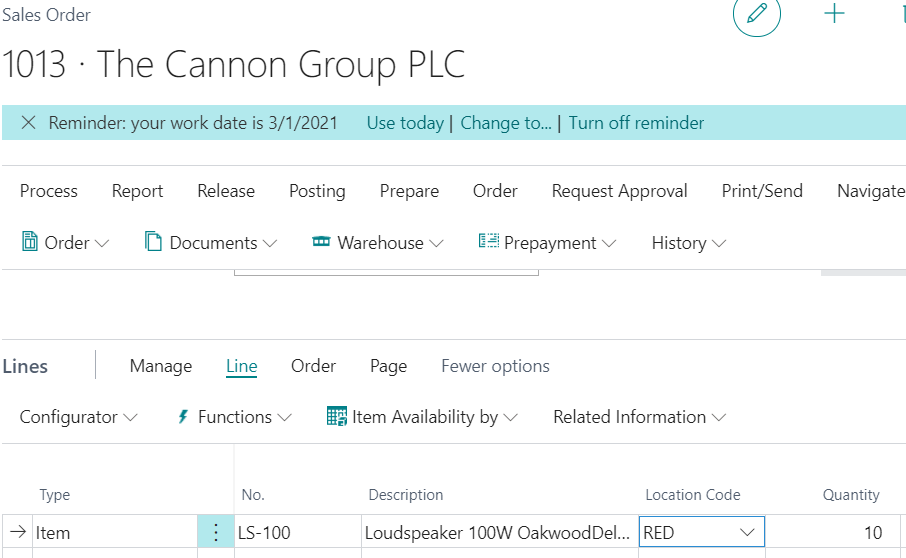
    pastedimage1616095853816v1.png

    Now Excel:

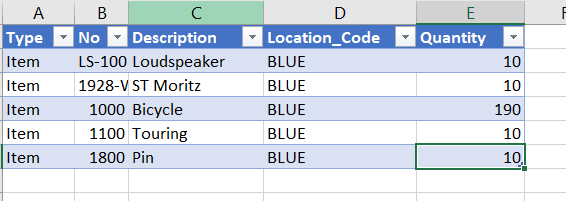
    pastedimage1616095873500v2.png

    Now go back to Sales Order, with your Mouse 

    pastedimage1616095924798v3.png  and Paste the rows highlighted from Excel, without header
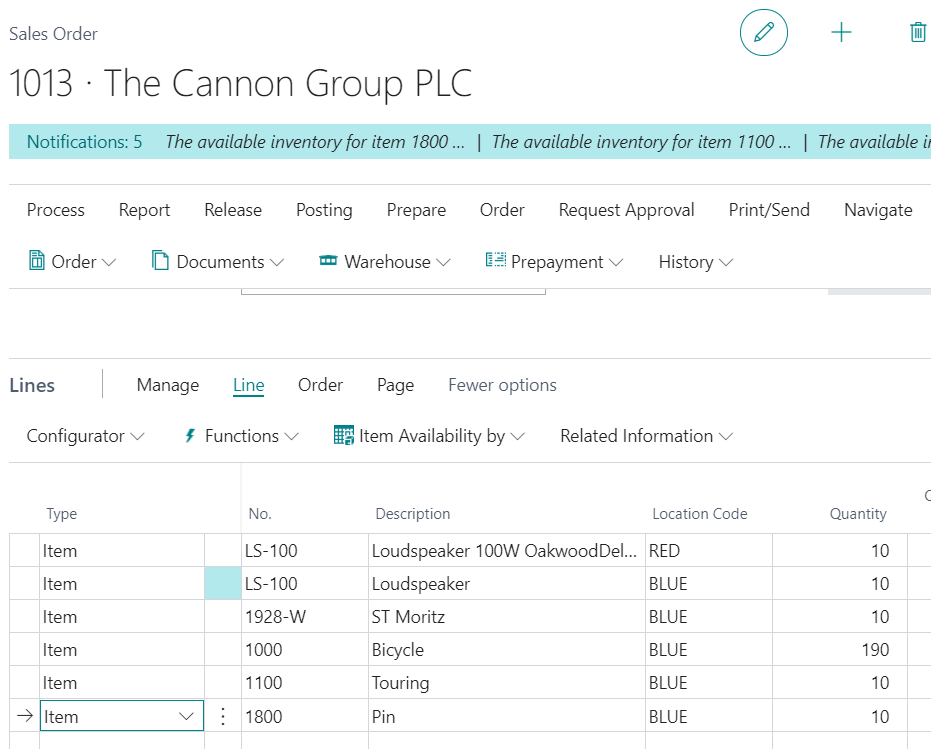
    pastedimage1616095988287v4.png

    Hope this helps. One last thing, the Copy Document function will help going forward to copy previously posted invoices or archived sales orders to duplicate. If you are trying to correct a previously posted invoice, yo can use the Correct function from the Posted Sales Invoice too.

    Thanks,

    Steve

  • Suggested answer
    JAngle Profile Picture
    133 on at

    Configuration packages offer another avenue if you don’t want to piece meal paste lines in which can be time consuming if you have more than one document. A guide on using them: docs.microsoft.com/.../admin-how-to-prepare-a-configuration-package

  • JohnnyLM Profile Picture
    187 on at

    Hello Steve,

    Your suggestion works for sales or purchase invoicelines but there you also have the option "edit in excel" which works much better for me.

    My question is not about sales or purchase invoicelines but credit memo lines. I have to import multiple lines for multiple credit memo's. If I try your suggestion there then I have one credit memo with all the lines of the other credit memo's in it too.

    To create multiple credit memo's with "edit in excel" works fine. Then I have to fill these credit memo's with credit memo lines. Here I do not find the option "edit in excel" which means I have to fill the credit memo's one by one with their credit memo lines.

    Greetings,

    John

  • Verified answer
    Community Member Profile Picture
    on at

    John,

    You are correct that Credit Memo does not have Edit in Excel. for credit memos Users rely on Correct, Copy Document or Copy/Paste to fill in the Credit Memo lines. If you are trying to create multiple Credit Memo seperately, you might consider a Configuration Package to populate the Header and Lines, with Document Type = Credit Memo. It might meet want you are looing for.

    Thanks,

    Steve

Under review

Thank you for your reply! To ensure a great experience for everyone, your content is awaiting approval by our Community Managers. Please check back later.

Helpful resources

Quick Links

Responsible AI policies

As AI tools become more common, we’re introducing a Responsible AI Use…

Neeraj Kumar – Community Spotlight

We are honored to recognize Neeraj Kumar as our Community Spotlight honoree for…

Leaderboard > Small and medium business | Business Central, NAV, RMS

#1
OussamaSabbouh Profile Picture

OussamaSabbouh 3,229

#2
Jainam M. Kothari Profile Picture

Jainam M. Kothari 1,867 Super User 2025 Season 2

#3
YUN ZHU Profile Picture

YUN ZHU 1,153 Super User 2025 Season 2

Last 30 days Overall leaderboard

Featured topics

Product updates

Dynamics 365 release plans