web
You’re offline. This is a read only version of the page.
close
Skip to main content

Announcements

No record found.

News and Announcements icon
Community site session details

Community site session details

Session Id :
Customer experience | Sales, Customer Insights,...
Suggested Answer

If/then email opened branch doesn't catch opens

(0) ShareShare
ReportReport
Posted on by 12

Hi,

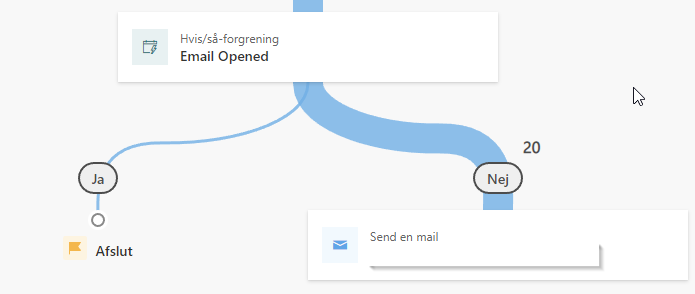
I have a workflow in Realtime Marketing, with a reminder email 2 weeks after the initial send, to those in the segment that haven't opened the email.
pastedimage1675865121604v1.png

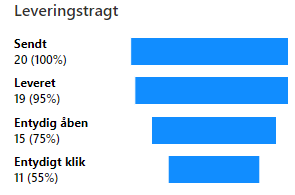
But the If/then branch doesn't catch any of the opens. The email interaction panel shows that 15 of 20 recipients have opened the email.
pastedimage1675865244206v2.png

Hope someone can pinpoint where things go wrong.

I have the same question (1)
  • Suggested answer
    Eiken Profile Picture
    Microsoft Employee on at

    Hi,

    When create the Journey and add the If/then branch, you should set the Time limit.

    It means the time limit about this condition and the default time is a day.

    Once this time exceeded, the flow will flow to No.

    pastedimage1675924100668v1.png

  • AndersRos Profile Picture
    12 on at

    Hi Eiken,

    The Time limit is set to 14 days, so that's not the issue.

    The Email opened trigger doesn't register any opens. The email interaction panel shows that 15 of 20 recipients have opened the email.

    Best regards

    Anders

  • Suggested answer
    Eiken Profile Picture
    Microsoft Employee on at

    Hi,

    Have you solved the problem now.

    I ran many tests to reproduce your solution but failed.(The email opened will flow to "Yes")

    Maybe there is something wrong with the system.

    By the way, is your analytics from the action "send an email" which is before the bench.

    pastedimage1676337310361v2.png

  • AndersRos Profile Picture
    12 on at

    Hi,

    No, the problem persists. It seems that there is something wrong with the system or the initial setup.

    Best regards

    Anders

  • AndersRos Profile Picture
    12 on at

    Found the issue, and fixed it.

  • Eiken Profile Picture
    Microsoft Employee on at

    Hi Ander,

    Can you share your solution if it's convenient?

    It may help others with the same problem.

Under review

Thank you for your reply! To ensure a great experience for everyone, your content is awaiting approval by our Community Managers. Please check back later.

Helpful resources

Quick Links

Introducing the 2026 Season 1 community Super Users

Congratulations to our 2026 Super Stars!

Meet the Microsoft Dynamics 365 Contact Center Champions

We are thrilled to have these Champions in our Community!

Congratulations to the April Top 10 Community Leaders

These are the community rock stars!

Leaderboard > Customer experience | Sales, Customer Insights, CRM

#1
ManoVerse Profile Picture

ManoVerse 81 Super User 2026 Season 1

#2
Muhammad Shahzad Shafique Profile Picture

Muhammad Shahzad Sh... 69 Most Valuable Professional

#3
11manish Profile Picture

11manish 62

Last 30 days Overall leaderboard

Product updates

Dynamics 365 release plans
