web
You’re offline. This is a read only version of the page.
close
Skip to main content

Notifications

Announcements

No record found.

Community site session details

Community site session details

Session Id :
Small and medium business | Business Central, N...
Answered

BC 16 app is not installing due to table extension

(0) ShareShare
ReportReport
Posted on by 70

BC 16: I receive the below error when trying to install an app which compiles well in VS Code:

Could not install the extension ACBankingWizard on tenant default due to the following error: The following SQL error was unexpected: Invalid object name 'CRONUS.dbo.CRONUS NZ$Bank Account$b6d599c0-acd0-4e8e-a4ea-15f7b04dc527'.

This is the code that breaks the app (notice I added 2 at the end thinking it may be to do with another app I have a dependency to, but that one has a different Prefix altogether, so it's not that):
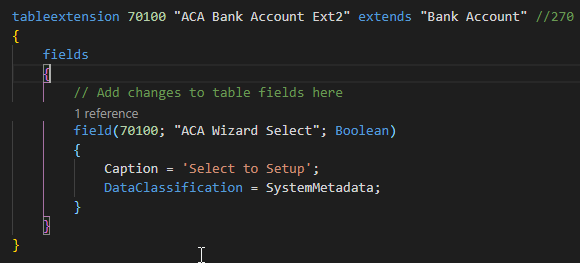
pastedimage1586814180653v1.png

Anyone knows why?

Kind Regards,

Robert

I have the same question (0)
  • Daniel Rimmelzwaan Profile Picture
    3,485 on at

    Looks to me like you made a change to the app id in app.json and there is already another version of your app with another app id. This id is used to create the table names for the new tables and the table extensions.

  • Robert Bulugea Profile Picture
    70 on at

    Thank you, it was the first table extension added to this app and no previous version had a table extension.

    I am sure I haven't changed the ID of the app. But your comment gives me more food for thought...

    My app is dependent on another app that has an extension on the same table (different object and table extension names).

    What I will try to do tomorrow is recreate the container, install the other app again and try again (today I am a bit slammed with other stuff).

    That way if there is a metadata/data issue with the way the other extension was installed, this it will get it resolved.

    I will keep you posted tomorrow if that worked...

  • Daniel Rimmelzwaan Profile Picture
    3,485 on at

    Did you copy the app.json file from the other app into the new app?

    Make sure that the app id of the dependent app and the one you are working on are different, it must be unique for each app. You can simply delete the app.json file from your workspace, and then VSCode will tell you that a manifest file is missing with a button to create one. If it doesn't show you that message, you can use the AL: Generate Manifest to create a new app.json file.

  • Robert Bulugea Profile Picture
    70 on at

    no, I created a new project even used the createguid tool (I always do) for the new app ID (the one at the start of the app file).

    * I checked and ID's are certainly different.

    in my app I have a dependency on the old one, together with the two BC16 dependencies.

    * I appreciate the suggestion though.

    I will try refreshing the container tomorrow, but can't just look into this one today, I think there may be something wrong with the other app installation I am dependent of....can't tell what and if a refresh fixes it then I'll update the case here.

  • Daniel Rimmelzwaan Profile Picture
    3,485 on at

    Sounds like the app id is not your problem :) now I'm curious what is the cause

  • Suggested answer
    Robert Bulugea Profile Picture
    70 on at

    Ok, so I downloaded a newer container today. it works, no idea why it didn't in my previous one.

    I did have to re-create the table extension as I deleted it previously to check if it still installs, but yeah, no major difference,same field ID, different name.

    New container details: Version: NZ Business Central 16.0 (Platform 16.0.11233.12163 + Application 16.0.11240.12188)

    Old container details: Version: NZ Business Central 16.0 (Platform 16.0.11233.12078 + Application 16.0.11240.12085)

    Just in case you want to satisfy your curiousity...I'm happy it works.

  • Verified answer
    Daniel Rimmelzwaan Profile Picture
    3,485 on at

    Weird... but I've had similar things happen. Thanks for the update, and glad to hear you got it to work

Under review

Thank you for your reply! To ensure a great experience for everyone, your content is awaiting approval by our Community Managers. Please check back later.

Helpful resources

Quick Links

Responsible AI policies

As AI tools become more common, we’re introducing a Responsible AI Use…

Neeraj Kumar – Community Spotlight

We are honored to recognize Neeraj Kumar as our Community Spotlight honoree for…

Leaderboard > Small and medium business | Business Central, NAV, RMS

#1
OussamaSabbouh Profile Picture

OussamaSabbouh 2,990

#2
Jainam M. Kothari Profile Picture

Jainam M. Kothari 1,576 Super User 2025 Season 2

#3
YUN ZHU Profile Picture

YUN ZHU 1,028 Super User 2025 Season 2

Last 30 days Overall leaderboard

Featured topics

Product updates

Dynamics 365 release plans
