web
You’re offline. This is a read only version of the page.
close
Skip to main content

Announcements

No record found.

News and Announcements icon
Community site session details

Community site session details

Session Id :
Microsoft Dynamics AX (Archived)

Payment Methods in Receipt Retail POS

(0) ShareShare
ReportReport
Posted on by

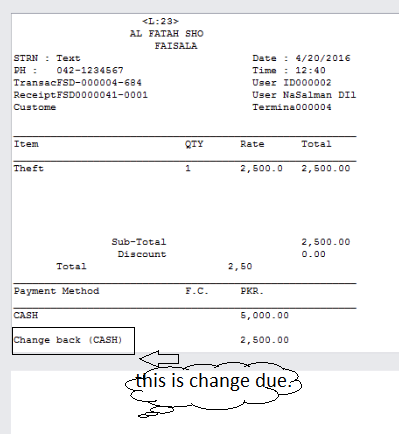
I am working on a receipt customization. I have to add payment methods to the receipt. Now when I put the payment methods in the receipt it also fetches the change due in the payment method section. (It considers the change due as one of the payment method).

I need to add change due to my receipt but separate from payment methods. how can I get the change due to another section. ??? 

Note: The change due is the amount to be pay back to the customer. like if customer pay 1000 for 950 purchasing then 50 is the change due.
receipt.png

*This post is locked for comments

I have the same question (0)
  • Verified answer
    Oksana Kovaliova Profile Picture
    3,597 on at

    Hi Muhammad,

    Such split cannot be done by configuration, this will be a customization.
    The reason is from POS side 'pay back' is simple payment line but with negative amount.

    Please, see below pictures to understand what modifications in 'Printing' project of SDK can help:

    2016_2D00_04_2D00_21_5F00_22_2D00_56_2D00_59.png

    2016_2D00_04_2D00_21_5F00_22_2D00_56_2D00_59.png

    Regards,
    Oksana

  • Community Member Profile Picture
    on at

    Hi Oksana,

    Thanks for you answer.

    It was really to the point and exactly what i was searching for. It was a great help actually !

    Thanks again.

    Regards:

    Muhammad Gulfam

  • eng.tarek83 Profile Picture
    25 on at

    sorry to interrupt ...but where to find the 'Printing' project ?

  • Oksana Kovaliova Profile Picture
    3,597 on at

    Printing project is located in Retail SDK > POS Plug-ins > Services. This project is a part of 'Services' solution.

Under review

Thank you for your reply! To ensure a great experience for everyone, your content is awaiting approval by our Community Managers. Please check back later.

Helpful resources

Quick Links

Introducing the 2026 Season 1 community Super Users

Congratulations to our 2026 Super Stars!

Meet the Microsoft Dynamics 365 Contact Center Champions

We are thrilled to have these Champions in our Community!

Congratulations to the April Top 10 Community Leaders

These are the community rock stars!

Leaderboard > 🔒一 Microsoft Dynamics AX (Archived)

#1
CP04-islander Profile Picture

CP04-islander 39

#2
Michel ROY Profile Picture

Michel ROY 14

#3
imran ul haq Profile Picture

imran ul haq 8

Last 30 days Overall leaderboard

Featured topics

Product updates

Dynamics 365 release plans
