web
You’re offline. This is a read only version of the page.
close
Skip to main content

Notifications

Announcements

No record found.

Community site session details

Community site session details

Session Id :
Microsoft Dynamics CRM (Archived)

Global Actions not work, return 204

(0) ShareShare
ReportReport
Posted on by

Hi Experts,

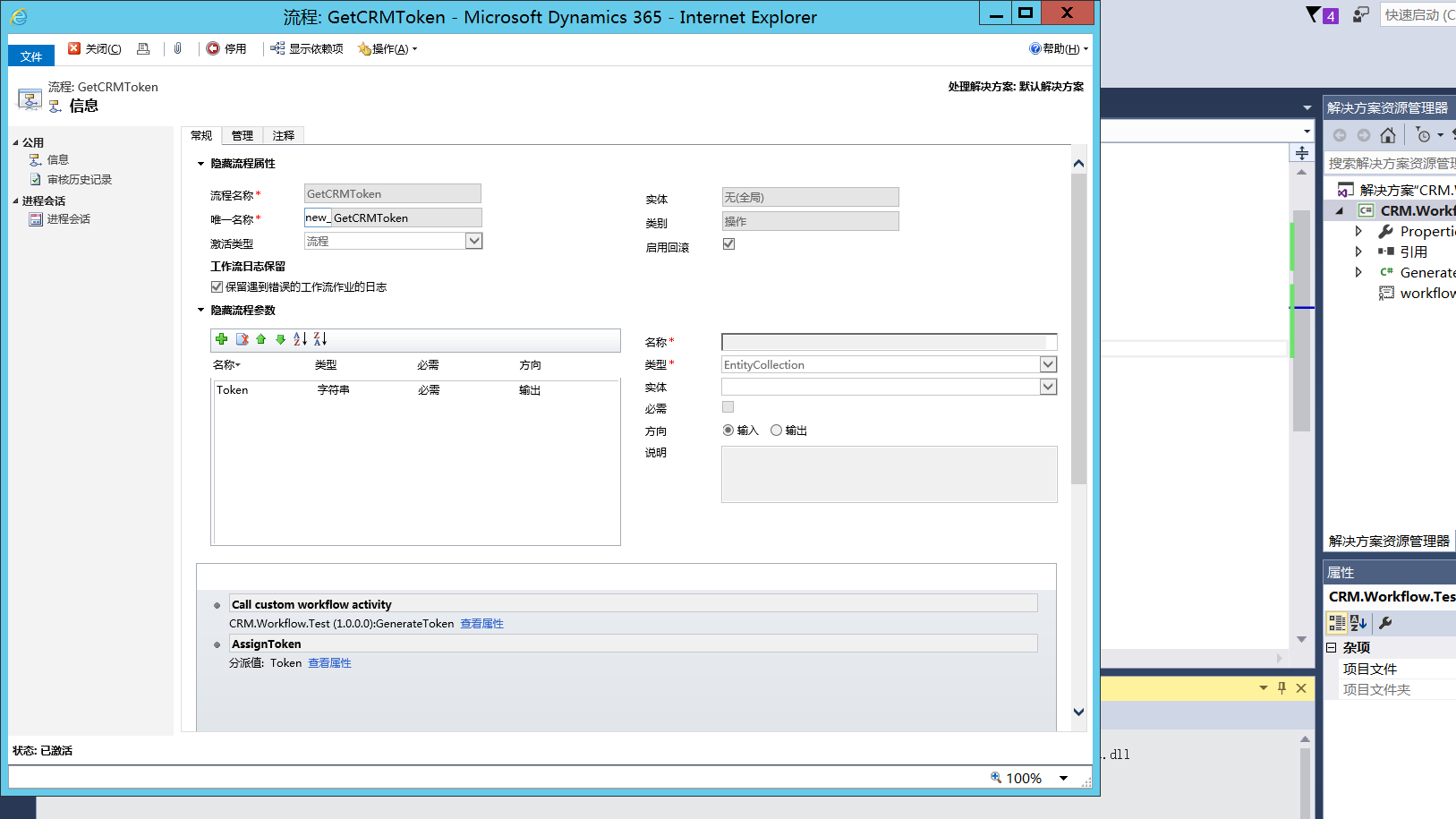
In my current project ,I set a workflow which type is an Global Action , and there are two steps in it .

Step 1, Run custom workflow(registered with sandbox mode) and return a output parameter.

Setp 2, assign a value for the Action argument.

This works fine over a period of time!

but something strange happens. when i export my Dev environment solution to my Test solution ,i call this action using javascript , it returns http status code 204.

and i couldn't found any reason about this.

could you help me with this ?

Thanks a lot!
2146.a.png4212.b.png

*This post is locked for comments

I have the same question (0)
  • AJAnsari Profile Picture
    5,754 on at

    Hi,

    You've asked your question in the wrong community. This community is for users of Microsoft Dynamics 365 Business Edition / Dynamics 365 for Financials.

    You'll have better luck with your inquiry in the Dynamics CRM or Dynamics 365 Enterprise Edition Community.

  • Community Member Profile Picture
    on at

    Thanks ,i will delete my question later

  • Community Member Profile Picture
    on at

    Hi Experts,

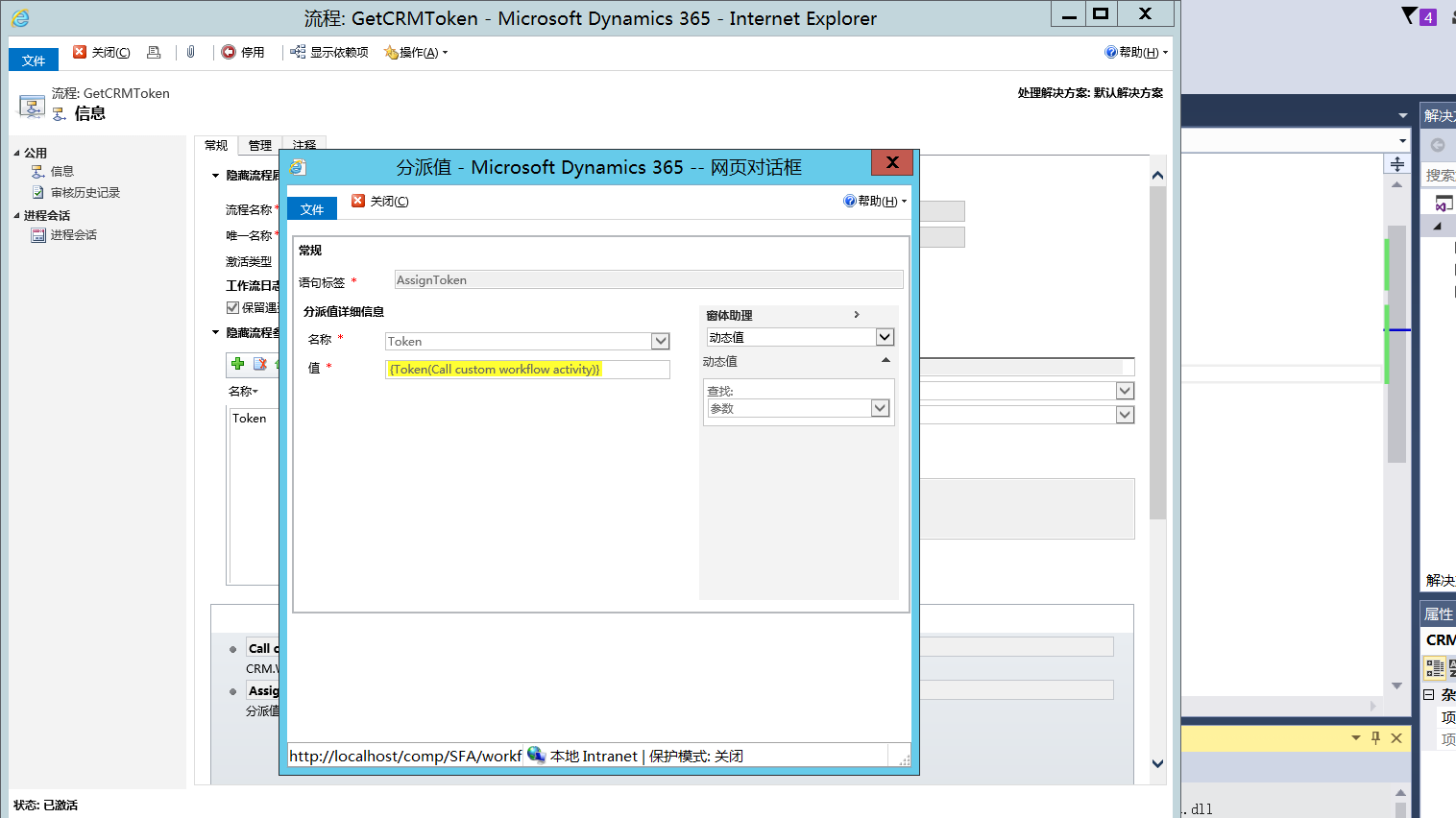
    In my current project ,I set a workflow which type is a Global Action , and there are two steps in it .

    Step 1, Run custom workflow(registered with sandbox mode) and return an output parameter.

    Setp 2, assign a value for the Action argument.

    This works fine over a period of time!

    but something strange happens. when i export my Dev environment solution to my Test solution ,i call this action using javascript , it returns http status code 204.

    and i couldn't found any reason about this.

    could you help me with this ?

    Thanks a lot!
    7674.b.png7674.b.png7587.winServer2012_2D00_CRM365_2D00_2017_2D00_04_2D00_26_2D00_15_2D00_12_2D00_09.png

  • ashok teja Profile Picture
    290 on at

    Hello,

    Have a look at the following link and verify your script once.  

    osmosee.wordpress.com/.../dynamics-365-trigger-action-using-js

    Thanks 

    Ashok J

  • Community Member Profile Picture
    on at

    Thanks Ashok, but i have simulated the request using Fiddler,it also return 204,i think the javascript is ok ,and i have no ideas now !

  • Community Member Profile Picture
    on at

    i have simulated the request with Fiddler ,it also return 204 !

  • Community Member Profile Picture
    on at

    I have the same problem :(

    Did you find a solution?

  • Community Member Profile Picture
    on at

    we call the Global Action using    the soap envelope captured by the SOAPLogger instead of normal Request.

    the request is like the following codes.

    var request = [];

         request.push("<s:Envelope xmlns:s=\"schemas.xmlsoap.org/.../envelope\">");
         request.push("<s:Body>");
         request.push("<Execute xmlns=\"schemas.microsoft.com/.../Services\"");
         request.push(" xmlns:i=\"www.w3.org/.../XMLSchema-instance\">");
         request.push("<request i:type=\"b:AssignRequest\"");
         request.push(" xmlns:a=\"schemas.microsoft.com/.../Contracts\"");
         request.push(" xmlns:b=\"schemas.microsoft.com/.../Contracts\">");
         request.push("<a:Parameters xmlns:c=\"schemas.datacontract.org/.../System.Collections.Generic\">");
         request.push("<a:KeyValuePairOfstringanyType>");
         request.push("<c:key>Target</c:key>");
         request.push("<c:value i:type=\"a:EntityReference\">");
         request.push("<a:Id>" + this._xmlEncode(Target) + "</a:Id>");
         request.push("<a:LogicalName>" + this._xmlEncode(Type) + "</a:LogicalName>");
         request.push("<a:Name i:nil=\"true\" />");
         request.push("</c:value>");
         request.push("</a:KeyValuePairOfstringanyType>");
         request.push("<a:KeyValuePairOfstringanyType>");
         request.push("<c:key>Assignee</c:key>");
         request.push("<c:value i:type=\"a:EntityReference\">");
         request.push("<a:Id>" + this._xmlEncode(Assignee) + "</a:Id>");
         request.push("<a:LogicalName>systemuser</a:LogicalName>");
         request.push("<a:Name i:nil=\"true\" />");
         request.push("</c:value>");
         request.push("</a:KeyValuePairOfstringanyType>");
         request.push("</a:Parameters>");
         request.push("<a:RequestId i:nil=\"true\" />");
         request.push("<a:RequestName>Assign</a:RequestName>");
         request.push("</request>");
         request.push("</Execute>");
         request.push("</s:Body>");
         request.push("</s:Envelope>");

      var req = new XMLHttpRequest();
      req.open("POST", SDK.SOAPSamples._getClientUrl(), true)
      // Responses will return XML. It isn't possible to return JSON.
      req.setRequestHeader("Accept", "application/xml, text/xml, */*");
      req.setRequestHeader("Content-Type", "text/xml; charset=utf-8");
      req.setRequestHeader("SOAPAction", "schemas.microsoft.com/.../Execute");
      req.onreadystatechange = function () { SDK.SOAPSamples.assignResponse(req, successCallback, errorCallback); };
      req.send(request.join(""));

  • Community Member Profile Picture
    on at

    Any one find other solutions ?

  • Suggested answer
    Simon Tooley Profile Picture
    60 on at

    Hi Tencent,

    We have been experiencing the same issue and have found a couple of ways of fixing the issue:

    1. Restart the CRM application pool - obviously not a brilliant solution for a live system
    2. Correct the incorrect XAML of the workflow action generated by the CRM UI (explained below)

    It appears that there is a bug in the CRM Workflow UI when generating steps for global CRM actions.  Whenever a step is added and the action is saved the XAML of the action is generated with a Target entity parameter of null, if you go back and change the name of the action and save it and then revert it back the XAML will no longer contain the Target parameter which is correct.  This is the resolution whenever an action is created/updated:

    1. Generate the action and save it
    2. Change the name of the action and save it
    3. Revert the name back to the original and save it
    4. The XAML will now no longer contain the Target parameter and will now import without any issue

    The following SQL query will list any workflow actions that have the Target parameter referenced:

    select workflowid,name, xaml, statecode,createdon, primaryentity from workflowbase

    where Xaml like '%<x:Property Name="Target"%'

    and statecode=1 and category=3 and type=1  and primaryentity=0

    order by name

    I've tried this out and once this solution is imported over the top of over solutions the global action continues to work.  Note, if the action is already returning 204 before the solution is imported then the CRM applicaiton pool will need to be restarted.

    Hope this helps.

    Regards,
    Simon Tooley
    Time4Advice

Under review

Thank you for your reply! To ensure a great experience for everyone, your content is awaiting approval by our Community Managers. Please check back later.

Helpful resources

Quick Links

Responsible AI policies

As AI tools become more common, we’re introducing a Responsible AI Use…

Neeraj Kumar – Community Spotlight

We are honored to recognize Neeraj Kumar as our Community Spotlight honoree for…

Leaderboard > 🔒一 Microsoft Dynamics CRM (Archived)

#1
SA-08121319-0 Profile Picture

SA-08121319-0 4

#1
Calum MacFarlane Profile Picture

Calum MacFarlane 4

#3
Alex Fun Wei Jie Profile Picture

Alex Fun Wei Jie 2

Last 30 days Overall leaderboard

Featured topics

Product updates

Dynamics 365 release plans



