web
You’re offline. This is a read only version of the page.
close
Skip to main content

Notifications

Announcements

No record found.

Community site session details

Community site session details

Session Id :
Microsoft Dynamics CRM (Archived)

Adding 'supplier' information to the New case form

(0) ShareShare
ReportReport
Posted on by 5,514

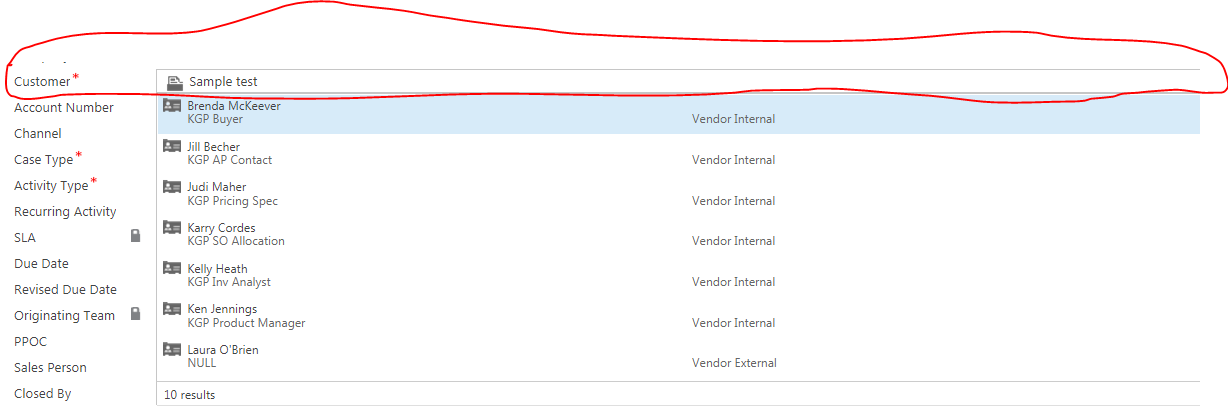
As an inside (or outside) sales rep who wants to open a new case within the “Customer Care/Cases” module of CRM, I should be able to select a supplier name from a drop-down box. The supplier name should be defaulted to “n/a”. I should be able to select from a pre-populated list of Supplier names or if I cannot find my supplier, I should be able to select “Other”.

Just like we can see Customer details
7384.0.PNG

How can we achieve this as Customer field in inbuilt

*This post is locked for comments

I have the same question (0)
  • sandeepc Profile Picture
    5,514 on at

    can i get any suggestion? will mark as verified

  • sandeepc Profile Picture
    5,514 on at

    na.PNG

    How can i show N/A in the field automaticlay

  • Verified answer
    SergiiChvyr Profile Picture
    on at

    Hi. You can have several options here.

    a)

    1. I suppose, you already have suppliers as accounts in your CRM. And you, probably mark them as such in accounts by some field.

    2. If not, you can create a new entity called supplier and add required records to it.

    In the case entity, add Supplier field of Lookup type (as lookup entity use Account for the first option, or your custom entity for the second option)

    Then add this field on the form. If you select the first option, then you'll have to add some more magic to filter lookup field like described here: msdn.microsoft.com/.../gg334266.aspx

    b)

    If your suppliers list is quite static (new items are not added frequently), you may create an attribute in Case entity of the Option Set type (better global for this scenario), in which you add your suppliers as options + "Other" and N/A option. Set N/A as default 

    Then add this field to a form

  • sandeepc Profile Picture
    5,514 on at

    @SergiiChvyr ok , but u said to add some more magic so could you help m eout to add that

  • Verified answer
    Community Member Profile Picture
    on at

    Hi,

    You can set the default value by using the same name action in business rule. In 'Set Default Value' action select the N/A option if you decide the supplier field as optionset or the N/A record if it is lookup. In both the cases you need to create either optionset value or lookup entity record with name 'N/A'.

    Regards,

    Sanchita

  • Verified answer
    Community Member Profile Picture
    on at

    Another thing to consider in setting the lookup with default value is - need to keep the guid of the default record same among all the environments to avoid any post deployment steps.

  • sandeepc Profile Picture
    5,514 on at

    how to make N/A as default as i added supplier as lookup field

  • sandeepc Profile Picture
    5,514 on at

    thank you

  • shivaram Profile Picture
    3,315 on at

    Hi Sandeep,

    I tried to understand your question, As per my understanding, you have one lookup Customer and based on Customer lookup, you want to Update Supplier Name(Option Set) either N/A or related Name or Other. Isn't it?

  • sandeepc Profile Picture
    5,514 on at

    no, just like i have for customer i wannted to add N/a for supplier field and sanchita has suggested the answer

Under review

Thank you for your reply! To ensure a great experience for everyone, your content is awaiting approval by our Community Managers. Please check back later.

Helpful resources

Quick Links

Responsible AI policies

As AI tools become more common, we’re introducing a Responsible AI Use…

Neeraj Kumar – Community Spotlight

We are honored to recognize Neeraj Kumar as our Community Spotlight honoree for…

Leaderboard > 🔒一 Microsoft Dynamics CRM (Archived)

#1
SA-08121319-0 Profile Picture

SA-08121319-0 4

#1
Calum MacFarlane Profile Picture

Calum MacFarlane 4

#3
Alex Fun Wei Jie Profile Picture

Alex Fun Wei Jie 2

Last 30 days Overall leaderboard

Featured topics

Product updates

Dynamics 365 release plans



