web
You’re offline. This is a read only version of the page.
close
Skip to main content

Notifications

Announcements

No record found.

Community site session details

Community site session details

Session Id :
Microsoft Dynamics CRM (Archived)

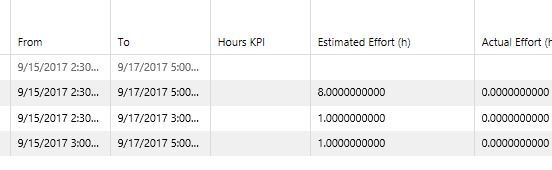
Decimal place precision, how can I change this globally? 0.0000000000

(0) ShareShare
ReportReport
Posted on by

The currency and time decimal place precision is set to 10 places by default, on every form page.

I have seen posts that give instruction on how to change these to lets say 2 places, on certain forms, but that method only changes it on that particular said form.

My Question: Is the there a place to change this globally, so no matter where I go, project tasks, Gantt charts etc. that it would be changed for all of them to show two (0.00) places as opposed to ten (0.0000000000) places?

Below is a snapshot taken from my Gantt. 

I am running the latest release of CRM online
4011.Capture.JPG

*This post is locked for comments

I have the same question (0)
  • Suggested answer
    Community Member Profile Picture
    on at
  • Community Member Profile Picture
    on at

    Thanks for trying to help.

    In the following link that you provided, scaleablesolutions.com/currency-precision-in-dynamics-crm I have already made the change here to my desired pricing decimal precision. However the instructions get very vague after that.

    For example after changing the pricing decimal places, it goes on to say "On the field level, Under field properties........"

    Uhm...how about telling us where to find this "Field level, field properties" This is typical Microsoft. Give detailed instructions on how to edit something but leave out the part on where the item they are talking about lives.

    77013.Capture.JPG

    The second two links were of no help, but thank you for trying. 

  • Suggested answer
    RaviKashyap Profile Picture
    55,410 Moderator on at

    Hi,

    To edit the field properties, you can follow the below steps-

    1. Make sure you have the System Administrator security role or equivalent permissions in Microsoft Dynamics 365.

    2. Go to Settings > Customizations.

    3. Click Customize the System.

    4. Under Components, expand Entities, and then expand the entity you want.

    5. Select field which you want to edit

    6. To edit one or more fields, select the field or fields (using the Shift key) you want to modify and then on the Actions toolbar, select Edit.

    Steps taken from technet.microsoft.com/.../dn531187.aspx

    Hope this helps

  • Community Member Profile Picture
    on at

    I am aware of this...but this doesn't address my question of, is there one global place to change precision for ALL fields. This method, in each type of field has anywhere form 1 to 10 or more places that contain currency field that would each have to be changed individually. That would take about a year to do.

    Also in my example image I am specifically showing the Gantt chart with the hours (not currency) that I want to change.

  • Suggested answer
    Community Member Profile Picture
    on at

    Keep cool,

    I mean there is no other way for the number fields.

    If you have let's say 360 fields in your CRM environment, reasonably you edit one field per 1 minuts.

    You will spend 360 minuts => 6 hours at 8hours a day. It is not even  a day of work which you are now losing.

    I know it is annoying but next time in you solution design your requirement engineer needs to specify it or you let him change all those fields :)

  • Community Member Profile Picture
    on at

    Keep Cool?

    I don't recall loosing my cool.

    Pointing out the stupidity of assuming most of the users would like this many .000000000000000000 decimal places listed when logging time or currency in no way takes away from my coolness.

    And cheers to you for knowing how to add and multiply and assume that I want to pay someone to spend the day changing decimal place fields instead of working on client projects to make money and keep my clients happy.

    I assume aside from your useless comment.....you have no answers so why even chime in.

  • Suggested answer
    RaviKashyap Profile Picture
    55,410 Moderator on at

    Hi,

    Unfortunately, there isn't any way that I can think of updating this setting globally.

    There is a tool in XRM Toolbox which updates the attribute metadata. I havent tried it but worth trying.

    github.com/.../Attribute-Bulk-Updater

  • Suggested answer
    Community Member Profile Picture
    on at

    Hi LKiefer,

    I had a similar issue where I needed to set the precision to 0. I found help from CRMtipoftheday.com, in this helpful article:

    https://crmtipoftheday.com/1019/understand-decimal-precision-in-dynamics-365/

    The way I did it was to go to settings (gear at top right corner) >Options

    3060.Currency2.PNG

    Under General >Click on your default currency to open the Information Window for that currency. 

    3060.Currency2.PNG

    Here you can change the Precision, Symbol, and Currency Name for the selected currency. This should work for anywhere that you use that currency in your instance. 

    5415.Currency3.PNG

    Hope this solves your issue, and please mark this complete if it does solve it. 

    Thanks,

    Kleanthi

Under review

Thank you for your reply! To ensure a great experience for everyone, your content is awaiting approval by our Community Managers. Please check back later.

Helpful resources

Quick Links

Responsible AI policies

As AI tools become more common, we’re introducing a Responsible AI Use…

Neeraj Kumar – Community Spotlight

We are honored to recognize Neeraj Kumar as our Community Spotlight honoree for…

Leaderboard > 🔒一 Microsoft Dynamics CRM (Archived)

#1
SA-08121319-0 Profile Picture

SA-08121319-0 4

#1
Calum MacFarlane Profile Picture

Calum MacFarlane 4

#3
Alex Fun Wei Jie Profile Picture

Alex Fun Wei Jie 2

Last 30 days Overall leaderboard

Featured topics

Product updates

Dynamics 365 release plans
