web
You’re offline. This is a read only version of the page.
close
Skip to main content

Notifications

Announcements

No record found.

Community site session details

Community site session details

Session Id :
Microsoft Dynamics AX (Archived)

Cannot delete a Transfer Order Line

(0) ShareShare
ReportReport
Posted on by 345

Hi All,

I am not able to delete a transfer order line which is in created status. I tried to put reservation qty to zero but it wont accept

The following message appears while deleting the transfer order line
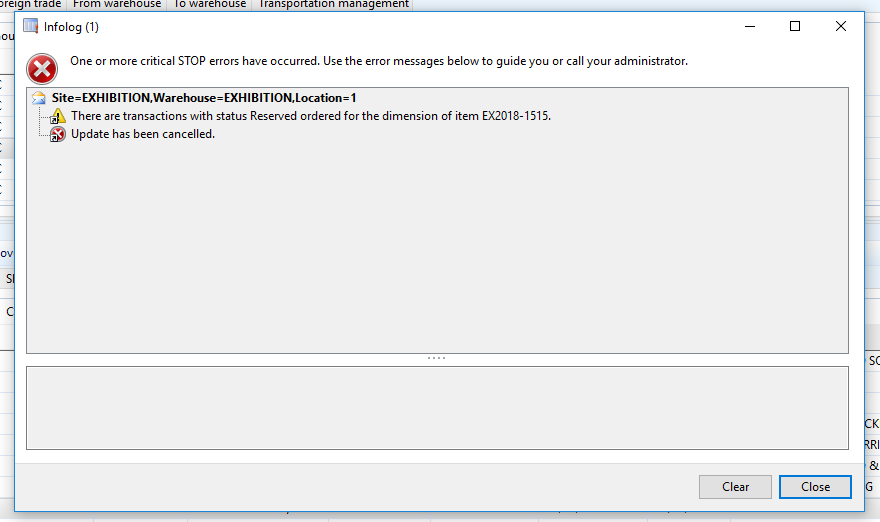
5554.Transfer-Order.PNG

*This post is locked for comments

I have the same question (0)
  • Albrecht Prieler Profile Picture
    857 on at

    Hello Zakeer,

    i would check the Reservation on the "sent to" Location cause it is reserved ordered.

    Or check on the sent to Location you have mark to a sales line or production order?

    Then unmark that

    hope this helps

  • Zakeer Hussain Profile Picture
    345 on at

    Hi Albrecht,

    Thanks for the reply.

    I cannot find reservation on sent to location on transfer order screen.

    I am trying to transfer the item between two warehouses and this item is already sold in to store and is in negative balance.

    Thanks

  • Suggested answer
    Khaled Alloud Profile Picture
    3,658 on at

    Hello,

    Have you tried to put the same quantity but with negative sign instead of zero? and check the transactions of the item from Item master.

    Thank you,

  • Suggested answer
    Weaveriski Profile Picture
    23,620 Moderator on at

    What happens when you put the reserved quantity to 0?

    Is there an active pick against the TO? (Complete it for 0)

    Are you using advanced warehousing and it has been released to the warehouse?

  • Community Member Profile Picture
    on at

    Hi Zakeer

    Kindly check and validate the transaction of the item in the  Inventory. If there are pending transaction , closed it

    first before deleting.

    reserv.png  

    TIA

Under review

Thank you for your reply! To ensure a great experience for everyone, your content is awaiting approval by our Community Managers. Please check back later.

Helpful resources

Quick Links

Responsible AI policies

As AI tools become more common, we’re introducing a Responsible AI Use…

Neeraj Kumar – Community Spotlight

We are honored to recognize Neeraj Kumar as our Community Spotlight honoree for…

Leaderboard > 🔒一 Microsoft Dynamics AX (Archived)

#1
Priya_K Profile Picture

Priya_K 4

#1
Martin Dráb Profile Picture

Martin Dráb 4 Most Valuable Professional

#3
Scott_itD Profile Picture

Scott_itD 2 Community Manager

Last 30 days Overall leaderboard

Featured topics

Product updates

Dynamics 365 release plans
