web
You’re offline. This is a read only version of the page.
close
Skip to main content

Announcements

No record found.

News and Announcements icon
Community site session details

Community site session details

Session Id :
Microsoft Dynamics AX (Archived)

Change resource reservation in a Planned Order

(0) ShareShare
ReportReport
Posted on by

Hi All,

Scenario: running MRP with job scheduling method. In a production order we can change the resource reservation, running a job scheduling, but when we try to reschedule a planned order :
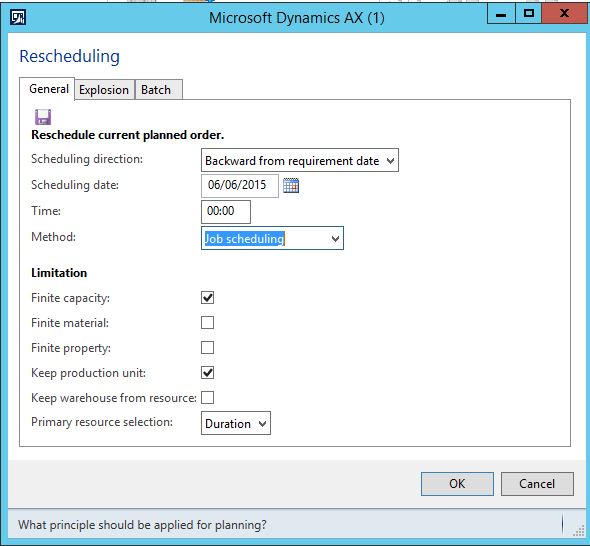
rescheduling.JPG

there is no option to select a job and change the resource.

Obviously if I firm the order then I can change the reservation in the production order, but I would like to know if there is any way to change the reservation in a planned order.

Best Regards,

Carlos B.

*This post is locked for comments

I have the same question (0)
  • Suggested answer
    Weaveriski Profile Picture
    23,620 Moderator on at

    I believe it is planned based upon the current active route, so you would need a different route at that stage, or firm it and replan.

  • Carlos B Profile Picture
    on at

    Hi Steven,

    thanks for your quick reply. I explain in detail the scenario:

    I have a resource group (testing) composed by 6 machines. The route is defined by resource group and the MRP assigns 2 machines (i ex: TST-01, TST-02) but I want to use TST-03 instead of TST-2.

    I cannot change the active route :(

    Best Regards,

    Carlos B.

  • Weaveriski Profile Picture
    23,620 Moderator on at

    You cannot make that decision until you firm it.

    If you finite control the resource it would do it for you based upon availability, but picking what you want needs a firmed order I believe.

  • Suggested answer
    Fredrik Sætre Profile Picture
    12,644 on at
  • Suggested answer
    Fredrik Sætre Profile Picture
    12,644 on at

    You can only change resource to another resource that fulfills you route operation resource requirement.

    If not, you need to change this in your route and replan...

Under review

Thank you for your reply! To ensure a great experience for everyone, your content is awaiting approval by our Community Managers. Please check back later.

Helpful resources

Quick Links

Introducing the 2026 Season 1 community Super Users

Congratulations to our 2026 Super Stars!

Meet the Microsoft Dynamics 365 Contact Center Champions

We are thrilled to have these Champions in our Community!

Congratulations to the April Top 10 Community Leaders

These are the community rock stars!

Leaderboard > 🔒一 Microsoft Dynamics AX (Archived)

#1
CP04-islander Profile Picture

CP04-islander 24

#2
Michel ROY Profile Picture

Michel ROY 14

#3
Jagadabi Profile Picture

Jagadabi 6

Last 30 days Overall leaderboard

Featured topics

Product updates

Dynamics 365 release plans
