web
You’re offline. This is a read only version of the page.
close
Skip to main content

Announcements

No record found.

News and Announcements icon
Community site session details

Community site session details

Session Id :
Microsoft Dynamics AX (Archived)

Retail POS R2 Rounding change issue

(0) ShareShare
ReportReport
Posted on by 505

Good day.

i am hoping that someone could assist me. i am having a very strange issue on our POS. We have set up the cash tender type to round down to the nearest 0.10c, we have also set the minimum change to 0.10c. but when a transaction is tendered with cash and the change back is 0.10c then the POS does something strange and does not apply the correct rounding, it appears to add 0.01c to the transaction and not give the 0.10c as change. has anyone come across a situation like this before?

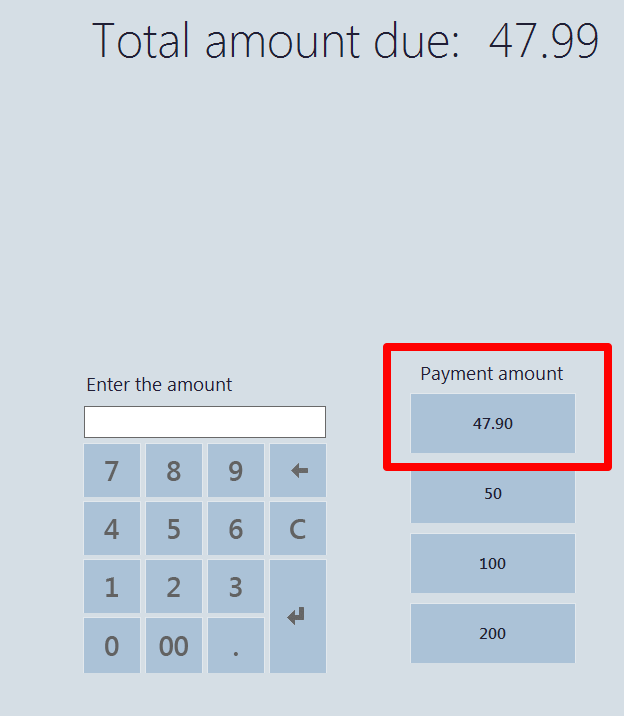
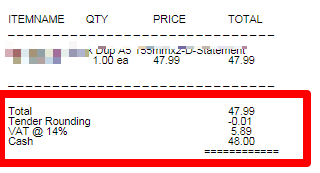
in the screenshot below, you will see that the amount of the transaction is 47.99. When tendering with Cash the correct rounding is applied to the payment amount button (eg. 47.90) but when tendering with 48.00 the tender rounding should be 0.09c and the change should be 0.10c. however the tender rounding becomes -0.01c and no change is given.

The button shows that it has rounded down to 47.90
PaymentAmount.png

but when concluding the transaction with 48.00 the tender rounding becomes -0.01c instead of 0.10c and the 0.10c change is not given.
Pos-Rounding-Issue.png

i have been looking at the Rounding class but cannot see why the POS is doing this. it seems that it will not give the 0.10c change at all, i have tried different values all the change should be 0.10c but it does the same.

any help regarding this would be highly appreciated.

*This post is locked for comments

I have the same question (0)
  • Suggested answer
    Girish V Profile Picture
    on at

    Hi,

    Pls try the below fix for R2

    "KB 2990682 Rounding down does not work consistently in POS"

    Regards,

    Girish

  • B.W Profile Picture
    505 on at

    Good day Girish.

    Thank you for reply.

    i cannot seem to find that KB, do you perhaps have a direct link for me please?

  • Verified answer
    Girish V Profile Picture
    on at

    Hi, 

    Pls check if this below link works for you..

    https://fix.lcs.dynamics.com/Issue/Resolved?kb=2990682&bugId=1710639&qc=dd96f6ddd1e1bd3ea1dfd287b0d6b272a1d7c069656e21e33e2a8aa532b42c62

    Regards,

    Girish

  • B.W Profile Picture
    505 on at

    Thank you Girish.

    i will take a look and let you know.

Under review

Thank you for your reply! To ensure a great experience for everyone, your content is awaiting approval by our Community Managers. Please check back later.

Helpful resources

Quick Links

Introducing the 2026 Season 1 community Super Users

Congratulations to our 2026 Super Stars!

Meet the Microsoft Dynamics 365 Contact Center Champions

We are thrilled to have these Champions in our Community!

Congratulations to the March Top 10 Community Leaders

These are the community rock stars!

Leaderboard > 🔒一 Microsoft Dynamics AX (Archived)

#1
Joris dG Profile Picture

Joris dG 5

#2
Andrew Jones a1x Profile Picture

Andrew Jones a1x 2

#3
Basit Profile Picture

Basit 1

Last 30 days Overall leaderboard

Featured topics

Product updates

Dynamics 365 release plans
