web
You’re offline. This is a read only version of the page.
close
Skip to main content

Notifications

Announcements

No record found.

Community site session details

Community site session details

Session Id :
Microsoft Dynamics GP (Archived)

PO Enhancements - Activate Approvals - Error on SQL

(0) ShareShare
ReportReport
Posted on by

Hi,

I am using GP 10.0 When enhancing the PO Approvals on GP I get a "A get/change next operation on table "POP_PO" is for an invalid key.

I only have allow SA user for unlimited approval.

I have Check Links before

I have reconcile PO Documents
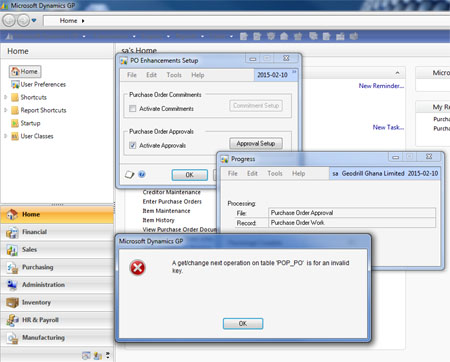
Do someone knows which query the system is running ? Or anyone has an solution ?

Cheers.

Patrick

*This post is locked for comments

I have the same question (0)
  • Suggested answer
    Bill Campbell Profile Picture
    12 on at

    Patrick, when did you last apply a service pack to GP 10?

    What version of GP is running - look at Help and About - attach a screen clip of the window.

    Have you got any 3rd party applications running or any specific customizations that have been built for your client?

    When ever I have turned on this button, things go smoothly, as this should be part of the core software features.  So, it would appear that you might need to do a 'rebuild' of some of the company database tables.  But lets start with providing more details first.

  • Community Member Profile Picture
    on at

    Hi Bill,

    We have never installed updates on our GP therefore we are at version 10.00.1061. We are using Wensoft for maintenance planning. I beleive that the error above occurs when GP is doing (Maintenance/Purchase ORder Enhancement). This operation goes through all POP_PO lines to convert the Old Bin Numbers to the new Bin/Sites number.

    I suspect that not all my PO has the required field information entered. I have seen POP_PO without dates and without sites. Maybe the operation stops when it arrives to one of this PO.

    I have tried to clean those PO but maybe the best Idea is to move them into PO History. What do you think ?

    Patrick

  • Justin Thorp Profile Picture
    2,265 on at

    Hi,

    I believe the problem is due to a mismatch in the dictionary versions.

    In the PO Enhancements setup window, click on the About button.  What is the version of Purchase Order Enhancements?  From your previous screenshot we can see the version of GP.

    Once you know both versions, compare these version with a working environment.

    Depending on what you find, you may want to uninstall, then reinstall the Purchase Order Enchancements addon.

    Thanks,
    Justin

  • Community Member Profile Picture
    on at

    Hi Justin,

    We have never installed any updates on our GP 10.0. The version of the PO Enhancements is the same as GP (from Help About). The About window is identical to the one included in my previous message even though I do Help About from the PO Enhancements Setup window.

    Regards,

    Patrick

  • Verified answer
    Justin Thorp Profile Picture
    2,265 on at

    Hi Patrick,

    I know this kb article is for v8.0, but I'm sure it still applies to v10.0, and this is where I would recommend starting:

    http://support.microsoft.com/kb/934662/

    Thanks,
    Justin

  • Community Member Profile Picture
    on at

    Thanks. The kb solved my problem. !

    Cheers

Under review

Thank you for your reply! To ensure a great experience for everyone, your content is awaiting approval by our Community Managers. Please check back later.

Helpful resources

Quick Links

Responsible AI policies

As AI tools become more common, we’re introducing a Responsible AI Use…

Neeraj Kumar – Community Spotlight

We are honored to recognize Neeraj Kumar as our Community Spotlight honoree for…

Leaderboard > 🔒一 Microsoft Dynamics GP (Archived)

#1
Community Member Profile Picture

Community Member 2

#2
mtabor Profile Picture

mtabor 1

#2
Victoria Yudin Profile Picture

Victoria Yudin 1

Last 30 days Overall leaderboard

Featured topics

Product updates

Dynamics 365 release plans



