web
You’re offline. This is a read only version of the page.
close
Skip to main content

Notifications

Announcements

No record found.

Community site session details

Community site session details

Session Id :
Finance | Project Operations, Human Resources, ...
Answered

How to Extract NON-Primary contacts on the vendor Card

(1) ShareShare
ReportReport
Posted on by 307

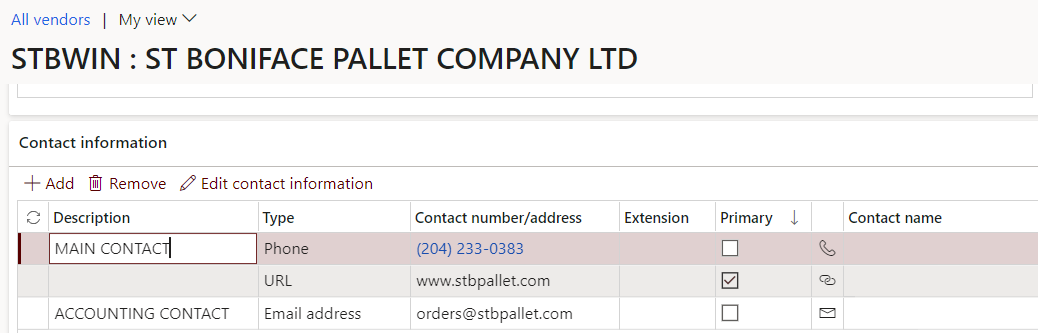
I am trying to figure out how to extract the NON-Primary contacts on my vendor cards.  Thus far all I can pull are the contacts marked as primary.  I have tried all entities that have any contact information:  However it is very easily done for the customers.

Electronic Contacts

Electronic Address Contacts 

Party Contacts

Party Address Contacts

Global Address Book

None of these will pull the contacts that are not marked as primary on the contact card.

I can pull the URL through Data Management but the other two, as they are not marked Primary will not pull.
pastedimage1638394261439v1.png

I have the same question (1)
  • Verified answer
    saurabh bharti Profile Picture
    15,039 Moderator on at

    Hi,

    Navigate to Common Module > Common . Office integration > Excel work book designer > Search or Partycontact data entity > Select all fields > Click on create workbook

    pastedimage1638412097870v1.png

    Apply filter on Party type as Vendor and other contact purpose filters etc... and extract data in excel

    Same you can do using data management export using same data entity

  • Suggested answer
    Vickie8346 Profile Picture
    307 on at

    This worked perfect!  Thank you

  • André Arnaud de Calavon Profile Picture
    300,970 Super User 2025 Season 2 on at

    Hi Vickie,

    If the reply from Saurabh helped you, would you mind to mark his answer so the question will get the status answered? This will also be beneficial for other persons with the same question as they will be directed to the verified answers.

  • Suggested answer
    Alireza Eshaghzadeh Profile Picture
    14,679 Super User 2025 Season 2 on at

    Hi Vickie8346,

    Please try to refresh entity list in Data management and then create a export project for "Party contacts V3" entity.

    This entity include all contact information for global address book (e.g. customers and vendors)

    pastedimage1638516208039v1.png

Under review

Thank you for your reply! To ensure a great experience for everyone, your content is awaiting approval by our Community Managers. Please check back later.

Helpful resources

Quick Links

Responsible AI policies

As AI tools become more common, we’re introducing a Responsible AI Use…

Neeraj Kumar – Community Spotlight

We are honored to recognize Neeraj Kumar as our Community Spotlight honoree for…

Leaderboard > Finance | Project Operations, Human Resources, AX, GP, SL

#1
Martin Dráb Profile Picture

Martin Dráb 672 Most Valuable Professional

#2
André Arnaud de Calavon Profile Picture

André Arnaud de Cal... 534 Super User 2025 Season 2

#3
Sohaib Cheema Profile Picture

Sohaib Cheema 289 User Group Leader

Last 30 days Overall leaderboard

Product updates

Dynamics 365 release plans
