web
You’re offline. This is a read only version of the page.
close
Skip to main content

Notifications

Announcements

No record found.

Community site session details

Community site session details

Session Id :
Small and medium business | Business Central, N...
Suggested Answer

No approval email notification BC20

(0) ShareShare
ReportReport
Posted on by 59

I cannot receive approval email notification ? 

Test email is succeesful but when user send po approval . I did not receive approval request email. 

Job queue entries not show error.

pastedimage1659359260889v1.png

I have the same question (0)
  • Suggested answer
    Vaishnavi J Profile Picture
    3,062 on at

    Hi,

    1. Did you set up the email account in the email account page marked as default?

    2. Did you add email address of the approver in the Approval user setup?
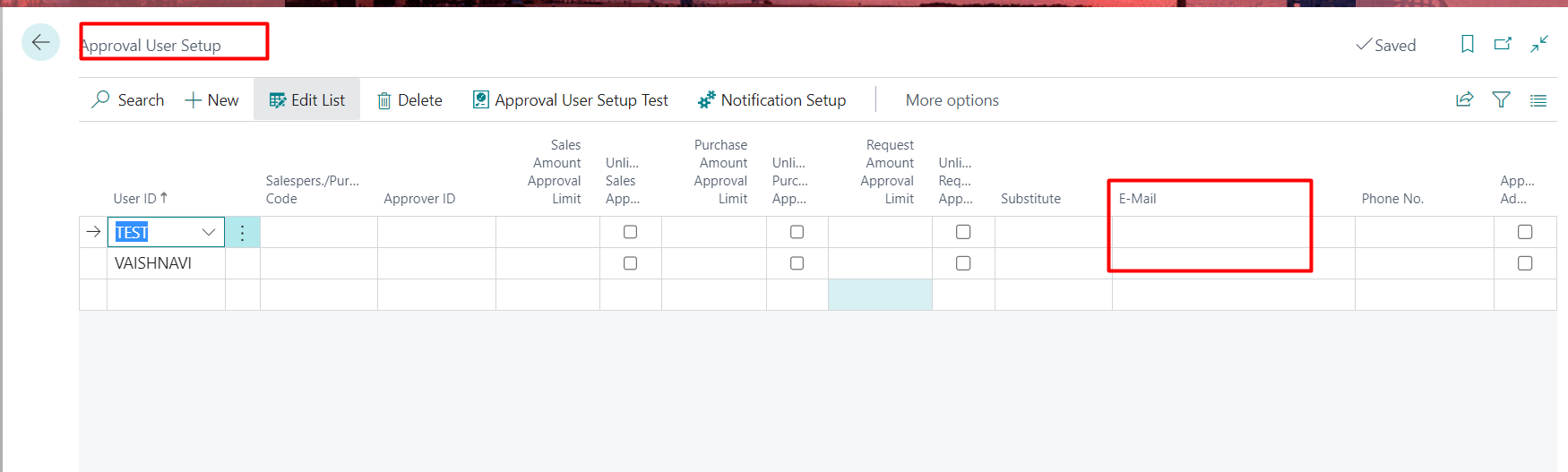
    pastedimage1659359747997v1.png

    3. Did you use Notification Setup in Approval user setup  and can you share the screenshot too?

    4. Check if the below highlighted part is present in your workflow? 

    pastedimage1659359937783v2.png

    if all the points mentioned above are covered and still you are unable to receive any notification then kindly share the screenshots for the following Approval user setup, Email accounts, Notification Setup, Workflow.

    If my answer was helpful to you, please verify it so that other users know it worked. Thank you very much

  • CU01100927-0 Profile Picture
    59 on at

    I already setup all that your suggest but still not receive email. TT

    pastedimage1659361842686v1.png

    pastedimage1659361853468v2.png

  • Suggested answer
    Vaishnavi J Profile Picture
    3,062 on at

    Hi Nam,

    Did you add the approval Id in approval user setup  who is going to approve which user?

    if Test User has raised a approval request the notification  will be send to Vaishnavi User. 

    pastedimage1659362218636v1.png

    and did you created the workflow from the standard template or your own ?

    Also can you share the notification entries screenshot search it globally?

    If my answer was helpful to you, please verify it so that other users know it worked. Thank you very much

  • CU01100927-0 Profile Picture
    59 on at

    Hi Vaishnavi Joshi,

    I used standard workflow template.

    pastedimage1659363648278v1.png

    Thanks for your help.

  • Suggested answer
    Chameera Kavinda Profile Picture
    510 on at

    Hi,

    Check the email outbox in BC whether there is an error for sending mails.

    Thank you.

    Chameera

  • CU01100927-0 Profile Picture
    59 on at

    Dear All,

    I already got email notification. The root cause is setup on Enable task schedule is not active.

    Thank you everyone.

    pastedimage1659445360790v1.png

Under review

Thank you for your reply! To ensure a great experience for everyone, your content is awaiting approval by our Community Managers. Please check back later.

Helpful resources

Quick Links

Responsible AI policies

As AI tools become more common, we’re introducing a Responsible AI Use…

Neeraj Kumar – Community Spotlight

We are honored to recognize Neeraj Kumar as our Community Spotlight honoree for…

Leaderboard > Small and medium business | Business Central, NAV, RMS

#1
OussamaSabbouh Profile Picture

OussamaSabbouh 3,143

#2
Jainam M. Kothari Profile Picture

Jainam M. Kothari 1,694 Super User 2025 Season 2

#3
YUN ZHU Profile Picture

YUN ZHU 1,067 Super User 2025 Season 2

Last 30 days Overall leaderboard

Featured topics

Product updates

Dynamics 365 release plans


