web
You’re offline. This is a read only version of the page.
close
Skip to main content

Notifications

Announcements

No record found.

Community site session details

Community site session details

Session Id :
Small and medium business | Business Central, N...
Suggested Answer

Consolidation company - business unit card setup - exchange rate gain account

(0) ShareShare
ReportReport
Posted on by 5

Hello, 

Can someone help regarding consolidation company business unit setup? There are 2 accounts which has to be indicated mandatory "Exchange rate gains account" and "exchange rate loss account". 

After running consolidated reports there are some revaluations made by system to these 2 accounts. (all entities are in different currencies) 

Can someone give some details what are those revaluations? I do not understand where does this exchange rate diff comes from. (for now i only see difference in P&L no BS and this comes before eliminations) 

Thank you in advance! 

I have the same question (0)
  • Suggested answer
    Marco Mels Profile Picture
    on at

    Hello,

    If you do not get further traction from the community, feel free to raise it to Microsoft support via your partner or CSP.

    Thanks.

  • Suggested answer
    Community Member Profile Picture
    on at

    Augustas,

    The Exchange Rate Gain and Loss Accounts, on the Business Unit, instruct BC when consolidating which G/L Account to use when bringing a Business Unit into the Consolidating Company and calculating the translation exchange rate adjustment between the Consolidated Company LCY and the Business Unit on the Consolidation Date.

    You establish on each Chart of Account how that specific account will calculate these gains and loss by the Consol. Translation Method:
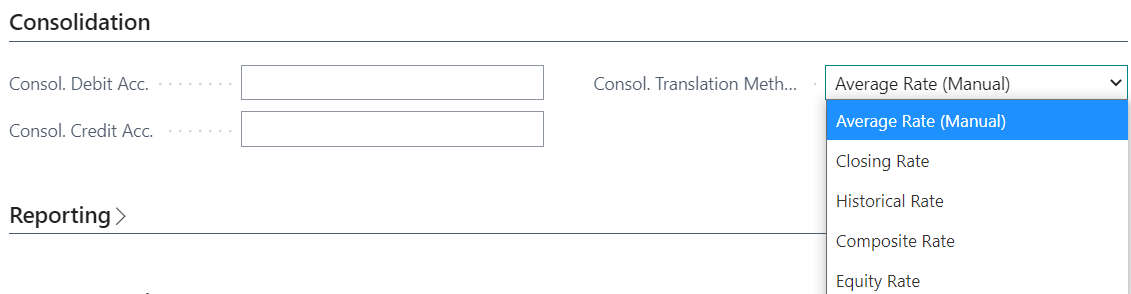
    pastedimage1643576556301v1.png

    Consol. Translation Method – this field contains the consolidation translation method that will be used for the account. The translation method identifies the currency translation rate to be applied to the account. The following are options in the Consol. Translation Method field:

    Average Rate (Manual) – the average rate for the period to be consolidated. Calculate the average either as an arithmetic average or as a best estimate and enter it for each business unit.

    Closing Rate – the rate that prevails in the foreign exchange market at the date for which the balance sheet or income statement is being prepared. Enter the rate for each business unit.

    Historical Rate – the rate of exchange for the foreign currency that prevailed when the transaction occurred.

    Composite Rate – the current period amounts are translated at the average rate and added to the previously recorded balance in the consolidated company. This method is typically used for retained earnings accounts because they include amounts from different periods and are therefore a composite of amounts translated with different exchange rates.

    Hope this all helps.

    Thanks,

    Steve

Under review

Thank you for your reply! To ensure a great experience for everyone, your content is awaiting approval by our Community Managers. Please check back later.

Helpful resources

Quick Links

Responsible AI policies

As AI tools become more common, we’re introducing a Responsible AI Use…

Neeraj Kumar – Community Spotlight

We are honored to recognize Neeraj Kumar as our Community Spotlight honoree for…

Leaderboard > Small and medium business | Business Central, NAV, RMS

#1
OussamaSabbouh Profile Picture

OussamaSabbouh 2,238

#2
YUN ZHU Profile Picture

YUN ZHU 773 Super User 2025 Season 2

#3
Sumit Singh Profile Picture

Sumit Singh 630

Last 30 days Overall leaderboard

Featured topics

Product updates

Dynamics 365 release plans
