web
You’re offline. This is a read only version of the page.
close
Skip to main content

Notifications

Announcements

No record found.

Community site session details

Community site session details

Session Id :
Microsoft Dynamics CRM (Archived)

How to hide generic button bar when using custom URL in SiteMap SubArea?

(0) ShareShare
ReportReport
Posted on by 855

Hi, 

We are using the SiteMap to add some menu items pointing to custom URLs in CRM Dynamics:
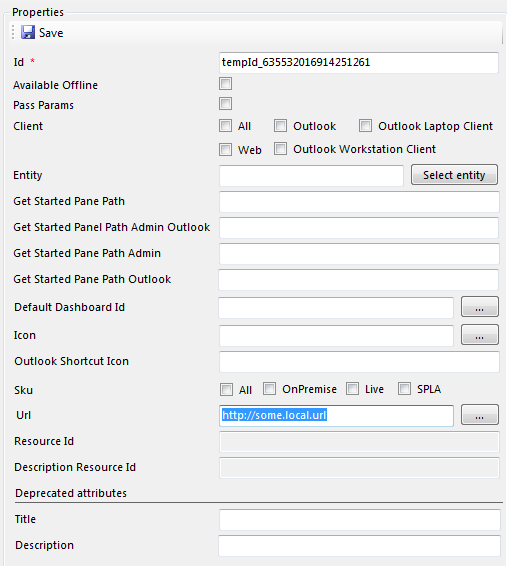
2014_2D00_12_2D00_03_5F00_11_2D00_17_2D00_05.png

The problem is that the CRM always shows a generic button bar:
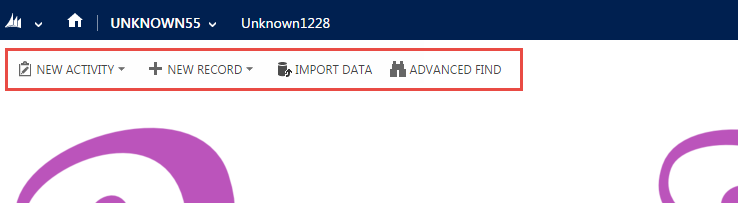
Is it possible to hide those buttons and regain that area?

Many thanks

*This post is locked for comments

I have the same question (0)
  • Suggested answer
    Deepesh161 Profile Picture
    6,317 on at
  • quite_dynamic Profile Picture
    855 on at

    Hi Deepesh, thank you for your answer.

    I tried what you suggested with URLs like:

    http://some_local_url?cmdbar=false

    and

    http://some_local_url?cmdbar=false&navbar=off

    but no luck, the command bar is still showing. Do you have something else to suggest?

    Many thanks

  • Aileen Gusni Profile Picture
    44,524 on at

    Hi Quite_dynamic

    You can try to see this link:

    community.dynamics.com/.../141259.aspx

    (Unsupported)

    But somehow, I was thinking to use custom rule, page rule, but page rule said here also cannot detect the external page.

    See this post for similar case here:

    community.dynamics.com/.../289016.aspx

    I haven't tried for CRM 2013 SP1, but I think it was stated before as new feature to hide the command bar, you need to check Deepesh email, but it should be SP1.

  • Deepesh161 Profile Picture
    6,317 on at

    This will only work if pages reside within CRM, not for external pages

  • Nikhil Kumar Das Profile Picture
    680 on at

    Hi,

    I dont think there is a supported way to hide command bar. Following code will hide the command bar but it's not supported . following  script works in IE and chrome. Add below script in onload event of the form ( web resource)

    window.parent.document.getElementById('crmRibbonManager').style.display = "none";

  • quite_dynamic Profile Picture
    855 on at

    Thank you all for your inputs, this one is taking a little longer to test, but rest assure that I will come back to this post and comment on the option that allowed to resolve the issue.

    Best regards

Under review

Thank you for your reply! To ensure a great experience for everyone, your content is awaiting approval by our Community Managers. Please check back later.

Helpful resources

Quick Links

Responsible AI policies

As AI tools become more common, we’re introducing a Responsible AI Use…

Neeraj Kumar – Community Spotlight

We are honored to recognize Neeraj Kumar as our Community Spotlight honoree for…

Leaderboard > 🔒一 Microsoft Dynamics CRM (Archived)

#1
SA-08121319-0 Profile Picture

SA-08121319-0 4

#1
Calum MacFarlane Profile Picture

Calum MacFarlane 4

#3
Alex Fun Wei Jie Profile Picture

Alex Fun Wei Jie 2

Last 30 days Overall leaderboard

Featured topics

Product updates

Dynamics 365 release plans



