web
You’re offline. This is a read only version of the page.
close
Skip to main content

Announcements

No record found.

News and Announcements icon
Community site session details

Community site session details

Session Id :
Microsoft Dynamics AX (Archived)

Configured VSTS in VM (Update 15 D365FO)

(0) ShareShare
ReportReport
Posted on by 56

Dear All,

I have configured VSTS on my VM (Update 15 D365FO). I have created projects like Test Project in VSTS.
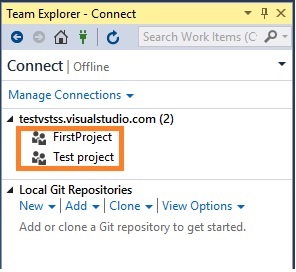
6114.P1.jpg

My question is

1. How i will add new objects like table, Form OR Class etc... in "TestProjects". Is't Possible?

2. Suppose if i create a new Project in VS then how i will map with VSTS? Means i want to see that new project in VSTS also.

Please give me more shed on this.

Thanks!

*This post is locked for comments

I have the same question (0)
  • Suggested answer
    Martin Dráb Profile Picture
    239,082 Most Valuable Professional on at

    A good starting point for learning absolute basics may be Develop and share your code in TFVC using Visual Studio.

  • @rp@n Profile Picture
    56 on at

    Yes, I already configured workspace. How to adding objects to source control?

  • Suggested answer
    nmaenpaa Profile Picture
    101,166 Moderator on at

    When you create a solution (in which your new projects will live) you have a checkbox "Add solution to source control".

    If you skipped that, you can just right click the project in the Solution explorer and add it to source control.

  • Jie G Profile Picture
    Microsoft Employee on at

    After configuring workspace, move your existing project to the workspace folder. Then open the project in VS and right click it to add solutions to source control.

  • nmaenpaa Profile Picture
    101,166 Moderator on at

    Ada,

    I think it's better to configure the workspace to use your existing project folder (the one where the Visual Studio projects are created by default).

  • @rp@n Profile Picture
    56 on at

    Thanks to all,

    For testing purpose, Simply create a new solution for "SalesInvoiceReport" and trying to add to source control. but i am getting below error :

    SalesInvoice.jpg

    Kindly help me how to resolve ?

    Please give me more shed on this.

    Thanks!

  • Suggested answer
    nmaenpaa Profile Picture
    101,166 Moderator on at

    Like I said, you should map your Visual Studio project folder to source control, if you want to add your projects to source control.

    You also need to map your AosService\PackagesLocalDirectory folder. So two mappings are needed for your workspace.

    1777.workspace.png

  • Martin Dráb Profile Picture
    239,082 Most Valuable Professional on at

    Check if you put the project to a location with mapping to VSTS and whether your solution has been added to source control.

Under review

Thank you for your reply! To ensure a great experience for everyone, your content is awaiting approval by our Community Managers. Please check back later.

Helpful resources

Quick Links

Introducing the 2026 Season 1 community Super Users

Congratulations to our 2026 Super Stars!

Meet the Microsoft Dynamics 365 Contact Center Champions

We are thrilled to have these Champions in our Community!

Congratulations to the March Top 10 Community Leaders

These are the community rock stars!

Leaderboard > 🔒一 Microsoft Dynamics AX (Archived)

#1
Joris dG Profile Picture

Joris dG 5

#2
Andrew Jones a1x Profile Picture

Andrew Jones a1x 2

#3
Basit Profile Picture

Basit 1

Last 30 days Overall leaderboard

Featured topics

Product updates

Dynamics 365 release plans
