web
You’re offline. This is a read only version of the page.
close
Skip to main content

Notifications

Announcements

No record found.

Community site session details

Community site session details

Session Id :
Microsoft Dynamics 365 | Integration, Dataverse...
Suggested Answer

Creating a post request to Dynamics 365 from Google Sheets

(0) ShareShare
ReportReport
Posted on by

Hello

I hope anyone with experience in both Google Sheets and Dynamics 365 can answer my question.

I've been assigned a task that requires me to create entities in Dynamics 365 if a certain range in a Google Sheet is filled out. I know how to read and write data to ranges in Google Sheet using javascript and I know basic REST principles, but I am having a difficult time trying to make this work. I've created an app in Azure AD, setup a Postman environment to retrieve the access token and it works fine when I test it out in Postman.

In the Google Sheet script this is the code that makes the POST request to create a contact entity in Dynamics 365

codesheets.png


When I edit the specific range in the Sheet, I get a 401 error which basically means that the request is unauthorized.

Does anyone have experience with this and know what might be the issue? I'm kind of the dark here.

I have the same question (0)
  • nkhemji Profile Picture
    2 on at

    As per my understanding, you need to Adal.js for authentication.

    check this

    alexanderdevelopment.net/.../

    www.npmjs.com/.../dynamics-web-api

  • Suggested answer
    cloflyMao Profile Picture
    25,210 on at

    Hi Fred,

    As dyn365 mentioned, adal.js is still required if you would like do any Dynamics 365 Web API request.

    The reason is in your "Authorization": "Bearer" ... header, we can't simply add token in request header, this type of request will never be permitted by D365 server.

    Instead, you should use authContext.acquireToken(organizationURL, yourFunction), which means we can only excute our own function that request to D365 Web API inside acquireToken callback scope.

    You could take my simple demo as reference.(pure javascript, only run it with a live server extension from VS Code)


        Get Token from Dynamics 365


    Or run doc sample code directly:

    https://docs.microsoft.com/en-us/powerapps/developer/common-data-service/walkthrough-registering-configuring-simplespa-application-adal-js

    Settings in AAD application:

    Whitelist your web page which requests Web API.(and enable Implicit grant)

    pastedimage1584699214221v2.png

    Allow implicit flow:

    pastedimage1584699304089v3.png

    Find you teanant in branding > publisher domain:
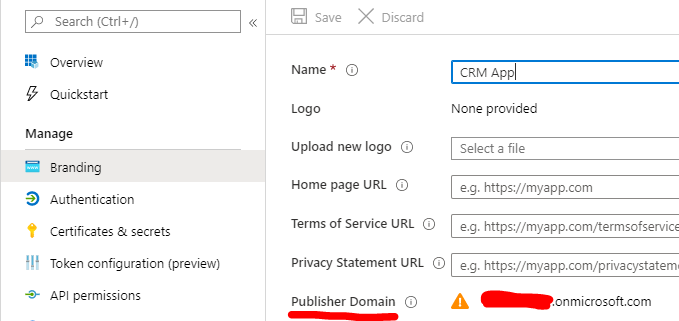
    pastedimage1584699350346v4.png

    API permission:

    pastedimage1584699392142v5.png

    Result:

    pastedimage1584699426501v6.png

    Here are some other supplement I would like to share:

    1. In first time running, you need to add your username and password in popup window,(sign in)

    then user credential will save in your browser cache.

    2. It seems that method or function for skipping login window only exists in back-end ways such as C# and Nodejs.

    3. You can try to search whether the skipping login window method would be available in msal.js.

    4. You could try whether Google sheet connector in Power Automate could meet your requirement.(without code)
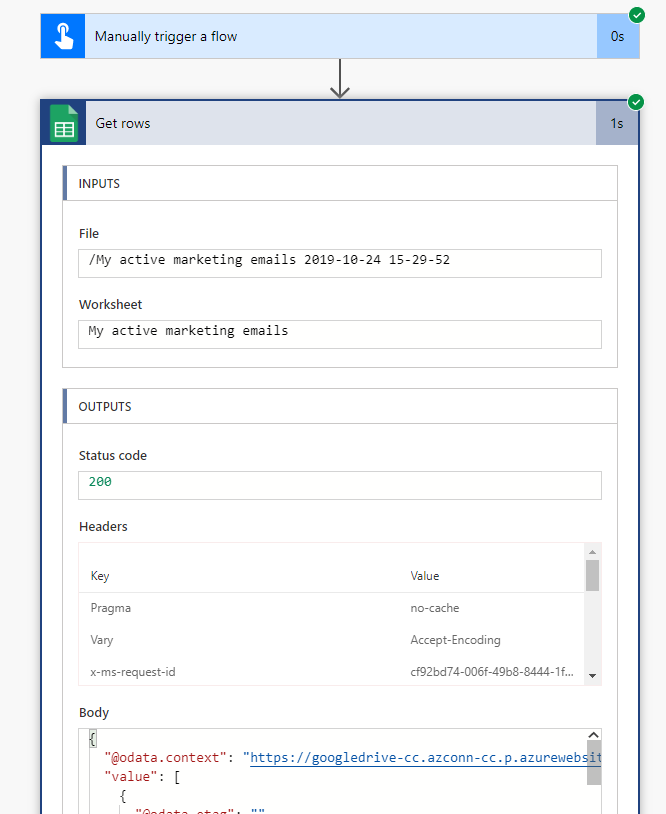
    pastedimage1584699812762v7.png

    Regards,

    Clofly

Under review

Thank you for your reply! To ensure a great experience for everyone, your content is awaiting approval by our Community Managers. Please check back later.

Helpful resources

Quick Links

Responsible AI policies

As AI tools become more common, we’re introducing a Responsible AI Use…

Neeraj Kumar – Community Spotlight

We are honored to recognize Neeraj Kumar as our Community Spotlight honoree for…

Leaderboard > Microsoft Dynamics 365 | Integration, Dataverse, and general topics

#1
Martin Dráb Profile Picture

Martin Dráb 49 Most Valuable Professional

#2
André Arnaud de Calavon Profile Picture

André Arnaud de Cal... 38 Super User 2025 Season 2

#3
#ManoVerse Profile Picture

#ManoVerse 31

Last 30 days Overall leaderboard

Product updates

Dynamics 365 release plans



