web
You’re offline. This is a read only version of the page.
close
Skip to main content

Notifications

Announcements

No record found.

Community site session details

Community site session details

Session Id :
Microsoft Dynamics CRM (Archived)

Opportunity Product - edit for properties and Suggestions do not show

(0) ShareShare
ReportReport
Posted on by

I've created product families with properties and products which do inherit those properties - Published

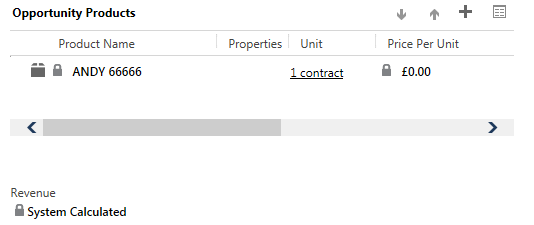
When I add them to an Opportunity you cannot edit Properties and Suggestions do not show either.

Help please! See image below: I expected a red cross and edit in the properties column
*This post is locked for comments

I have the same question (0)
  • Aileen Gusni Profile Picture
    44,524 on at

    Andrew,

    You have set all of the properties and suggestion for product ANDY 66666 right?

    It seems this inline edit view still like the old format of the inline grid.

    Try to remove and add it back?

    THanks

  • Mahendar Pal Profile Picture
    45,095 on at

    Please share screenshots of family and product as well, Are you able to see properties under product ??

  • Community Member Profile Picture
    on at

    I tried the remove and add back - still no joy

    Here's the product setup:

  • Community Member Profile Picture
    on at

    As I can't think why it won't show I looked at the 'Opportunity Product: Opportunity Product' Form - I may have modified it in CRM2013 (unsure - I know I modified the Information form)

    I can see this field in the list of unused fields:  Property Configuration - if I add it to the form I can never remove it as it is a mandatory field. However I can see it is defaulting to 'Not Configured'

    Is this the cause?

    (I can't upload any images now - file size limits)

  • Community Member Profile Picture
    on at

    I've tried everything I can think of: I cannot get the Properties or suggestions to show hyperlinks. Has anyone seen this work?

  • Aileen Gusni Profile Picture
    44,524 on at

    Andrew,

    Please try to another entity, like Order Product, the one that you have never modified it first.

    Thanks.

  • Community Member Profile Picture
    on at

    Hi Aileen;

    I can see the edit function in the Orders area. How do I get that back into my Opportunity Products area?

  • Aileen Gusni Profile Picture
    44,524 on at

    Andrew,

    I see...

    I think something happened with your Opportunity Product view.

    How about in Quote and Invoice?

    Hm...do you have any backup form?

    You did modification this form?

  • Community Member Profile Picture
    on at

    I can't change the in line edit view that displays on the Opportunity form; if you try and edit it you only get a Save as option. So as far as I know the view displayed is vanilla.

    I don't know if there is a way of reverting the Opportunity Product form that I did change (to add a Costs field) back to the factory default to see if that is what is affecting the edit feature displaying in the view on the Opportunity form.

    The in line edit view works in all the other entities I can see the edit link in Orders, Quotes and Invoices.

    Any help will be appreciated.

    Andrew

  • Aileen Gusni Profile Picture
    44,524 on at

    Andrew,

    can you help to screenshot the inline edit view property?

    thanks!

Under review

Thank you for your reply! To ensure a great experience for everyone, your content is awaiting approval by our Community Managers. Please check back later.

Helpful resources

Quick Links

Responsible AI policies

As AI tools become more common, we’re introducing a Responsible AI Use…

Neeraj Kumar – Community Spotlight

We are honored to recognize Neeraj Kumar as our Community Spotlight honoree for…

Leaderboard > 🔒一 Microsoft Dynamics CRM (Archived)

#1
SA-08121319-0 Profile Picture

SA-08121319-0 4

#1
Calum MacFarlane Profile Picture

Calum MacFarlane 4

#3
Alex Fun Wei Jie Profile Picture

Alex Fun Wei Jie 2

Last 30 days Overall leaderboard

Featured topics

Product updates

Dynamics 365 release plans
