web
You’re offline. This is a read only version of the page.
close
Skip to main content

Notifications

Announcements

No record found.

Community site session details

Community site session details

Session Id :
Finance | Project Operations, Human Resources, ...
Unanswered

Workflow condition isn't working, always returns true.

(0) ShareShare
ReportReport
Posted on by 133

Hello all,

I have created one custom workflow few days ago. Now, we have a requirement to add one condition in it. But the condition isn't working at all. 

The condition always returns true. Is there anything we have to modify using code or we are missing something in the workflow?
Image

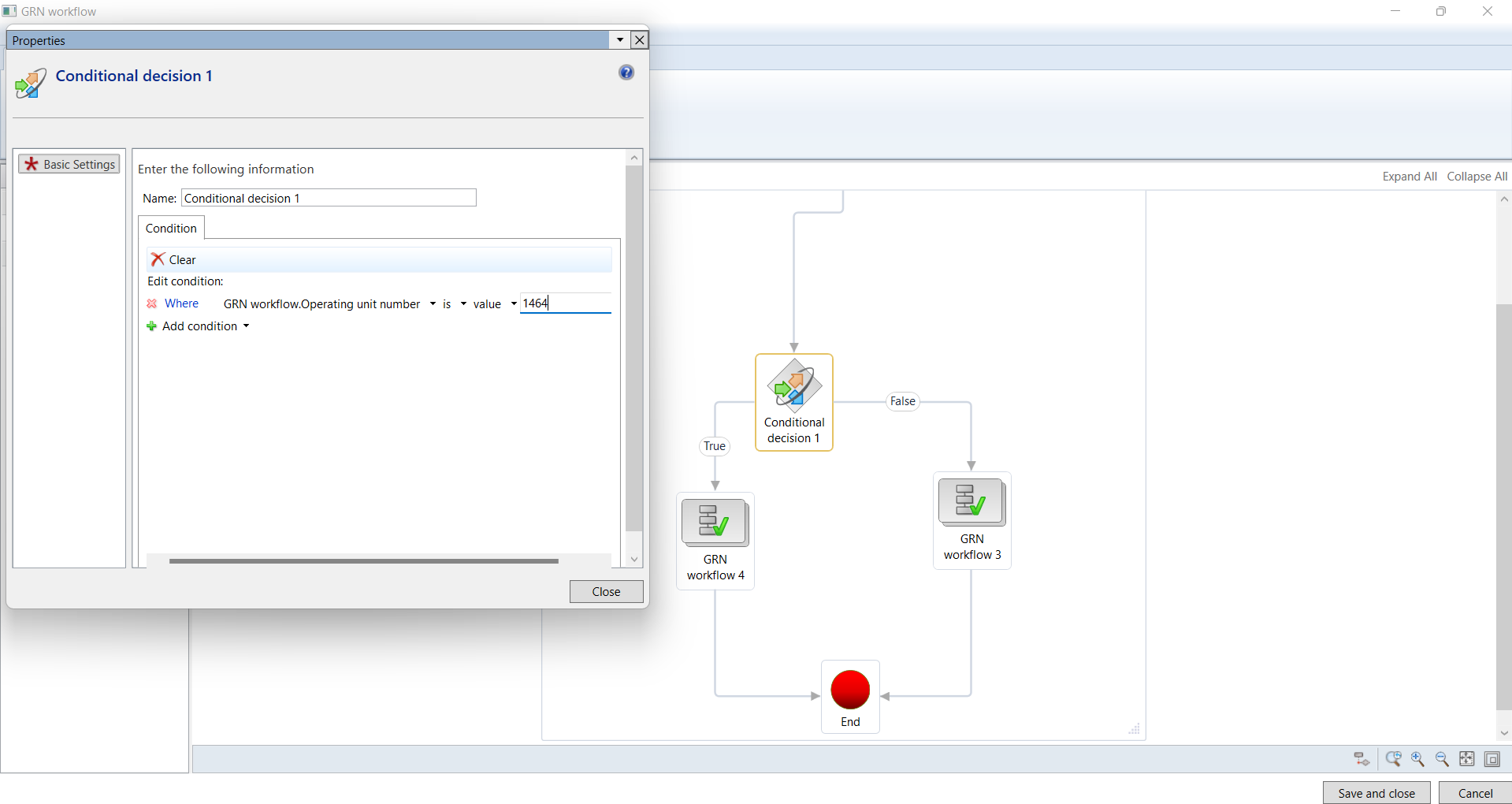
Here, as shown in the image, I have added one condition to the workflow, that If the department is 1464 then GRN workflow 4, else GRN workflow 3.

But whatever department I have in my table, it always returns true in the condition, and runs GRN workflow 4.

I also have ledgerDimension recId in my table, which has department value. But this also doesn't work, Even if the value is blank, it returns true.

Image

I debugged the submit manager class, in which I am getting my table with all the values in it.

And I have activated the new version. It also shows in the workflow history.

What am I doing wrong here? Is anything missing from frontend or from coding side?

Thanks in advance,

Bhagyashree Dave

I have the same question (0)
  • André Arnaud de Calavon Profile Picture
    301,231 Super User 2025 Season 2 on at

    Hi Bhagyashree,

    What is the "GRN workflow"? I do assume this is a custom workflow? You might need to check the workflow query if the data sources are correctly linked and returning the correct values.

  • Bhagyashree Dave Profile Picture
    133 on at

    Hi,

    Yes, it is a custom workflow. And there is only one table in the query, which is also custom.

    I have wrote Participant provider class to solve the issue, which is solved from backend. But we need to do the same from front end without code.

    Is there anything we are missing?

  • André Arnaud de Calavon Profile Picture
    301,231 Super User 2025 Season 2 on at

    HI,

    I doubt if it is related to your participant provider as your condition is not working. As mentioned above, have you verified if the query used for the workflow document is correct?

Under review

Thank you for your reply! To ensure a great experience for everyone, your content is awaiting approval by our Community Managers. Please check back later.

Helpful resources

Quick Links

Responsible AI policies

As AI tools become more common, we’re introducing a Responsible AI Use…

Neeraj Kumar – Community Spotlight

We are honored to recognize Neeraj Kumar as our Community Spotlight honoree for…

Leaderboard > Finance | Project Operations, Human Resources, AX, GP, SL

#1
Abhilash Warrier Profile Picture

Abhilash Warrier 669 Super User 2025 Season 2

#2
André Arnaud de Calavon Profile Picture

André Arnaud de Cal... 449 Super User 2025 Season 2

#3
Martin Dráb Profile Picture

Martin Dráb 384 Most Valuable Professional

Last 30 days Overall leaderboard

Product updates

Dynamics 365 release plans
