web
You’re offline. This is a read only version of the page.
close
Skip to main content

Announcements

No record found.

News and Announcements icon
Community site session details

Community site session details

Session Id :
Microsoft Dynamics AX (Archived)

AX 2012 R2 CU6 - Project Prepayment for Time & Material - how to delete Prepayment line accidentally created

(0) ShareShare
ReportReport
Posted on by 10

We have used the Customer advance button to create a prepayment for a T&M project.  I understand that after the customer advance is setup this way, an invoice proposal is automatically created, along with an on-account transaction for the prepayment amount.

Somehow, my end users created extra customer advances (2 for every 1 they needed).  I have deleted the proposal and the corresponding on-account transaction line for the "extra" customer advances.  However, these "extra" customer advances are still showing up in the "reconciliation with customer advances" section of the invoice proposal.  Note: we have already done the T&M billing where we deducted the original (and legitimate) prepayments.
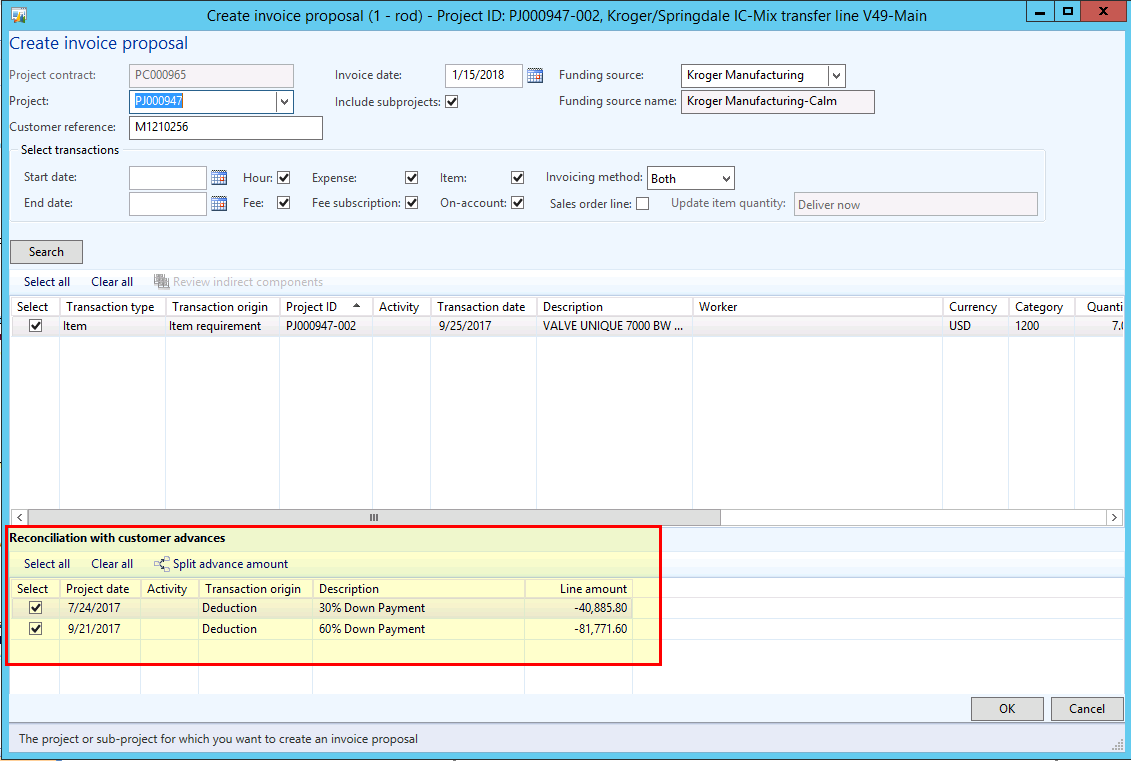
Project-Invoice-Proposal-with-Prepayments.png

I do not know where else this information is still being held in the system.  They must still reside somewhere, because they are showing up on the invoice proposal, however I don't know where to find and delete that information.  Any help would be appreciated.

Thank you!

*This post is locked for comments

I have the same question (0)
  • Verified answer
    Ludwig Reinhard Profile Picture
    Microsoft Employee on at

    Hi,

    Have you checked the project contract billing section?

    What I'm not clear about is whether the prepayments have already been invoiced or not. Can you clarify that?

    Best regards,

    Ludwig

  • CandidaTruitt Profile Picture
    10 on at

    There were 4 prepayments created, in total.  2 have been invoiced and even deducted from an invoice for the Project work thus far.  The 2 shown above were never invoiced, therefore I was able to delete the invoice proposal and on-account transactions for them.  

    I have not checked the project contract billing section.  I've seen and worked with Project contracts, but not sure where I'd check on the project contract in regards to a prepayment that had been setup.  Can you explain that further?

    Thanks!

    Candi

  • CandidaTruitt Profile Picture
    10 on at

    Ludwig - I found it!  I was going through the Project Contract, after you mentioned it above, and realized that there had been a Pending transaction created for these prepayments.  I was able to delete those pending transactions through the project contract and now they no longer appear in the "reconciliation with customer advances" section, when I create a new invoice proposal.

    Thank you for pointing me in the right direction!  Have a great day!

    Candi

Under review

Thank you for your reply! To ensure a great experience for everyone, your content is awaiting approval by our Community Managers. Please check back later.

Helpful resources

Quick Links

Introducing the 2026 Season 1 community Super Users

Congratulations to our 2026 Super Stars!

Meet the Microsoft Dynamics 365 Contact Center Champions

We are thrilled to have these Champions in our Community!

Congratulations to the March Top 10 Community Leaders

These are the community rock stars!

Leaderboard > 🔒一 Microsoft Dynamics AX (Archived)

#1
CP04-islander Profile Picture

CP04-islander 39

#2
Michel ROY Profile Picture

Michel ROY 14

#3
imran ul haq Profile Picture

imran ul haq 8

Last 30 days Overall leaderboard

Featured topics

Product updates

Dynamics 365 release plans
