web
You’re offline. This is a read only version of the page.
close
Skip to main content

Notifications

Announcements

No record found.

Community site session details

Community site session details

Session Id :
Microsoft Dynamics AX (Archived)

AX 7 workflow error

(0) ShareShare
ReportReport
Posted on by

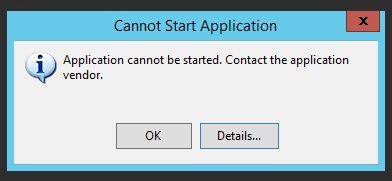
When i run downloaded application manifest file for creating workflow i am getting below error :
2818.error.jpg

"Deployment and application do not have matching security zones"


Please suggest, if anyone have solution.

Thanks.


*This post is locked for comments

I have the same question (0)
  • Community Member Profile Picture
    on at

    Hi Vinay

    Please try using in Microsoft Edge or IE

    PS: I also had same problem using Chrome.

  • Mahesh Ambati Profile Picture
    105 on at

    Hi Aloysius,

    i am opening from IE, still getting same error as Vinay mentioned. Let me know if any solution for this.

  • Suggested answer
    Community Member Profile Picture
    on at

    Got same error in Chrome but running from Edge solved the issue

  • Community Member Profile Picture
    on at

    Download the latest version of .NET Framework and install, then try it...

  • Suggested answer
    Mohamed CHEBBO Profile Picture
    5 on at

    Try to Open it in Internet Explorer 11.

    it will Work Properly.

  • Suggested answer
    Ricardo Gomes Profile Picture
    15 on at

    Solution that worked for me:

    1. Start up Edge
    2. Type in the browser adressbar:     edge://settings/defaultbrowser
    3. Make Edge Default Browser.
    4. Set stetting op “Allow”.

    pastedimage1672911432380v1.png

  • Deepak Agarwal Profile Picture
    8,598 on at

    This error comes when you open workflow designer in other than Edge browser. In most of the case this should be fixed when you use Edge browser (Assuming you have required roles). If you are still facing issues, you can try

    1. Reset internet cache

    2. Clear user usages data on application

    3. Try a different user and machine.

Under review

Thank you for your reply! To ensure a great experience for everyone, your content is awaiting approval by our Community Managers. Please check back later.

Helpful resources

Quick Links

Responsible AI policies

As AI tools become more common, we’re introducing a Responsible AI Use…

Neeraj Kumar – Community Spotlight

We are honored to recognize Neeraj Kumar as our Community Spotlight honoree for…

Leaderboard > 🔒一 Microsoft Dynamics AX (Archived)

#1
Martin Dráb Profile Picture

Martin Dráb 4 Most Valuable Professional

#1
Priya_K Profile Picture

Priya_K 4

#3
MyDynamicsNAV Profile Picture

MyDynamicsNAV 2

Last 30 days Overall leaderboard

Featured topics

Product updates

Dynamics 365 release plans
