web
You’re offline. This is a read only version of the page.
close
Skip to main content

Notifications

Announcements

No record found.

Community site session details

Community site session details

Session Id :
Microsoft Dynamics AX (Archived)

Recreate SSRS encryption key after deletion

(0) ShareShare
ReportReport
Posted on by 2,162

Entire AX 2012 setup was moved to a different domain without taking a backup of SSRS encryption key.

I didn't have the backup encryption key so I deleted the encryption key as hinted by many posts.

Now I want to recreate an encryption key. Any idea on how to do it?

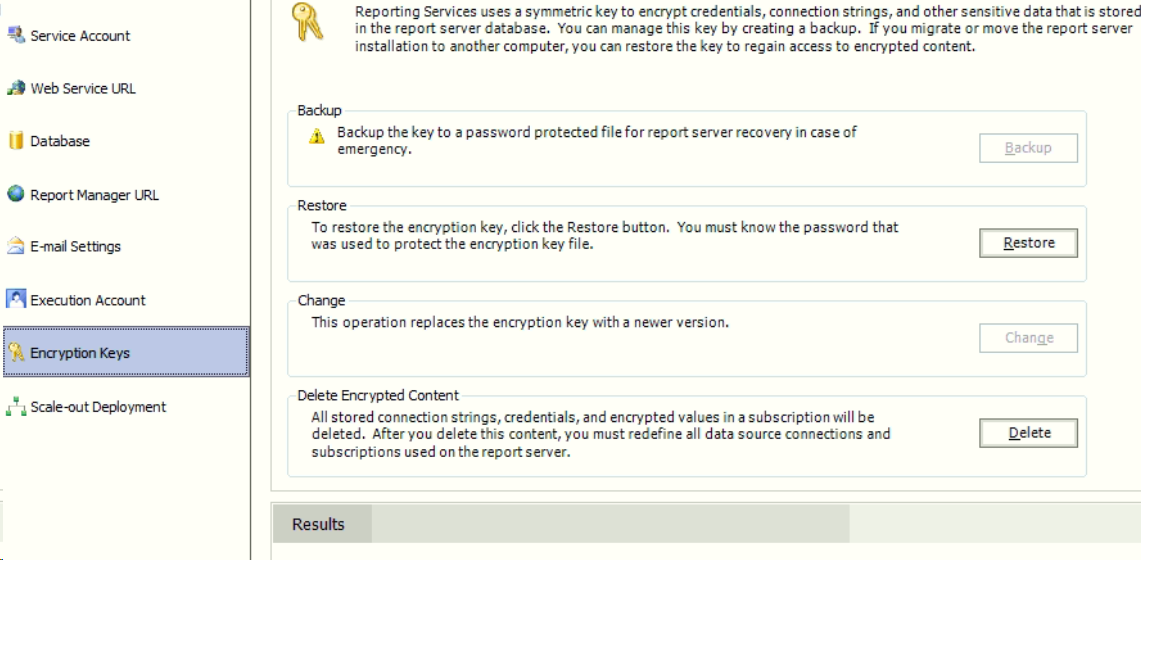
This is how the Reporting configuration manager looks like on AOS server:
5824.Untitled.png

*This post is locked for comments

I have the same question (0)
  • Verified answer
    Hassan_rulz Profile Picture
    3,801 on at

    I have performed similar type of activity on one of my client and I simply delete the encryption keys and then click on "Change" button to replace with new one.

    I also did not have any backup. You just need to replace service account with new domain and restart service. Then you should able to change encryption keys.

  • MYGz Profile Picture
    2,162 on at

    Thanks. That worked pretty well! I am able to open the url now and validate the connection in Report Server in AX.

    But I'm unable to see reports. I tried to redeploy the reports through shell but getting this error:

    WARNING: The security group Administrators contains a member that is causing

    the following error : An error (1332) occurred while enumerating the group

    membership.  The member's SID could not be resolved..

    Publish-AXReport : The deployment was aborted. You do not have privileges to

    deploy to server: appdtcho. For deployment, you must have administrative

    rights to the SQL Server Reporting Services (SSRS) server. Contact your

    administrator to deploy.

    At line:1 char:1

    + Publish-AXReport ?ReportName *

    + ~~~~~~~~~~~~~~~~~~~~~~~~~~~~~~

       + CategoryInfo          : SecurityError: (Microsoft.Dynam...ReportsDeploye

      r:ReportsDeployer) [Publish-AXReport], SecurityException

       + FullyQualifiedErrorId : The deployment was aborted. You do not have priv

      ileges to deploy to server: appdtcho. For deployment, you must have admini

     strative rights to the SQL Server Reporting Services (SSRS) server. Contac

    t your administrator to deploy.,Microsoft.Dynamics.AX.Framework.Management

    .Reports.PublishReportCommand

    Deployment completed.

  • MYGz Profile Picture
    2,162 on at

    report_5F00_deploy1.PNGreport_5F00_deploy2.PNG

    Error ^^^ while deplying an ssrs report through AOT.

  • Suggested answer
    Hassan_rulz Profile Picture
    3,801 on at

    Make sure your user have admin rights in OS and reporting server URL.

  • MYGz Profile Picture
    2,162 on at

    How do I check that? I was wondering if I have to change the SID in Users table in SSRS database. Since 1 part in SID creation is domain and that is changed now.

    This is how the users table looks like:

    UserID Sid UserType AuthType UserName
    846C29BA-A039-4AD7-9927-AAF4DB7EDBC8 0x010100000000000100000000 1 1 Everyone
    2B436A5B-37DE-4CB6-AC2C-2405D13700C2 0x010100000000000512000000 0 1 NT AUTHORITY\SYSTEM
    C36D0F62-29A4-40DE-85DD-E424071E844B 0x01020000000000052000000020020000 1 1 BUILTIN\Administrators
    4033C77D-7BB2-4BC7-9D75-8E4F11FAF1EC 0x0105000000000005150000005AE2326D3D9AC66DD5CCABEE56040000 1 1 ITDTC\AXADMIN
    4257E64C-D123-4076-A088-1CA240CD1746 0x0105000000000005150000005AE2326D3D9AC66DD5CCABEE7C040000 1 1 ITDTC\AXService
    4A92EA5D-7B67-4B79-A6D6-B3A5B70BC739 0x010500000000000515000000A4D71C7CE6B6712836B9074259040000 1 1 ITDTC\AXADMIN
    701DCA01-F587-47AA-B5D7-A4734623EC28 0x010500000000000515000000A4D71C7CE6B6712836B907425B040000 1 1 ITDTC\AXService
  • Suggested answer
    Hassan_rulz Profile Picture
    3,801 on at

    Open report server URL > Site Settings > Security > Add user here from which you are deploying reports and provide full rights

    Open report server URL > Click/Open "Dynamics AX" report folder > Folder Settings > Security > Add your user with full rights

  • MYGz Profile Picture
    2,162 on at

    Added the user with full rights. Still the same error while deploying report. Earlier AX was not opening on because of changed SID. I had to update sid in db.usersinfo table of MicrosoftDynamicsAX database. Do you think it's the same SID issue with Reporting database as well?

    The error I'm getting while trying to open the report:

    Failed to load expression host assembly. Details: Could not load file or assembly 'Microsoft.Dynamics.Framework.Metadata.AX, Version=6.2.0.0, Culture=neutral, PublicKeyToken=31bf3856ad364e35' or one of its dependencies. The system cannot find the file specified. (rsErrorLoadingExprHostAssembly) 

  • MYGz Profile Picture
    2,162 on at

    So after offsite help from Hassan, found that the Reporting Service extension was not installed. Installing it and creating a new SSRS database resolved the issue.

Under review

Thank you for your reply! To ensure a great experience for everyone, your content is awaiting approval by our Community Managers. Please check back later.

Helpful resources

Quick Links

Responsible AI policies

As AI tools become more common, we’re introducing a Responsible AI Use…

Neeraj Kumar – Community Spotlight

We are honored to recognize Neeraj Kumar as our Community Spotlight honoree for…

Leaderboard > 🔒一 Microsoft Dynamics AX (Archived)

#1
Martin Dráb Profile Picture

Martin Dráb 4 Most Valuable Professional

#1
Priya_K Profile Picture

Priya_K 4

#3
MyDynamicsNAV Profile Picture

MyDynamicsNAV 2

Last 30 days Overall leaderboard

Featured topics

Product updates

Dynamics 365 release plans
