web
You’re offline. This is a read only version of the page.
close
Skip to main content

Announcements

No record found.

News and Announcements icon
Community site session details

Community site session details

Session Id :
Finance | Project Operations, Human Resources, ...
Suggested Answer

Creating a tier 2 environment question

(0) ShareShare
ReportReport
Posted on by 16

Hi,

I recently setup a new tenant that will serve as the development tenant. I'm trying to replicate what was in the original tenant to the new tenant. One of the items the original tenant was able to do is to create tier 2 F&O environments. If I log into https://lcs.dynamics.com/ with credentials of the original tenant, the project section looks like:

LCS_5F00_production.JPG

There is a link to "Implementation". But on my new tenant, it looks like:

LCS_5F00_development.JPG

It's missing "Implementation' (I've masked out the environment name for security).. When I try to create a new project by clicking on the plus, I get the following menu:
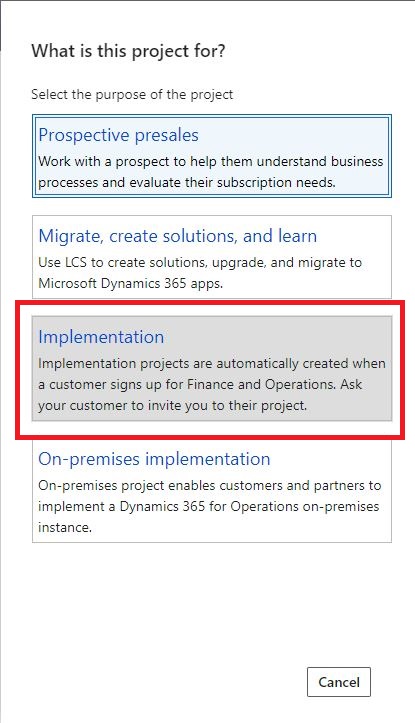
LCS_5F00_ProjectCreation.JPG

The Implementation option is present, but is greyed out. I was wondering what do I need to do in order to make creating tier 2 environments possible? e.g. would I need certain permissions or licenses to do this? Thanks!

Jason

I have the same question (0)
  • Suggested answer
    André Arnaud de Calavon Profile Picture
    303,481 Super User 2026 Season 1 on at

    Hi Jason,

    In a new tenant, you don't have the licenses to create Tier 2 environments. If the tenant is for development purposes, you can download a VHD for local development or deploy cloud hosted environments for this purpose.

    The Tier 2 environments are limited to implementation projects which are created as part of a Dynamics 365 F&O subscription linked to the Azure AD tenant.

  • Jason Yeung Profile Picture
    16 on at

    Hi Andre,

    thanks for the information. I was wondering what would be the name of the Dynamics 365 F&O subscription (e.g. possible names of the subscription). I need to link to the Azure AD tenant? I looked at my old tenant, but couldn't find one with F&O in its name.

    Jason

  • André Arnaud de Calavon Profile Picture
    303,481 Super User 2026 Season 1 on at

    Hi Jason,

    The subscription is managed by Microsoft and is in your original tenant. To get the subscription active in your new Azure subscription/tenant, you would need to purchase Dynamics 365 again. You can apply for a trial subscription which would then allow you to deploy Tier-1 development environments.

Under review

Thank you for your reply! To ensure a great experience for everyone, your content is awaiting approval by our Community Managers. Please check back later.

Helpful resources

Quick Links

Introducing the 2026 Season 1 community Super Users

Congratulations to our 2026 Super Stars!

Congratulations to our 2025 Community Spotlights

Thanks to all of our 2025 Community Spotlight stars!

Leaderboard > Finance | Project Operations, Human Resources, AX, GP, SL

#1
André Arnaud de Calavon Profile Picture

André Arnaud de Cal... 527 Super User 2026 Season 1

#2
Giorgio Bonacorsi Profile Picture

Giorgio Bonacorsi 473

#3
Adis Profile Picture

Adis 284 Super User 2026 Season 1

Last 30 days Overall leaderboard

Product updates

Dynamics 365 release plans
