web
You’re offline. This is a read only version of the page.
close
Skip to main content

Announcements

News and Announcements icon
Community site session details

Community site session details

Session Id :
Small and medium business | Business Central, N...
Suggested Answer

"Adjust Cost - Item Entries " adjusting item without any entry

(0) ShareShare
ReportReport
Posted on by 84

Hi, 

I'd to ask a question, 
Our team has been doing May Monthly Closing and do reconciliation and adjustment for inventory.
At 25 May 2022.

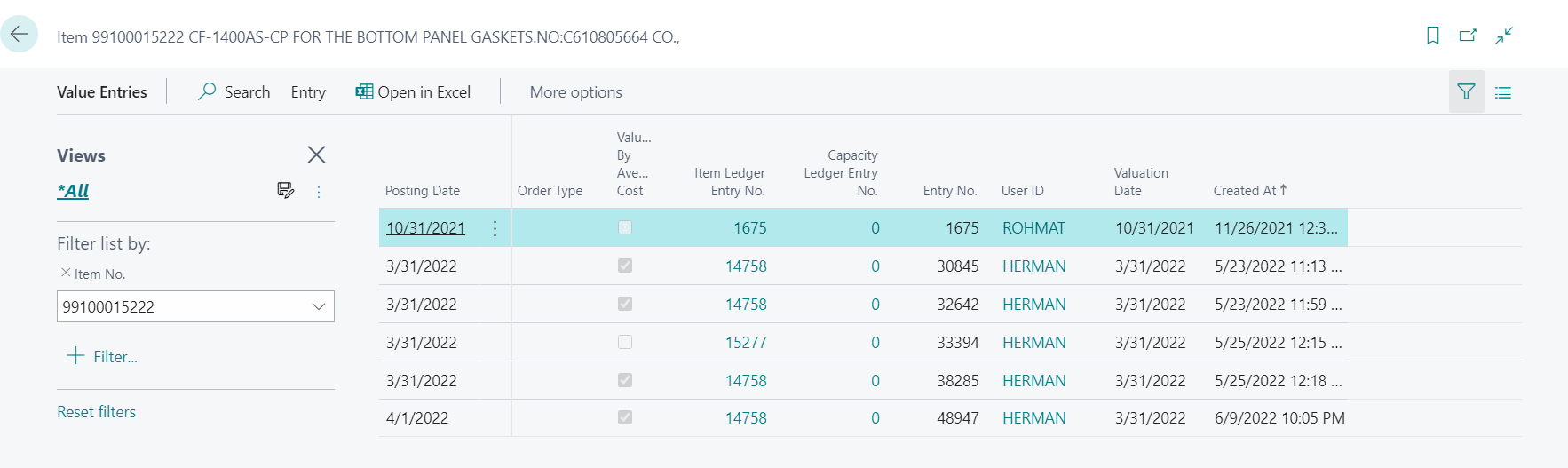
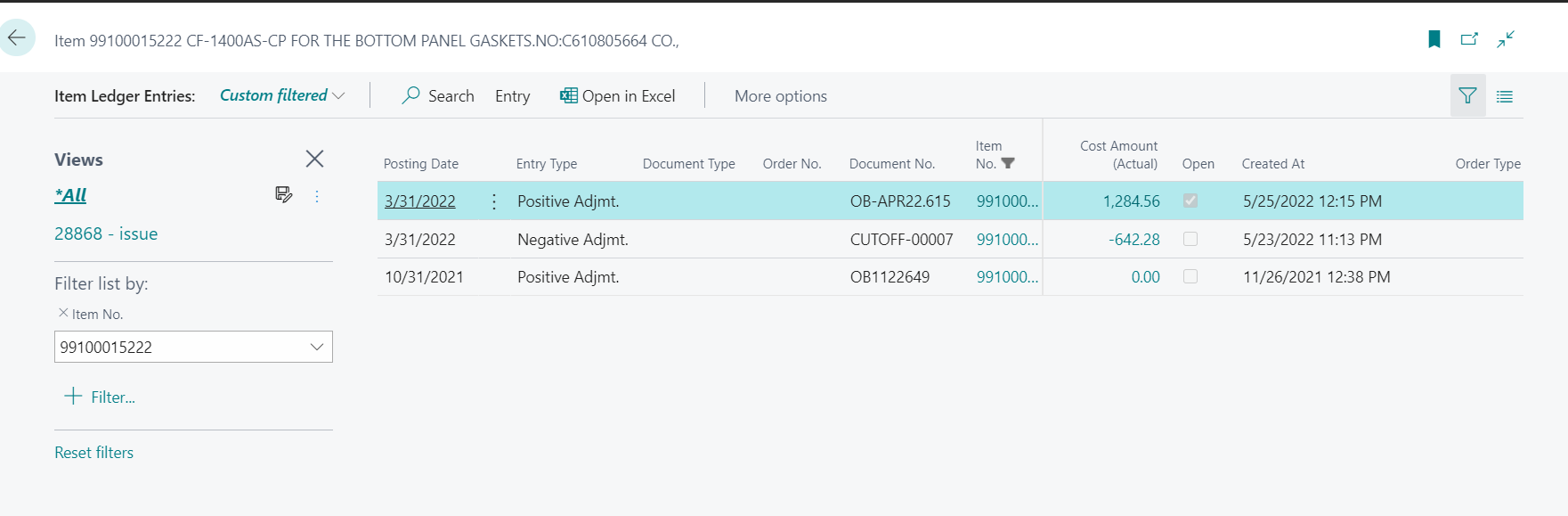
But we found out there's a scheduled "Adjust Cost - Item Entries"  on 9 June that adjusting thousand of items without any Entry/Transaction in pas few days from last closing.

Here's an example 1 of thousands items.
pastedimage1655372194521v1.png

pastedimage1655372326917v2.png

We have scheduled Adjust Cost at 10 PM every night. 

We have checked the job history, it always running successfully every night.
We have no idea how to track this.
Please give us an advice how to trace this.

Thanks.

I have the same question (0)
  • Suggested answer
    Marco Mels Profile Picture
    Microsoft Employee on at

    Hello,

    You need to ask your partner to assist you with this.

    Thanks.

  • Suggested answer
    Dallefeld Profile Picture
    235 User Group Leader on at

    It is vital that when running Adjust Cost - Item Entries that the Post to GL toggle is set to yes. If it is not, the value entries and items will be updated but the GL entries will not. You should run Post Cost to GL which will create the associated GL entries for the values entries that have already been posted.

  • Suggested answer
    IB-29041624-0 Profile Picture
    1,191 Moderator on at

    Making sure you have good routines for your cost adjustment in Business Central is crucial to your system.

    Hopefully my blog around this can give you an understanding.

    bc365.co/.../

    Try running Post Inventory Cost to G/L” report to get the system back in sync.

Under review

Thank you for your reply! To ensure a great experience for everyone, your content is awaiting approval by our Community Managers. Please check back later.

Helpful resources

Quick Links

Season of Sharing Community Challenge Winners!

Congratulations to our community stars!

Women in Power Builds Momentum

Expanding mentorship, skilling, and AI innovation

Congratulations to the July Top 10 Community Leaders

These are the community rock stars!

Leaderboard > Small and medium business | Business Central, NAV, RMS

#1
OussamaSabbouh Profile Picture

OussamaSabbouh 621 Super User 2026 Season 2

#2
YUN ZHU Profile Picture

YUN ZHU 380 Super User 2026 Season 2

#3
Grigorios Mavrogeorgis Profile Picture

Grigorios Mavrogeorgis 341 Super User 2026 Season 2

Last 30 days Overall leaderboard

Featured topics

Microsoft Training Manuals

Product updates

Dynamics 365 release plans