web
You’re offline. This is a read only version of the page.
close
Skip to main content

Notifications

Announcements

No record found.

Community site session details

Community site session details

Session Id :
Small and medium business | Business Central, N...
Suggested Answer

Attaching Debugger gives error

(0) ShareShare
ReportReport
Posted on by 5

Hi,

I'm trying to attach to a webservice but vs code keeps giving me the following fail:

The request for path /BC160/dev/metadata failed with code MethodNotAllowed. Reason: Method Not Allowed

Running the client with launch works only attach gives me this error.

I hope somebody can help me.

Thanks in advance

I have the same question (0)
  • THE Italian Profile Picture
    on at

    can you show here the following:

    1. launch.json file

    2. app.json file

    3. screenshot of the AL Language version that your are using (build no.)

  • Daan Schuitmaker Profile Picture
    5 on at

    launch.json

    {
        "version": "0.2.0",
        "configurations": [
            {
                "name": "ELC25 Local Development",
                "type": "al",
                "request": "launch",
                "server": "http://localhost",
                "serverInstance": "BC160",
                "authentication": "Windows",
                "startupObjectId": 22,
                //"startupObjectId": 11021530,            
                "startupObjectType": "Page",
                "breakOnError": true,
                "launchBrowser": true,
                "enableLongRunningSqlStatements": true,
                "enableSqlInformationDebugger": true,
                "schemaUpdateMode": "ForceSync"
            },
            {
                "name": "Debug: ELC25 WebService",
                "type": "al",
                "request": "attach",
                "server": "http://localhost",
                "port": 7047,
                "serverInstance": "BC160",
                "authentication": "Windows",
                "breakOnError": true,
                "breakOnRecordWrite": false,
                "enableSqlInformationDebugger": true,
                "enableLongRunningSqlStatements": true,
                "longRunningSqlStatementsThreshold": 500,
                "numberOfSqlStatements": 10,
                "breakOnNext": "WebServiceClient"
            }
        ]
    }

    app.json

    {
      "id": "781203f8-1ade-47fe-8d41-9c5319586d30",
      "name": "ELC25",
      "publisher": "Dysel",
      "version": "1.0.0.7",
      "brief": "ELC 25",
      "description": "ELC 25",
      "privacyStatement": "",
      "EULA": "",
      "help": "",
      "url": "",
      "logo": "",
      "dependencies": [
        {
          "id": "63ca2fa4-4f03-4f2b-a480-172fef340d3f",
          "publisher": "Microsoft",
          "name": "System Application",
          "version": "16.3.14085.14238"
        },
        {
          "id": "437dbf0e-84ff-417a-965d-ed2bb9650972",
          "publisher": "Microsoft",
          "name": "Base Application",
          "version": "16.3.14085.14238"
        }
      ],
      "screenshots": [],
      "platform": "16.0.0.0",
      "idRanges": [
        {
          "from": 50000,
          "to": 11134251
        }
      ],
      "contextSensitiveHelpUrl": "https://ELC24.com/help/",
      "showMyCode": true,
      "runtime": "5.0",
      "target": "OnPrem"
    }
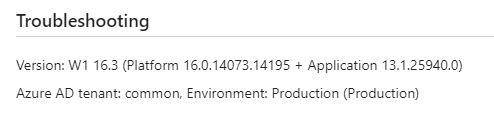
    pastedimage1605686104730v1.png

    Output of VS Code

    pastedimage1605686169175v2.png

  • Suggested answer
    THE Italian Profile Picture
    on at

    I can see Application 13.1 this shouldn't be like that. 

    When upgrading you should have followed the step of running Set-NAVApplication and change the application version. 

    Very hard to say what might go wrong in here. I would ask your CSP Partner to open a request to Microsoft support in order to double check and verify the upgrade has been performed OK and also the Attach procedure. 

  • Suggested answer
    Daan Schuitmaker Profile Picture
    5 on at

    I've found the solutions myself...

    It was the port... it needed to point to the development part.

  • THE Italian Profile Picture
    on at

    port no... an evergreen trivial mistake :-)

Under review

Thank you for your reply! To ensure a great experience for everyone, your content is awaiting approval by our Community Managers. Please check back later.

Helpful resources

Quick Links

Responsible AI policies

As AI tools become more common, we’re introducing a Responsible AI Use…

Neeraj Kumar – Community Spotlight

We are honored to recognize Neeraj Kumar as our Community Spotlight honoree for…

Leaderboard > Small and medium business | Business Central, NAV, RMS

#1
OussamaSabbouh Profile Picture

OussamaSabbouh 3,143

#2
Jainam M. Kothari Profile Picture

Jainam M. Kothari 1,694 Super User 2025 Season 2

#3
YUN ZHU Profile Picture

YUN ZHU 1,067 Super User 2025 Season 2

Last 30 days Overall leaderboard

Featured topics

Product updates

Dynamics 365 release plans



