web
You’re offline. This is a read only version of the page.
close
Skip to main content

Notifications

Announcements

No record found.

Community site session details

Community site session details

Session Id :
Microsoft Dynamics CRM (Archived)

Deleting Powermap Solution

(0) ShareShare
ReportReport
Posted on by

I want to delete my Powermaps solution in Dynamics CRM online but if i try this i get the following error:
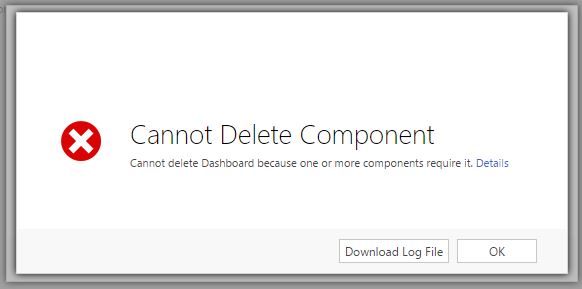
 

gdhf.JPG


The log-file contains this:

Unhandled Exception: System.ServiceModel.FaultException`1[[Microsoft.Xrm.Sdk.OrganizationServiceFault, Microsoft.Xrm.Sdk, Version=8.0.0.0, Culture=neutral, PublicKeyToken=31bf3856ad364e35]]: The {0}({1}) component cannot be deleted because it is referenced by {2} other components. For a list of referenced components, use the RetrieveDependenciesForDeleteRequest.
Data[0] = "Dashboard"
Data[1] = "<a id='a_helplink' tabindex='0' class='ms-crm-Dialog-Error-Link' onclick='openStdWin("\x2ftools\x2fdependency\x2fdependencyviewdialog.aspx\x3fobjectid\x3d\x257bc3ce619a-d415-4269-b096-f25731519fc8\x257d\x26objecttype\x3d7100\x26operationtype\x3ddependenciesforuninstall", null, 800, 600, null)'>Details</a>"Detail:
<OrganizationServiceFault xmlns:i="www.w3.org/.../XMLSchema-instance" xmlns="schemas.microsoft.com/.../Contracts">
<ErrorCode>-2147160033</ErrorCode>
<ErrorDetails xmlns:d2p1="schemas.datacontract.org/.../System.Collections.Generic">
<KeyValuePairOfstringanyType>
<d2p1:key>0</d2p1:key>
<d2p1:value xmlns:d4p1="www.w3.org/.../XMLSchema" i:type="d4p1:string">Dashboard</d2p1:value>
</KeyValuePairOfstringanyType>
<KeyValuePairOfstringanyType>
<d2p1:key>1</d2p1:key>
<d2p1:value xmlns:d4p1="www.w3.org/.../XMLSchema" i:type="d4p1:string">&lt;a id='a_helplink' tabindex='0' class='ms-crm-Dialog-Error-Link' onclick='openStdWin("\x2ftools\x2fdependency\x2fdependencyviewdialog.aspx\x3fobjectid\x3d\x257bc3ce619a-d415-4269-b096-f25731519fc8\x257d\x26objecttype\x3d7100\x26operationtype\x3ddependenciesforuninstall", null, 800, 600, null)'&gt;Details&lt;/a&gt;</d2p1:value>
</KeyValuePairOfstringanyType>
</ErrorDetails>
<Message>The {0}({1}) component cannot be deleted because it is referenced by {2} other components. For a list of referenced components, use the RetrieveDependenciesForDeleteRequest.
Data[0] = "Dashboard"
Data[1] = "&lt;a id='a_helplink' tabindex='0' class='ms-crm-Dialog-Error-Link' onclick='openStdWin("\x2ftools\x2fdependency\x2fdependencyviewdialog.aspx\x3fobjectid\x3d\x257bc3ce619a-d415-4269-b096-f25731519fc8\x257d\x26objecttype\x3d7100\x26operationtype\x3ddependenciesforuninstall", null, 800, 600, null)'&gt;Details&lt;/a&gt;"</Message>
<Timestamp>2016-10-24T11:30:27.7258172Z</Timestamp>
<InnerFault i:nil="true" />
<TraceText i:nil="true" />
</OrganizationServiceFault>

Who can help me deleting this solution?

*This post is locked for comments

I have the same question (0)
  • Verified answer
    Rutul Chauhan Profile Picture
    2 on at

    Hi,

    PLease click on details link displayed in error message and remove dependent component. Once all dependent component get deleted, then only you can uninstall this solution from crm

    Regards,

    Rutul

  • Verified answer
    Jay2014 Profile Picture
    on at

    Hi Adriaan, I have not used that solution but in terms of removing the dependency, i would create an unmanaged solution add the dependency components into it and manually delete or remove the dependencies in there ?

  • Community Member Profile Picture
    on at

    Hi Guido,

    This worked for me so i'm happy. In one of the custom made Dashboards there was a component of the Powermap solution wich prevented deleting the solution. By manually removing the component i was able to delete the solution.

    Thank you for your help!

    Kind regards, Adriaan

  • Community Member Profile Picture
    on at

    If there are others who also encounter this problem: www.powerobjects.com/.../powermap

    Scroll down to the bottom till you find: 'Uninstalling PowerMap'

    To uninstall, first delete any Entity to Map records you created. Then uninstall as usual, by deleting the solution. Deleting the ‘Entity to Map’ records removes SDK Message Processing Steps that would otherwise block the uninstall.

    Uninstalling the solution does not unsubscribe the solution.  If you’re discontinuing use of the add-on, you must first unsubscribe in the solution.

    Thank you for your interest in PowerMap, should you choose to subscribe you will be charged $2/enabled CRM user/month. If you have any questions or run into any issues with PowerMap, our friendly support team is here to help!

Under review

Thank you for your reply! To ensure a great experience for everyone, your content is awaiting approval by our Community Managers. Please check back later.

Helpful resources

Quick Links

Responsible AI policies

As AI tools become more common, we’re introducing a Responsible AI Use…

Neeraj Kumar – Community Spotlight

We are honored to recognize Neeraj Kumar as our Community Spotlight honoree for…

Leaderboard > 🔒一 Microsoft Dynamics CRM (Archived)

#1
SA-08121319-0 Profile Picture

SA-08121319-0 4

#1
Calum MacFarlane Profile Picture

Calum MacFarlane 4

#3
Alex Fun Wei Jie Profile Picture

Alex Fun Wei Jie 2

Last 30 days Overall leaderboard

Featured topics

Product updates

Dynamics 365 release plans



