web
You’re offline. This is a read only version of the page.
close
Skip to main content

Announcements

No record found.

News and Announcements icon
Community site session details

Community site session details

Session Id :
Microsoft Dynamics AX (Archived)

Data not shown on form

(0) ShareShare
ReportReport
Posted on by

Hi all,

I added the filed that is in the data source table field. and the data is there in table. but it showing unretrieved. Is it best practice to do this on that specific form? please help me.!
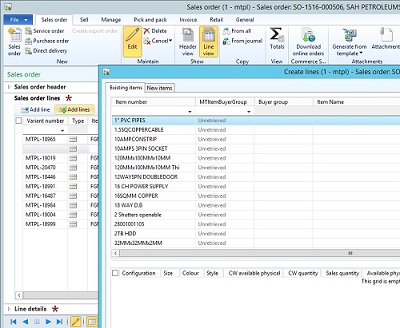
j1.jpg

itm.jpg

Regards,

suresh.

*This post is locked for comments

I have the same question (0)
  • Suggested answer
    Jonathan  Halland Profile Picture
    11,310 on at

    Hi Suresh. Check that you have run a syncronisation on your database. Then possibly restart your client.

    If the problem still persists clear your usage data.

  • Community Member Profile Picture
    on at

    hi Jonathan Halland,

      i did what u said. but no use at all, please help.

    suresh.

  • RamK Profile Picture
    2,580 on at

    Suresh, Have you added this field by personalization or added a new field in the form and created a relationship with the data set...?

  • Suggested answer
    Faisal Fareed Profile Picture
    10,796 User Group Leader on at

    Hi Suresh, try restarting AOS and before that you can try deleting *.AUC files

  • Community Member Profile Picture
    on at

    hi ram,

    i added the field which contain Form data source.

  • Community Member Profile Picture
    on at

    hi Faisal,

    I tried what you said but it is not working. please help.

  • Suggested answer
    Faisal Fareed Profile Picture
    10,796 User Group Leader on at

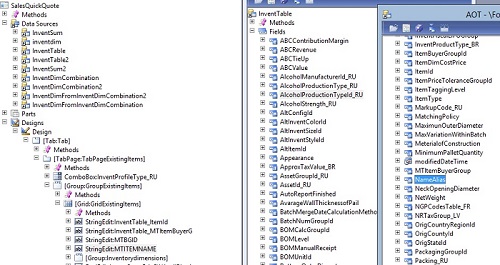
    Can you show the design of the form from AOT and also check datasource is assigned on this field. How did you add this field, Silly question but did you drag and drop from form's datasource or right click and added new field.

  • Community Member Profile Picture
    on at

    hi faisal,

    please check my post, i have edited my post.

    I have attached pic there and i dragged and drop the field into form from the data source.

  • Suggested answer
    Faisal Fareed Profile Picture
    10,796 User Group Leader on at

    I can see your first field in grid is InventTable_ItemId and the remaining fields are InventTable_MItem*** and I wonder you added either stringEdit controls which are binded with display methods or some other methods. You need to check either data is coming in these methods.

  • Community Member Profile Picture
    on at

    When the field is unretreived after creating, you should restart the AOS. Since you already did this and the problem is still there you probably have a programmatical error in the form. Please make sure the datasource and field properties are set correctly.

    'Unretreived' is also caused by grouping in the form datasource, when the particular field is not part of the grouping or fieldlist. So make sure there is no grouping where your field is missing.

Under review

Thank you for your reply! To ensure a great experience for everyone, your content is awaiting approval by our Community Managers. Please check back later.

Helpful resources

Quick Links

Introducing the 2026 Season 1 community Super Users

Congratulations to our 2026 Super Stars!

Meet the Microsoft Dynamics 365 Contact Center Champions

We are thrilled to have these Champions in our Community!

Congratulations to the April Top 10 Community Leaders

These are the community rock stars!

Leaderboard > 🔒一 Microsoft Dynamics AX (Archived)

#1
CP04-islander Profile Picture

CP04-islander 39

#2
Michel ROY Profile Picture

Michel ROY 14

#3
imran ul haq Profile Picture

imran ul haq 8

Last 30 days Overall leaderboard

Featured topics

Product updates

Dynamics 365 release plans
