web
You’re offline. This is a read only version of the page.
close
Skip to main content

Notifications

Announcements

No record found.

Community site session details

Community site session details

Session Id :
Microsoft Dynamics CRM (Archived)

Adxstudio : Modify controls of the confirmation account registration form

(0) ShareShare
ReportReport
Posted on by

Hi everybody !

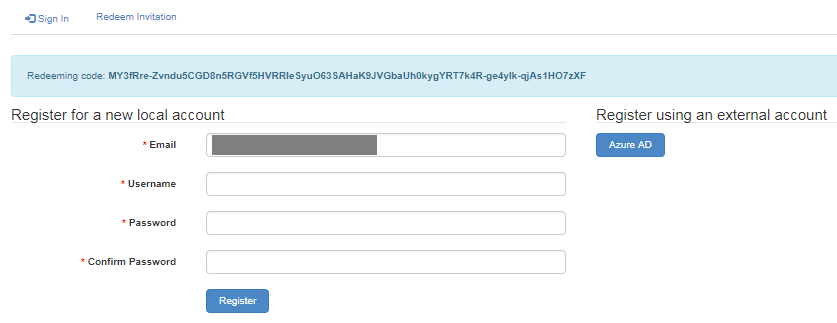
When a customer receive a confrimation mail of the creation of his account in the portal and click on the "activate your account" with the invitation code and submit the inivtation code, he arrives at this form :

(The Email field is already filled in)
activationAccount.png

So far everything is good.

But when a customer put a username all in UPPERCASE or fill a password with less than 5 characters (Deducted from several tests) and click on "register", the page reloads, come back at the same page with username and password fields empty. No error message and the account is not created.

So Is there a way to edit the controls of the fields of the form ?

Thank you for your help.

Best regards,

Raphaël HENIN.

*This post is locked for comments

I have the same question (0)
  • Verified answer
    RaviKashyap Profile Picture
    55,410 Moderator on at

    Hi,

    I am not sure if you can edit the controls but as you have already identified that the issue is caused due the the password. Basically, at the time of registration, portal enforce the password complexity i.e. "Passwords must contain characters from at least three of the following four classes: uppercase, lowercase, digit, and non-alphanumeric (special).".

    I had the same issue and end up putting a note on the registration page with the same text-

    password.png

    Alternatively if it fits your requirement, you can change the password complexity by using some site settings-

    https://docs.microsoft.com/en-us/dynamics365/customer-engagement/portals/set-authentication-identity

    Authentication/UserManager/PasswordValidator/EnforcePasswordPolicy

    Authentication/UserManager/PasswordValidator/RequiredLength

    Authentication/UserManager/PasswordValidator/RequireNonLetterOrDigit

    Authentication/UserManager/PasswordValidator/RequireDigit

    Authentication/UserManager/PasswordValidator/RequireLowercase

    Authentication/UserManager/PasswordValidator/RequireUppercase

    Hope this helps.

  • Community Member Profile Picture
    on at

    Thank you for your reply ! You put me on the good way.

    But, i have no Authentication/UserManager on my site settings :

    authenticationsettings.png

    So, normaly, there will be no password/username complexity, right ?

    Furthermore, can you explain me how do you put the warning message "Passwords must contain characters from at least three of the following four classes: uppercase, lowercase, digit, and non-alphanumeric (special)." ? I can't find on the Dynamics tool how to reach this registration form

    Thank you for your help.

    Best regards,

    Raphaël HENIN

  • Verified answer
    Jharana Baliyar Singh Profile Picture
    2,667 on at

    Hi Raphael,

    As Ravi said you need to create site settings with the followings :

    Authentication/UserManager/PasswordValidator/EnforcePasswordPolicy

    Authentication/UserManager/PasswordValidator/RequiredLength

    Authentication/UserManager/PasswordValidator/RequireNonLetterOrDigit

    Authentication/UserManager/PasswordValidator/RequireDigit

    Authentication/UserManager/PasswordValidator/RequireLowercase

    Authentication/UserManager/PasswordValidator/RequireUppercase

    & give the value as true.

    Thanks,

    Jharana

  • Community Member Profile Picture
    on at

    Thank you Jharana for you precision, I didn't understand ^^"

    I don't know well Adxstudio, so to create site settings I went to :

    CRM Dynamics -> Portal -> Site settings then i clicked on "New".

    I have filled the form like this :

    newsettingssite.png

    I did it again for the others settings.

    Am i doing it right ?

    When I go back to the register form, the "Email" field doesn't exist anymore :( but it's not important. When i fill the password field with a password all in lowercase, there is no error message and the page reloaded with clearing all fields(like i described at my first message of this topic). But when i respect the password policy, it works.
    So, do you know how to put an error message or a warning message for the customer?

  • Community Member Profile Picture
    on at

    Its work well now, thank you !

Under review

Thank you for your reply! To ensure a great experience for everyone, your content is awaiting approval by our Community Managers. Please check back later.

Helpful resources

Quick Links

Responsible AI policies

As AI tools become more common, we’re introducing a Responsible AI Use…

Neeraj Kumar – Community Spotlight

We are honored to recognize Neeraj Kumar as our Community Spotlight honoree for…

Leaderboard > 🔒一 Microsoft Dynamics CRM (Archived)

#1
SA-08121319-0 Profile Picture

SA-08121319-0 4

#1
Calum MacFarlane Profile Picture

Calum MacFarlane 4

#3
Alex Fun Wei Jie Profile Picture

Alex Fun Wei Jie 2

Last 30 days Overall leaderboard

Featured topics

Product updates

Dynamics 365 release plans



