web
You’re offline. This is a read only version of the page.
close
Skip to main content

Announcements

No record found.

News and Announcements icon
Community site session details

Community site session details

Session Id :
Finance | Project Operations, Human Resources, ...
Suggested Answer

How to filter a parameter lookup in a data controller class

(0) ShareShare
ReportReport
Posted on by 275

I've got a data contract class with an itemId parameter, I want to know if I can filter the lookup so not all items are visible.

Here is the field I want to filter.
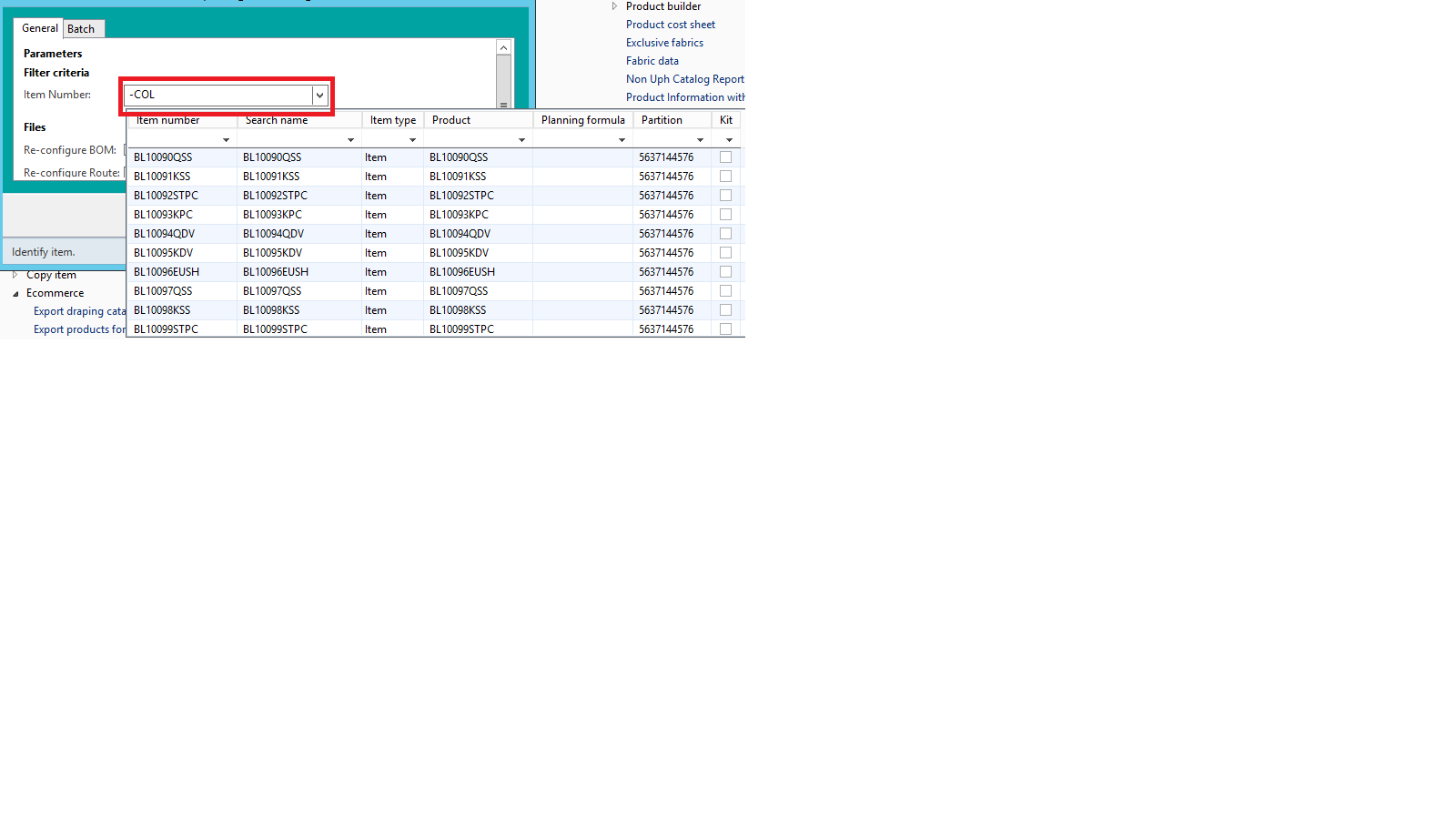
itemIdLookup.png

This is the DC class and the relevant parameter, how can I modify this so that it doesn't show every item Id. I didn't create this, only took it over, I don't see a datasource anywhere so I'm not even sure where the itemId Lookup is coming from, this is the only relevant bit of code I see. 
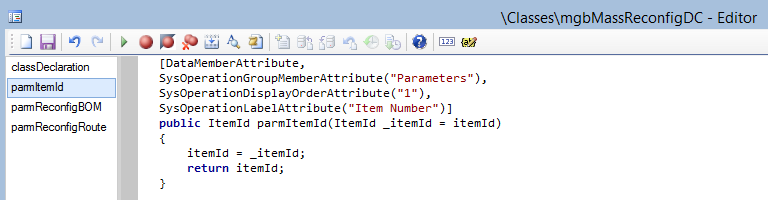
dcClass.png

I have the same question (0)
  • Suggested answer
    Gunjan Bhattachayya Profile Picture
    35,423 on at

    Hi thills,

    You can use a UI builder class linked to your data contract class. Please check the example in the following posts on how you can create a UI builder class and write a custom lookup method for one of the parameters -

    AX2012: SysOperation part 3: SysOperationAutomaticUIBuilder - Microsoft Dynamics AX Community

    Microsoft Dynamics Ax: RDP, Contract, UI Builder and Controller classes for SSRS report Development (microsoft-dynamics-ax-erp.blogspot.com)

  • Suggested answer
    Mohamed Amine Mahmoudi Profile Picture
    26,803 Super User 2026 Season 1 on at

    Hi thills 

    In UIBuilder class you must set this methods and in the query set yours ranges

    EXP : 

    class mbgMassReconfigUIBilder extends SrsReportDataContractUIBuilder
    {
        DialogField                             ItemIdDialog;
        mbgMassReconfigContract                 contract;
        
        /// 
        /// build dialogs with parameters
        /// 
        public void build()
        {
            Dialog dialogLocal = this.dialog();
            dialogLocal.caption('Your caption');
            contract = this.dataContractObject() as mbgMassReconfigContract;
    
            ItemIdDialog         = this.addDialogField(methodStr(mbgMassReconfigContract,parmItemId), contract);
        }
        
        /// 
        /// show parameters with lookups
        /// 
        public void postBuild()
        {
            super();
            
            DialogField dlgItemId = this.bindInfo().getDialogField(this.dataContractObject(), methodStr(mbgMassReconfigContract, parmItemId));
            
            dlgItemId.registerOverrideMethod(methodStr(FormStringControl, lookup), methodStr(mbgMassReconfigUIBilder, lookupItemId), this);
            
        }
        
        public void lookupItemId(FormStringControl _formStringControl)
        {
            
            Query query = new Query();
    
            // create a query
            QueryBuildDataSource        DS;
            QueryBuildRange             qbr;
            DS = query.addDataSource(tableNum(#TABLE));
            qbr = DS.addRange(fieldNum(#TABLE,#FIELD));
            qbr.value(ItemIdDialog.value());
            
            SysTableLookup sysTablelookup = SysTableLookup::newParameters(tableNum(#TABLE), _formStringControl);
            sysTablelookup.parmQuery(query);
            sysTablelookup.addLookupfield(fieldNum(#TABLE,#FIELD1));
            sysTablelookup.addLookupfield(fieldNum(#TABLE,#FIELD2));
            sysTablelookup.addLookupfield(fieldNum(#TABLE,#FIELD3));
            
           
            sysTablelookup.performFormLookup();
        }
    }

Under review

Thank you for your reply! To ensure a great experience for everyone, your content is awaiting approval by our Community Managers. Please check back later.

Helpful resources

Quick Links

Introducing the 2026 Season 1 community Super Users

Congratulations to our 2026 Super Stars!

Meet the Microsoft Dynamics 365 Contact Center Champions

We are thrilled to have these Champions in our Community!

Congratulations to the March Top 10 Community Leaders

These are the community rock stars!

Leaderboard > Finance | Project Operations, Human Resources, AX, GP, SL

#1
Giorgio Bonacorsi Profile Picture

Giorgio Bonacorsi 689

#2
André Arnaud de Calavon Profile Picture

André Arnaud de Cal... 606 Super User 2026 Season 1

#3
CP04-islander Profile Picture

CP04-islander 356

Last 30 days Overall leaderboard

Product updates

Dynamics 365 release plans
