web
You’re offline. This is a read only version of the page.
close
Skip to main content

Announcements

No record found.

News and Announcements icon
Community site session details

Community site session details

Session Id :
Finance | Project Operations, Human Resources, ...
Suggested Answer

Set default value "Never" to expire after column, when new financial report is generated.

(0) ShareShare
ReportReport
Posted on by 40

Hi everyone,

Good day to all, i am trying to set a default value in financial report version table the retentionExpirationDate field to max date which will show in the frontend form as "Never".
My code in financialreportVersion table extension:
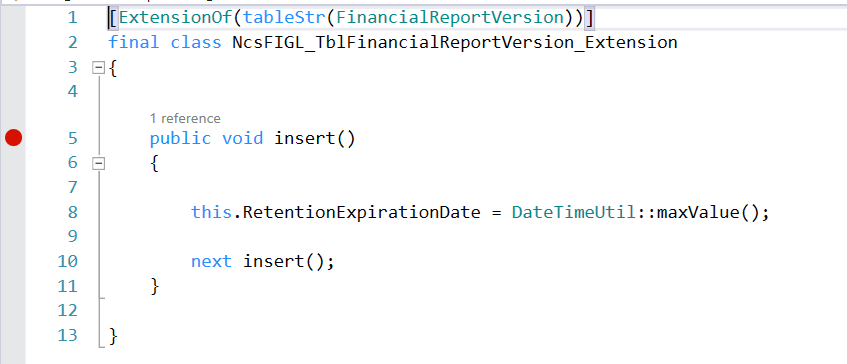
pastedimage1681375306539v1.png
Class extension on FinancialReportingGenerateController. When generate button is clicked this class will be called.
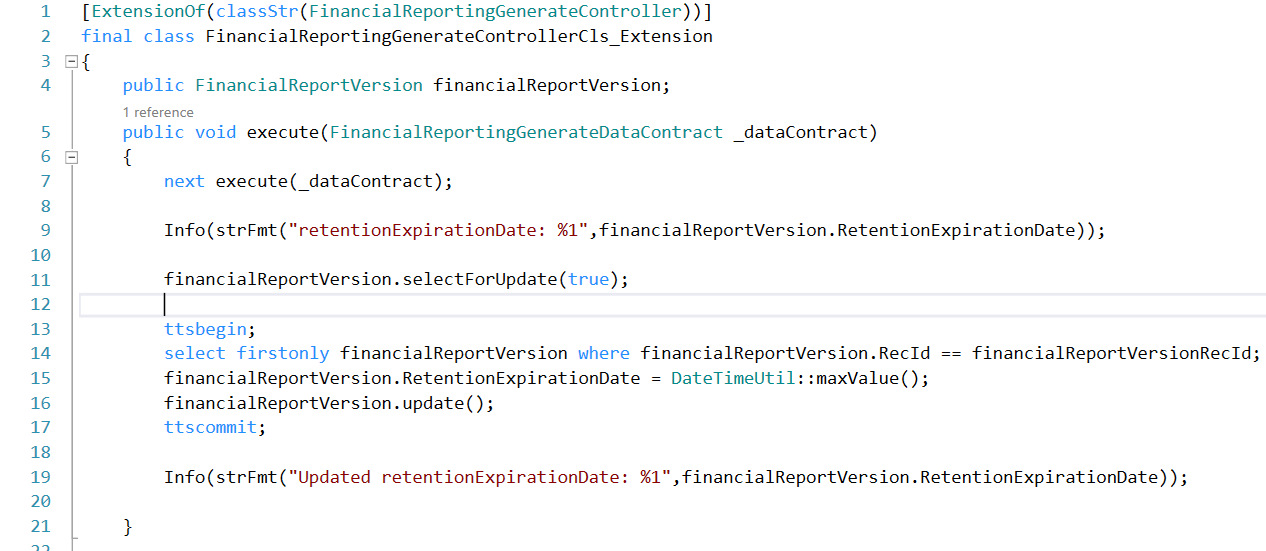
pastedimage1681375349243v2.png

after generating the report I am able to see the expiration date being overwritten as "Never" but as i refresh the value changes back to 90 days instead of Never. I am unable to find what is overwriting the value. Would like to seek help on this issue. Thank you so much.

I have the same question (0)
  • Suggested answer
    Mohit Rampal Profile Picture
    12,565 Moderator on at

    Hi Benjamin, You can put breakpoint at insert and update method of FinancialReportVersion table and investigate. Check the value is inserted correctly in table. Probably standard code or customization is updating the field again.

  • Benjamin long Profile Picture
    40 on at

    Hi Rampal,

    Thank you so much for your response, the table doesn't have any standard method. I also did a find reference to see if there is any customization or updating code to overwritten but couldn't find any.
    pastedimage1681376727487v1.png


    pastedimage1681376846107v2.png

  • Bharani Preetham Peraka Profile Picture
    3,634 Moderator on at

    Have you checked about modified field or modified methods? Also what did you find in execute query()?

  • Benjamin long Profile Picture
    40 on at

    Hi Bharani Preetham,

    Thank you so much for you response, I have checked modified field/methods in the form there is no methods found.

    pastedimage1681378595345v1.png
    The execute standard method insert the record to financialreportVersion table, i have debug this and i can see my overwritten expiration date being updated correctly.

  • Mohit Rampal Profile Picture
    12,565 Moderator on at

    You can create extension class and CoC on insert and update method, check if value is inserting correctly in insert and if update method is called you can check table buffer and call stack.

  • Benjamin long Profile Picture
    40 on at

    Hi Rampal,

    I did a Coc on insert and update on the class.

    pastedimage1681435220171v2.png

    when i generate the report it shows "Never" but whenever i click another financial report and go back to the current report i generated. The "expire after" field changes to 90 days expiration instead of "Never".  

  • Suggested answer
    Bharani Preetham Peraka Profile Picture
    3,634 Moderator on at

    I would suggest you to write this update or insert logic where the system is actually changing these values post next statement. For example in the updateReportVersionTable().

  • Benjamin long Profile Picture
    40 on at

    Hi Bharani Preetham,

    Thank you for the suggestion, but I am only able to COC in execute method as other methods are private and unable to do so.


  • Suggested answer
    Bharani Preetham Peraka Profile Picture
    3,634 Moderator on at

    Exactly, you should try COC on execute as it has public modifier. That should work.

    Also if coc doesn't work try event handler related to insert and update.

  • Benjamin long Profile Picture
    40 on at

    Yes thank you so much, my Screenshot on the discussion is the COC that i have done on execute method. 
    I have tried the event handlers on the form onupdating/oninserting/oninitialising and also table event handler onmodified but doesn't seem to hit the breakpoint when I debug.  

Under review

Thank you for your reply! To ensure a great experience for everyone, your content is awaiting approval by our Community Managers. Please check back later.

Helpful resources

Quick Links

Introducing the 2026 Season 1 community Super Users

Congratulations to our 2026 Super Stars!

Congratulations to our 2025 Community Spotlights

Thanks to all of our 2025 Community Spotlight stars!

Leaderboard > Finance | Project Operations, Human Resources, AX, GP, SL

#1
André Arnaud de Calavon Profile Picture

André Arnaud de Cal... 517 Super User 2026 Season 1

#2
Giorgio Bonacorsi Profile Picture

Giorgio Bonacorsi 440

#3
Adis Profile Picture

Adis 266 Super User 2026 Season 1

Last 30 days Overall leaderboard

Product updates

Dynamics 365 release plans
