web
You’re offline. This is a read only version of the page.
close
Skip to main content

Announcements

No record found.

News and Announcements icon
Community site session details

Community site session details

Session Id :
Microsoft Dynamics AX (Archived)

PUBLISH button is disappeared in the Retail Stores

(0) ShareShare
ReportReport
Posted on by

Hi All,

Can anyone here let me know how to add PUBLISH button in the Retail Stores screen? 

In the test environment I found this Publish button as below:
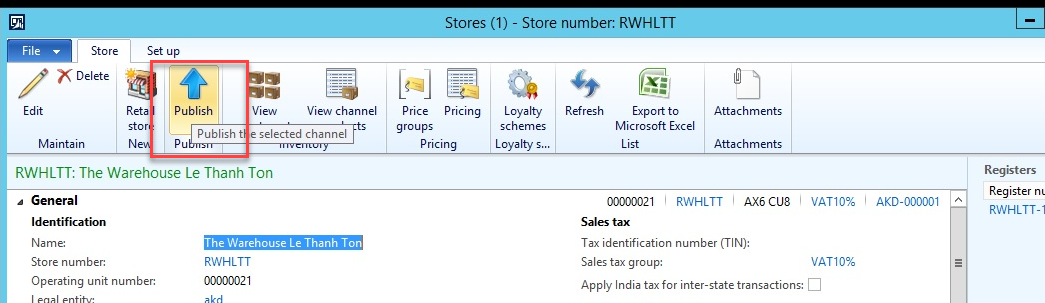
4747.0.png

But in other environments I couldn't find where to show that:
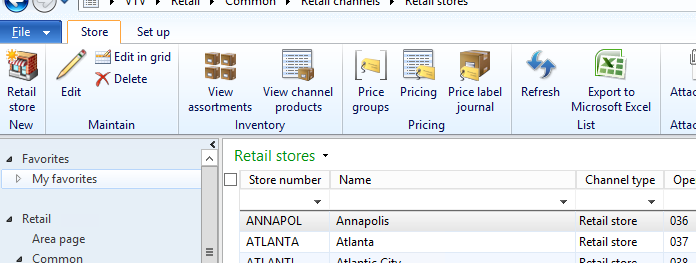
8883.01.png

Thank you in advanced. 

*This post is locked for comments

I have the same question (0)
  • Community Member Profile Picture
    on at

    I have exactly the same issue. There is no Publish button.

  • Verified answer
    Rodolfo Recalde Profile Picture
    on at

    Hi,

    If the the property 'Visible' in menuItemButton or ButtonGroup is set 'False' the button option will not appear on the form.

    Microsoft has disabled this option in a KB. Maybe these options were depreciated after some cumulative update, or the option of this function has been changed.

    RetailStoreTableListPage_5F00_Recalde.png

    RetailStoreTable Form

    RetailStoreTableListPage_5F00_Recalde.png

    RetailStoreTableListPage 

    In the environment that I work, we have used the retail module for some years, including this publish process. That solution was customize the button option to appear. Make sure it is really needed for your process.

    I Hope This Helps!

    Regards,

    Rodolfo Recalde.

  • Community Member Profile Picture
    on at

    Hi Rodolfo Recalde,

    Thank you a lot for the answer.

    Can you please help to send me the Fields name that you changed the setup as above?

    Your screenshot is small so I couldn't see the table & fields name

  • Suggested answer
    Community Member Profile Picture
    on at

    Thank you. This resolved  my problem.

  • Verified answer
    Rodolfo Recalde Profile Picture
    on at

    Hi Nglehang,

    Form RetailStoreTable > Desing > Desing > ActionPane > ActionPaneTab:Store > ButtonGroup:PublishButton > MenuItemButton:PublishButton > right click > Properties > Visible > Set to YES > Save

    ***

    Forms > RetailStoreTableListPage > Desing > Design >  ActionPane:ActionPane > ActionPaneTab:Store > ButtonGroup:PublishButton > MenuItemButton:PublishButton > right click > Properties > Visible > Set to YES > Save

  • SergeyP Profile Picture
    2,928 on at

    The 'Publish' button was removed in a favor of implicit channel publishing, in other words the channel publishing status is changed automatically when needed so you don't have to explicitly take care of that in AX UI, and as a result employees working with AX UI don't even have to know about that. It was done to simplify the flow from AX user point of view.

    Can you please explain why exactly you want the Publish button back? Did you experience any issues, or you just interpreted its absence as "something is most likely wrong with my environment" ?

  • Community Member Profile Picture
    on at

    Hi Sergey,

    Yes, I just want to know why this button is disappear on my environment.

    Thank you a lot for your explanation.  

Under review

Thank you for your reply! To ensure a great experience for everyone, your content is awaiting approval by our Community Managers. Please check back later.

Helpful resources

Quick Links

Introducing the 2026 Season 1 community Super Users

Congratulations to our 2026 Super Stars!

Meet the Microsoft Dynamics 365 Contact Center Champions

We are thrilled to have these Champions in our Community!

Congratulations to the March Top 10 Community Leaders

These are the community rock stars!

Leaderboard > 🔒一 Microsoft Dynamics AX (Archived)

#1
Joris dG Profile Picture

Joris dG 5

#2
Alexey Lekanov Profile Picture

Alexey Lekanov 2

#2
Henrik Nordlöf Profile Picture

Henrik Nordlöf 2 User Group Leader

Last 30 days Overall leaderboard

Featured topics

Product updates

Dynamics 365 release plans
