web
You’re offline. This is a read only version of the page.
close
Skip to main content

Notifications

Announcements

No record found.

Community site session details

Community site session details

Session Id :
Microsoft Dynamics CRM (Archived)

KingswaySoft, Account does not exist on Lookup Contact for Listmember

(0) ShareShare
ReportReport
Posted on by

Hi,

I am trying the import Marketing events using SSIS and Kingswaysoft and the CRM destination. My CRM is online Office 365.

I already succeeded to import contacts and accounts and successfully link them. I also imported Marketing Lists. Now I want to link the Marketing list to a contact, and i setup the CRM destination as follows:
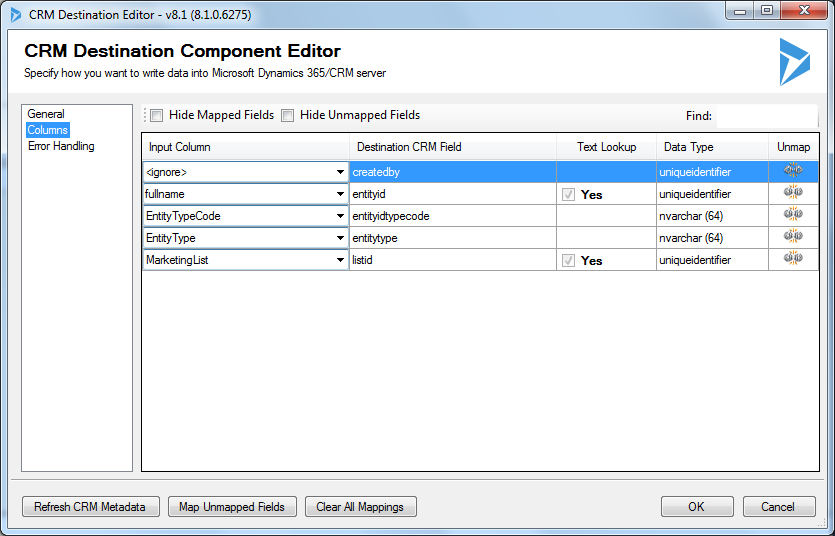
3581.CRM-Destination.png

The fields EntityTyp and EntityTypeCode have the value "contact' for all imported rows, while fullname contains the fullname of the contact to be linked.

In the Text Lookup Editor for the entityid field I chose Target Fields and Primary Lookup for all Target  Entities:
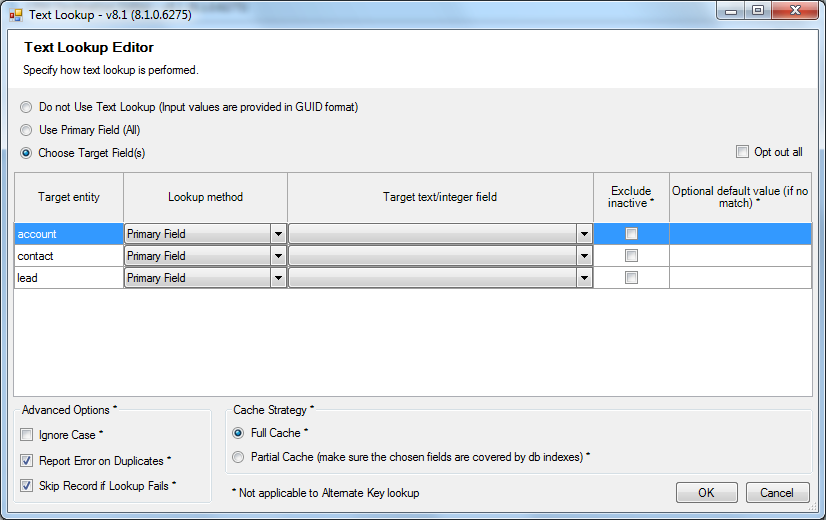
Text-Lookup-Editor.png

When I run the package  it fails:

Run-the-package.png

with the following error:

[Dynamics CRM Destination [2]] Error: An error occurred with the following error message: "System.Exception: Error(s) occurred when processing the batch: [1] CRM service call returned an error: account With Id = cd66ae3b-9840-e711-80fc-5065f38a5a01 Does Not Exist [2] CRM service call returned an error: account With Id = d266ae3b-9840-e711-80fc-5065f38a5a01 Does Not Exist [3] CRM service call returned an error: account With Id = d766ae3b-9840-e711-80fc-5065f38a5a01 Does Not Exist [4] CRM service call returned an error: account With Id = 93e6fe41-9840-e711-80fc-5065f38a5a01 Does Not Exist [5] CRM service call returned an error: account With Id = 98e6fe41-9840-e711-80fc-5065f38a5a01 Does Not Exist (SSIS Integration Toolkit for Microsoft Dynamics 365, v8.1.0.6275 - DtsDebugHost, v11.0.6020.0)

It succeeded o lookup the fullnames of the contacts, the mentioned ID's are the correct contactid's, but then apparently the component checks if theses ID's are accounts? They are not of course, they are contacts!

What is going wrong here? This is a very simple example!

When Itry to link accounts it works perfect!

Who can help me? Tha

*This post is locked for comments

I have the same question (0)
  • Thomas David Dayman Profile Picture
    11,323 on at

    Hi Herman,

    Are you upserting the data?

  • Community Member Profile Picture
    on at

    Hi Thomas,

    No I am creating the data

  • Thomas David Dayman Profile Picture
    11,323 on at

    Let me see if im correct.

    You have imported your Accounts and Contacts already and you have linked them successfully.

    You now want to create contacts and link them to a Marketing List?

    Could you possibly send a screen shot of the CRM Destination?

    2211.Screenshot_5F00_2.png

  • Community Member Profile Picture
    on at

    Yes Thomas, I did all that

    Here is the screenshot

    CRM-Destination-GENERAL.png

  • Community Member Profile Picture
    on at

    Here is the Connection (advanced settings are default)

    3073.Connection.png

  • ashlega Profile Picture
    34,477 on at

    Hi Herman,

     what if you set the destination to "ignore" entitytype field? (but keep entityidtypecode)

  • Verified answer
    Thomas David Dayman Profile Picture
    11,323 on at

    Is you're Marketing List of type 'contact'?

    2046.Screenshot_5F00_3.png

  • Thomas David Dayman Profile Picture
    11,323 on at

    Or possibly excluding accounts and leads?

    8468.Screenshot_5F00_4.png

  • Verified answer
    ashlega Profile Picture
    34,477 on at

    Actually, just following Thomas's idea.. if it's targetted at "Accounts" and you are trying to add a contact.. maybe that's where it gets confused since it's expecting an account

  • Verified answer
    a33ik Profile Picture
    84,331 Most Valuable Professional on at

    Hello,

    What's the target entity of your Marketing List? Can you please confirm it's a contact?

Under review

Thank you for your reply! To ensure a great experience for everyone, your content is awaiting approval by our Community Managers. Please check back later.

Helpful resources

Quick Links

Responsible AI policies

As AI tools become more common, we’re introducing a Responsible AI Use…

Neeraj Kumar – Community Spotlight

We are honored to recognize Neeraj Kumar as our Community Spotlight honoree for…

Leaderboard > 🔒一 Microsoft Dynamics CRM (Archived)

#1
SA-08121319-0 Profile Picture

SA-08121319-0 4

#1
Calum MacFarlane Profile Picture

Calum MacFarlane 4

#3
Alex Fun Wei Jie Profile Picture

Alex Fun Wei Jie 2

Last 30 days Overall leaderboard

Featured topics

Product updates

Dynamics 365 release plans
