web
You’re offline. This is a read only version of the page.
close
Skip to main content

Notifications

Announcements

No record found.

Community site session details

Community site session details

Session Id :
Small and medium business | Business Central, N...
Suggested Answer

[Error] "GST Business Posting group must be equals to in Gen Journal Line: Journal Template Name=CASHRCPT, Journal Batch Name=MAR, Line No.=0", please advise how to resolve this in Navision 2018?

(0) ShareShare
ReportReport
Posted on by 4,979

Hi Community

pastedimage1647252389959v1.png

Please advise how to resolve this in Navision 2018, thank you!

I have the same question (0)
  • Suggested answer
    Nitin Verma Profile Picture
    21,708 Moderator on at

    Hi Josh,

    When you are creating an Gen Line, please check there must not be selected Customer, Vendor and Bank Account in Account Type field.

    Thanks.

  • Suggested answer
    YUN ZHU Profile Picture
    95,748 Super User 2025 Season 2 on at

    Hi, Sorry I don't have an environment for the Indian version, but it might still be a setup issue, please refer to the link below.

    https://docs.microsoft.com/en-us/dynamics365/business-central/localfunctionality/india/gst-001-basic-setup

    If you have a development license and can use Debug, I believe it will find the problem faster.

    pastedimage1647300607342v1.png

    Hope this will help.

    Thanks.
    ZHU

  • joshtechsolutions Profile Picture
    4,979 on at

    Hi Nitin,

    I  think you are right, may I know is there a list of which what account type I should put? Thank you.

  • joshtechsolutions Profile Picture
    4,979 on at

    Hi Zhu,

    I don't think it is a setup issue, the pop out message happens when I selected GST posting group, of which I have already set up.

    Anyway, I will try to see if there is another reason/ way.

    Thank you!

  • Suggested answer
    Community Member Profile Picture
    on at

    Josh,

    The Error message points to an Account Type entered where that Type has the GST Bus. Posting Group setup or populated (i.e. G/L Account, Customer, Vendor, Bank). Now if you are not using a Customer, Vendor or Bank on your G/L Journal Line, what does the Chart of Accounts, for the Account No. you are using, show for the GST Bus. Posting Group? Here is my page as an example:
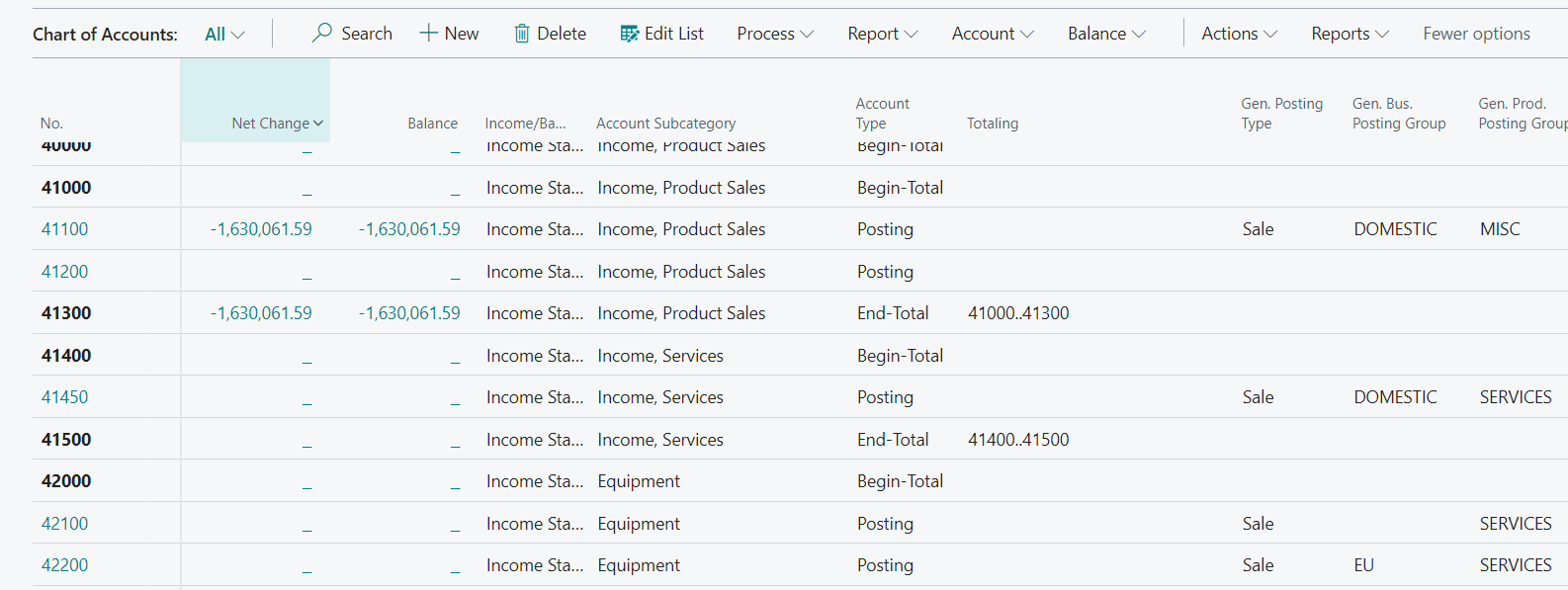
    pastedimage1650887165409v1.png

    I am guessing your are posting a payment and you will hit the Bank Account, which should not have GST Bus. Posting Group, the GL Account related to the Bank Posting Group should not have one setup either. The Customer does have one setup but the G/L Account for Accounts Receivable will not have one setup so it will be OK. Maybe send a screen shot of the entry to help assist if you cannot resolve.

    Hope this helps.

    Thanks,

    Steve

Under review

Thank you for your reply! To ensure a great experience for everyone, your content is awaiting approval by our Community Managers. Please check back later.

Helpful resources

Quick Links

Responsible AI policies

As AI tools become more common, we’re introducing a Responsible AI Use…

Neeraj Kumar – Community Spotlight

We are honored to recognize Neeraj Kumar as our Community Spotlight honoree for…

Leaderboard > Small and medium business | Business Central, NAV, RMS

#1
OussamaSabbouh Profile Picture

OussamaSabbouh 2,092

#2
YUN ZHU Profile Picture

YUN ZHU 663 Super User 2025 Season 2

#3
Sumit Singh Profile Picture

Sumit Singh 515

Last 30 days Overall leaderboard

Featured topics

Product updates

Dynamics 365 release plans



