web
You’re offline. This is a read only version of the page.
close
Skip to main content

Notifications

Announcements

No record found.

Community site session details

Community site session details

Session Id :
Microsoft Dynamics AX (Archived)

Report AX error

(0) ShareShare
ReportReport
Posted on by

Hi everyone,

Pls help with with problem, I receive a error when try to see Preview/Print in Purchase Crder Confirmations and this problem only occur when I open Preview/Print with vendor VL-NHATANHPHAT, other vendors is OK.

Sory for my english skill, I'm trying to improve it :)
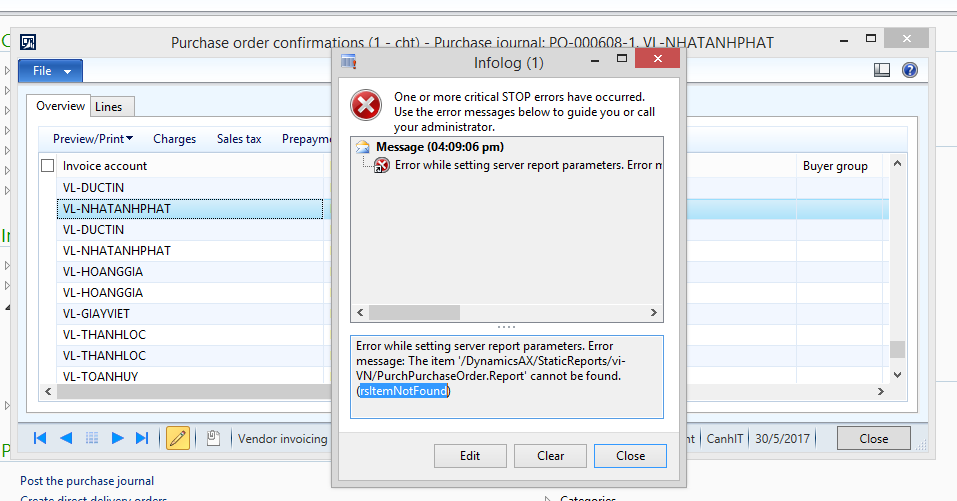
0525.Capture.PNG

*This post is locked for comments

I have the same question (0)
  • Suggested answer
    Vilmos Kintera Profile Picture
    46,149 on at

    This error typically comes if there is a report deployment issue with one of the designs, or an incorrect design is selected in one of the parameter settings..

    Do you have a static report design defined in System administration module > Setup > Business intelligence > Reporting services > Report deployment settings for your purchase order confirmations report.

    Also you need to check the Print management settings in your Accounts Payable module parameters, and for the specific Vendor, because report designs could be overridden on all 3 levels.

    If you have customizations in the report, make sure it is error free, so it could be published correctly with all designs to your SSRS instance.

  • Community Member Profile Picture
    on at

    Hi Vilmos,

    Actually, I'm just starting to administate AX 2012 so I don't anything about this problem, can you exlpain or give me any solotions to trouble this problem. Many thanks again, Vilmos.

    This is all static report Report deployment settings

    0525.Capture02.PNG

    And here is Print management settings in my Accounts Receivable module

    0525.Capture02.PNG

  • Suggested answer
    Vilmos Kintera Profile Picture
    46,149 on at

    You can see that the PurchPurchaseOrder report, mentioned in your error message is a static report, and it uses a specific design called Report as per the parameter in your first screenshot.

    Actually you need to check the setup of AP module instead of AR, and looking for the Report design setting for the Purchase confirmation's Original, or Copy documents. Same goes for your Vendors, because individual print settings could be defined for each vendor - maybe that is why it does not work correctly for only one of your vendors. That is in AP modul > Vendors > General ribbon > Print management (on the top).

    You should also navitate to your SSRS report folder, the URL can be found in the System administration module as the Report servers option. See if you are indeed missing the report design there in the folder.

  • Suggested answer
    Solozmar Profile Picture
    796 on at

    Just adding onto what  Vilmos has stated with regarding to checking if the report is a available in SRSS DynamicsAX folder - you can also navigate to the AOT > SSRS Reports > PurchPurchaseOrder, right click and Deploy Element.

    I would perform this though after checking to see if the report exists, so that you can verify if a change occurs.

    You also have the option to deploy the report via Dynamics Powershell by running it as admin and deploying that report:

    "Publish-AXReport -ReportName PurchPurchaseOrder"

  • Community Member Profile Picture
    on at

    Hi Solomon and Vilmos,

    In my AP i can see the vendors is config with Print management --> PurchPurChaseOrder.Report

     6675.Capture03.PNG

    And I also access to SSRS report folder  via web and I can not see PurchPurChaseOrder.Report

    6675.Capture03.PNG

    And then I access to my AOT--> SSRS Report and PurchPurChaseOrder.Report is available

    1300.Capture05.PNG

    All I need is Right Click on PurchPurChaseOrder.Report and choose Deploy element, that's right ?

  • Vilmos Kintera Profile Picture
    46,149 on at

    You should be checking the design in the Static folder and not in the main folder, based on your report deployment configuration.

    If it is not there as well, then you just have to deploy it again.

  • Community Member Profile Picture
    on at

    Hi Vilmos,

    Many thanks for your help, but can you help me how to open "the Static folder" and "the main folder". Actually I don't know ?

  • Suggested answer
    Vilmos Kintera Profile Picture
    46,149 on at

    The same way as per your second screenshot in your last post, on the report server URL. The navigation path can be found in your original posts' error message. If the report is not there, try deploying it again. Your last resort could be copying over the design from another language if it does exist there.

  • Suggested answer
    Solozmar Profile Picture
    796 on at

    To your question of right clicking and selecting Deploy element, correct.  That will work to deploy the report. But follow up with Vilmos' suggestion first.

  • Verified answer
    Community Member Profile Picture
    on at

    Many thanks for your help Vilmos and Solomon, I have resolved my problem, check again my PO and I see that I configured wrong language in Header View --> Setup --> Language

Under review

Thank you for your reply! To ensure a great experience for everyone, your content is awaiting approval by our Community Managers. Please check back later.

Helpful resources

Quick Links

Responsible AI policies

As AI tools become more common, we’re introducing a Responsible AI Use…

Neeraj Kumar – Community Spotlight

We are honored to recognize Neeraj Kumar as our Community Spotlight honoree for…

Leaderboard > 🔒一 Microsoft Dynamics AX (Archived)

#1
Martin Dráb Profile Picture

Martin Dráb 4 Most Valuable Professional

#1
Priya_K Profile Picture

Priya_K 4

#3
MyDynamicsNAV Profile Picture

MyDynamicsNAV 2

Last 30 days Overall leaderboard

Featured topics

Product updates

Dynamics 365 release plans
