web
You’re offline. This is a read only version of the page.
close
Skip to main content

Announcements

No record found.

News and Announcements icon
Community site session details

Community site session details

Session Id :
Microsoft Dynamics AX (Archived)

Blanket PO workflow error

(0) ShareShare
ReportReport
Posted on by 1,559

Hi Friends,

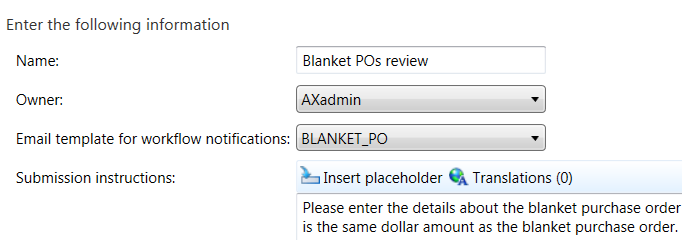
We have a Blanket PO workflow setup, when we need to reassign/delegate to other user, it throw out error. It looks like email template not setup right, missing subject and message, Setup looks all good to me. Please see screen shot. We don't have problem with other workflow .
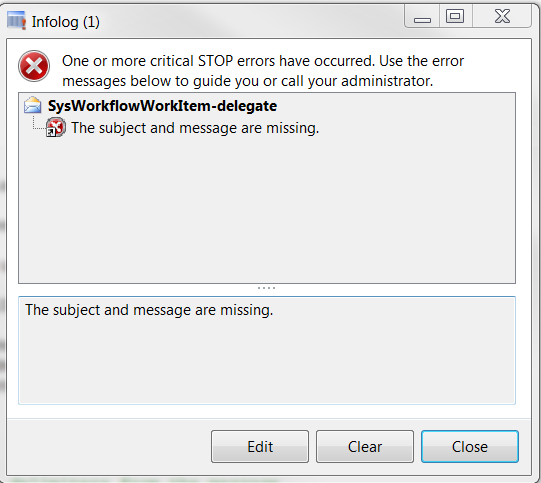

13834.Capture.PNG1665.Capture2.PNG

8117.Capture3.PNG

*This post is locked for comments

I have the same question (0)
  • André Arnaud de Calavon Profile Picture
    304,553 Super User 2026 Season 1 on at

    Hi River,

    I'm not sure if you use a standard workflow type or if it is a customization. Did you create a body for the email template?

  • Ganriver1 Profile Picture
    1,559 on at

    Andre,

    It's standard one.

    60011.Capture.PNG

  • André Arnaud de Calavon Profile Picture
    304,553 Super User 2026 Season 1 on at

    Hi River,

    Can you check which languages are used in the system settings and the user? Are they also set to en-us like your email template?

  • Ganriver1 Profile Picture
    1,559 on at

    Hi Andre,

    Yes, they are.

  • Suggested answer
    Ludwig Reinhard Profile Picture
    Microsoft Employee on at

    Hi,

    Which standard workflow type do you use?

    Please see:

    [View:https://docs.microsoft.com/en-us/dynamicsax-2012/appuser-itpro/workflow-types]

    I don't know a blanket PO workflow.

    If it is a self created workflow then please talk to your development team for some help to get this fixed.

    Best regards

    Ludwig

  • Ganriver1 Profile Picture
    1,559 on at

    Hi Ludwig,

    I am the one who setup workflow, got this error and try to figure it out.

  • Verified answer
    Ganriver1 Profile Picture
    1,559 on at

    Finally figured out, the problem is the table field supposed to be shown in description of message is empty, putting some dummy words along with it, it would be fine.

Under review

Thank you for your reply! To ensure a great experience for everyone, your content is awaiting approval by our Community Managers. Please check back later.

Helpful resources

Quick Links

Introducing the 2026 Season 1 community Super Users

Congratulations to our 2026 Super Stars!

Meet the Microsoft Dynamics 365 Contact Center Champions

We are thrilled to have these Champions in our Community!

Congratulations to the March Top 10 Community Leaders

These are the community rock stars!

Leaderboard > 🔒一 Microsoft Dynamics AX (Archived)

#1
CP04-islander Profile Picture

CP04-islander 39

#2
Michel ROY Profile Picture

Michel ROY 14

#3
imran ul haq Profile Picture

imran ul haq 8

Last 30 days Overall leaderboard

Featured topics

Product updates

Dynamics 365 release plans