web
You’re offline. This is a read only version of the page.
close
Skip to main content

Notifications

Announcements

No record found.

Community site session details

Community site session details

Session Id :
Microsoft Dynamics AX (Archived)

Customization Table In SSRS Report

(0) ShareShare
ReportReport
Posted on by 3,805

Hi Everyone,

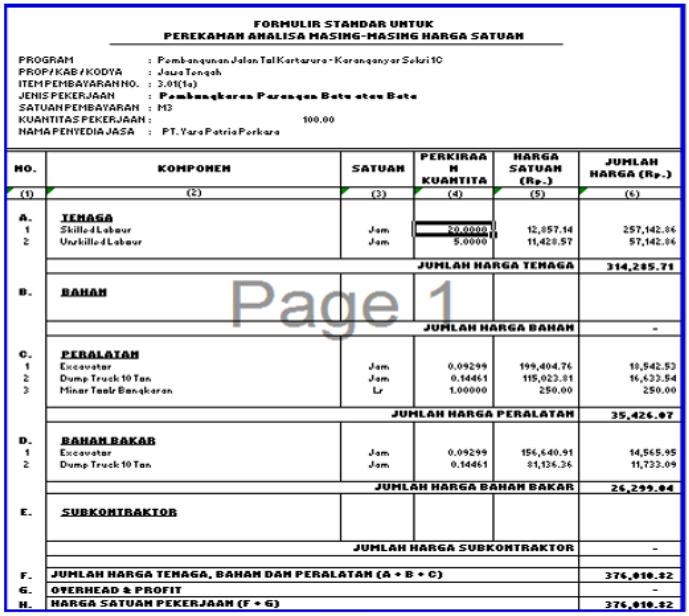
Im facing problem about customization table in SSRS Report.
Here is the output report that i need (Picture 1)
reportoutputssrs.PNG

Picture 1

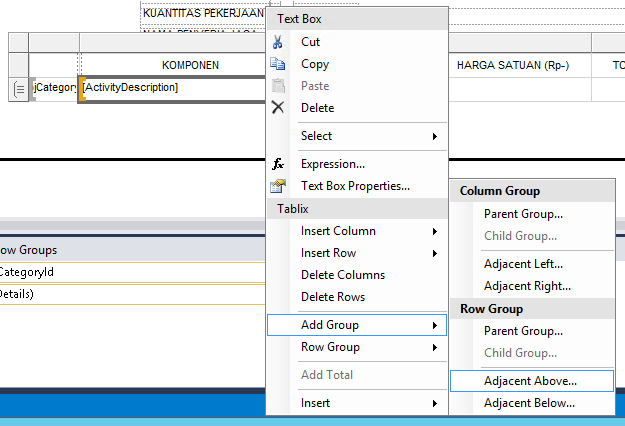
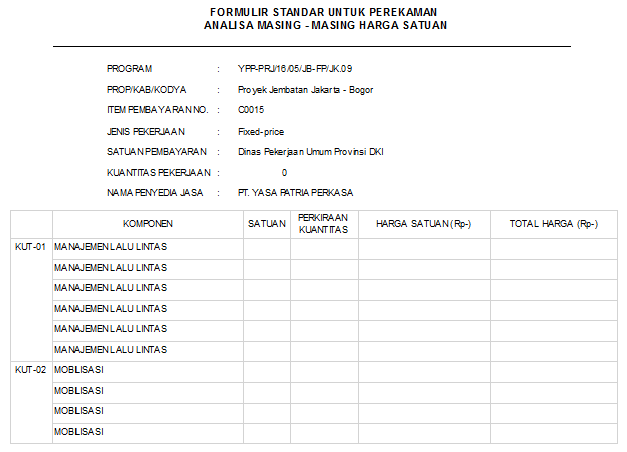
In Visual i've tried to custom using Row Group (Picture 2), but turns out the group create a new coloumn not in one column line in the Picture 1
rowgroup.png

Picture 2

This is the report output result after i applied the row group (Picture 3)
after-row-group-applying.png

Is there any other way to make the group in one coloumn??

Thanks for the help

Regards,
Enggar

*This post is locked for comments

I have the same question (0)
  • Suggested answer
    Hajish Profile Picture
    460 on at

    Right click the group and insert new row above.

    Copy paste other grop header value to 2nd cell the row.

    Delete the 1st column(don't delete associated group) only.

  • Hariharans87 Profile Picture
    3 on at

    I believe you are talking about first column (category id) in the picture 1.

    Instead of make the group in one column (category id), you can remove the bottom border. So, it will seems like single column.

  • fajar Profile Picture
    3,805 on at

    Hello Hajish

    Thanks a lot for your help, it mean a lot to me.
    But im lil bit confuse how to insert new row

    This is the screen shot of my table design in visual
    8551.2.png

    When i click insert row there are many other option, and i've tried inside and outside group but the result not like i need.

    8551.2.png

    Regards,

    Enggar

  • fajar Profile Picture
    3,805 on at

    Hello Hariharans87

    I've tried to remove the grid and yeah it become one coloumn like this
    Picture 1
    edit-success.png

    But what i need is to make the report become like this picture below

    Picture 2
    edit-success.png

    Is there any other way to make report to  become like Picture 2 ?


    Thanks and Regards,
    Enggar

  • Verified answer
    Hariharans87 Profile Picture
    3 on at

    It is same logic like sub total.

    1. Delete the category column. Make sure that not delete the category group.

    2. Right click on the detail row and select insert row outside group. So, you will get one row above the detail row like sub total.

    3. Select the all columns except no column in the newly added row and merge the cells.

  • Verified answer
    Hajish Profile Picture
    460 on at

    Insert row as "Outside the group" above and copy paste the value from 1st group to new row above category2.

    Remove 1st colum withou deleting row group.

    I hope that wil work fine.

  • fajar Profile Picture
    3,805 on at

    Hello Hariharan


    I've tried the solution like you said and it works 

    Thank you so much for your help
    It mean a lot to me

    Thanks and Regards,

    Enggar

  • fajar Profile Picture
    3,805 on at

    Hello Hajish

    Thanks for your help

    I've tried and yes i should click Insert Row then choose "Outside the group"

    Thank you so much for your help

    It mean a lot to me

    Thanks and Regards,

    Enggar

Under review

Thank you for your reply! To ensure a great experience for everyone, your content is awaiting approval by our Community Managers. Please check back later.

Helpful resources

Quick Links

Responsible AI policies

As AI tools become more common, we’re introducing a Responsible AI Use…

Neeraj Kumar – Community Spotlight

We are honored to recognize Neeraj Kumar as our Community Spotlight honoree for…

Leaderboard > 🔒一 Microsoft Dynamics AX (Archived)

#1
Martin Dráb Profile Picture

Martin Dráb 4 Most Valuable Professional

#1
Priya_K Profile Picture

Priya_K 4

#3
MyDynamicsNAV Profile Picture

MyDynamicsNAV 2

Last 30 days Overall leaderboard

Featured topics

Product updates

Dynamics 365 release plans
