web
You’re offline. This is a read only version of the page.
close
Skip to main content

Notifications

Announcements

No record found.

Community site session details

Community site session details

Session Id :
Small and medium business | Business Central, N...
Answered

Filter a Query in NAV Dev Env

(0) ShareShare
ReportReport
Posted on by 29

Good morning.

I have made a query on Purchase Lines table in Query Designer in NAV 2018

I want to set a filter, only those lines where Item No is not empty, and I am following the instructions here 

https://learn.microsoft.com/en-us/dynamics-nav/how-to--set-up-filter-rows-in-query-designer

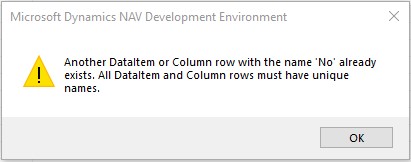
I added the filter row, however I hit a snag when I tried to set up the filter, the name is not unique.

What can I do to overcome this?
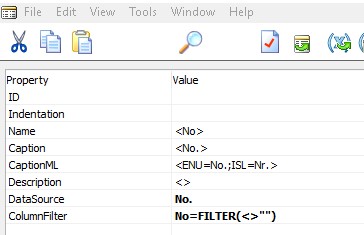
Step-5b.jpg

Step-6.jpg

0247.Error.jpg

Many thanks

Louise

I have the same question (0)
  • Suggested answer
    Gearoid Profile Picture
    on at

    Hi Louise,

    You should be update the "Name" property of the Filter to avoid this error, e.g. try renaming it to No2: 

    pastedimage1673008644414v1.png

  • Lovisa LH Profile Picture
    29 on at

    Hi Gearóid

    Thank you for the reply; I tried your suggestion, but no luck.

    Did it work for you?

    Screenshot-2023_2D00_01_2D00_06-143056.jpg

    Screenshot-2023_2D00_01_2D00_06-142942.jpg

  • Verified answer
    Gearoid Profile Picture
    on at

    Hi Louise,

    Yes, this works in my test environment. I think the problem is that the new field name you have specified includes angle-brackets. Please try changing the field name from "<No2>" to "No2". Hopefully that will avoid the remaining error. 

    The angle brackets you see in the other field names in your Query indicate that these are default names. When you change the default name you cannot use angle brackets. Hope that helps. 

  • Lovisa LH Profile Picture
    29 on at

    Hello again,

    Removing angel brackets stopped the error message, but i did not achieve my intended result of filtering out only lines from table 39 where field No. is not empty

    But i will try next week, armed with this new info!

Under review

Thank you for your reply! To ensure a great experience for everyone, your content is awaiting approval by our Community Managers. Please check back later.

Helpful resources

Quick Links

Responsible AI policies

As AI tools become more common, we’re introducing a Responsible AI Use…

Neeraj Kumar – Community Spotlight

We are honored to recognize Neeraj Kumar as our Community Spotlight honoree for…

Leaderboard > Small and medium business | Business Central, NAV, RMS

#1
OussamaSabbouh Profile Picture

OussamaSabbouh 3,151

#2
Jainam M. Kothari Profile Picture

Jainam M. Kothari 1,443 Super User 2025 Season 2

#3
YUN ZHU Profile Picture

YUN ZHU 1,092 Super User 2025 Season 2

Last 30 days Overall leaderboard

Featured topics

Product updates

Dynamics 365 release plans