web
You’re offline. This is a read only version of the page.
close
Skip to main content

Announcements

No record found.

News and Announcements icon
Community site session details

Community site session details

Session Id :
Microsoft Dynamics AX (Archived)

ComboBox Selection doesn't Catch

(0) ShareShare
ReportReport
Posted on by 563

Dear Expert,

I'm junior developer , new on dynamic ax and customizing the program

On Account type ComboBox there are Customer, Vendor, Ledger,etc
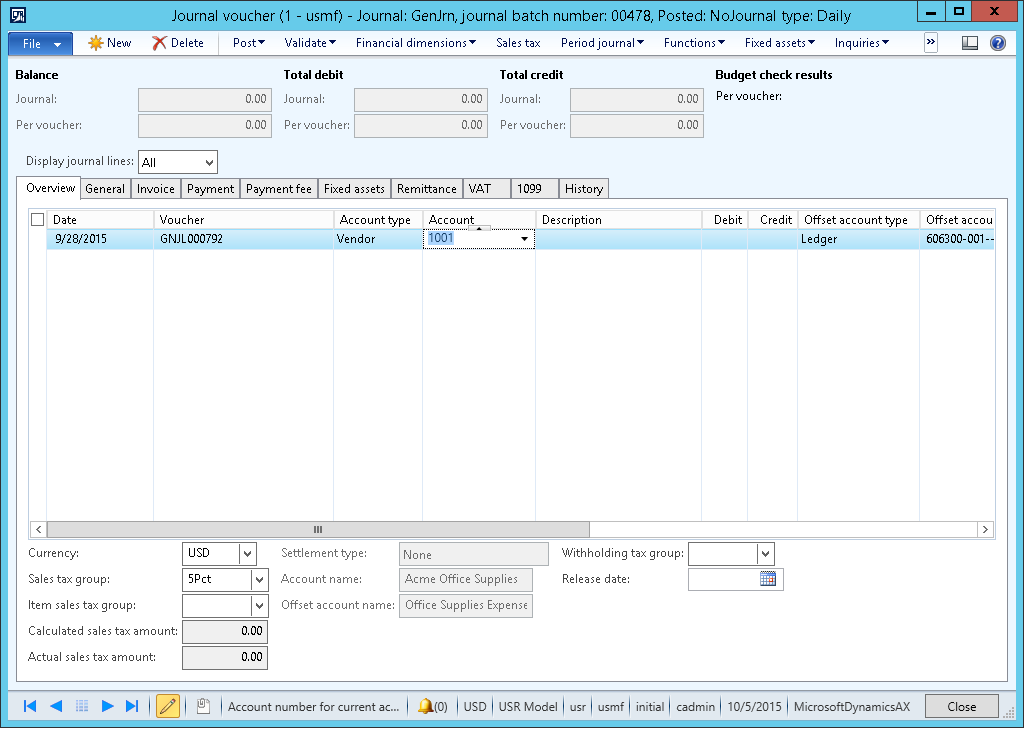
journal-trans.png

When I change Account, I want to show data from other table

Here is my code :

public boolean modified()
{
    boolean     ret;
    VendTable   vendTable;
    Args args = new Args();
    ;
    
    ret = super();
    if(LedgerJournalTrans_AccountType.selection() == LedgerJournalACType::Vend ){
        info(strFmt(this.valueStr()));

        //GET Data NPWP, Address and Tax Name
        select vendTable join vSNAddrVend where vendTable.AccountNum == this.valueStr()
            && vSNAddrVend.CustRefRecId == vendTable.RecId;

        info(VSNAddrVend.NPWP);
        info(VSNAddrVend.TaxName2);
    }

    return ret;
}


The problem is when I select on Account for the first time (Account type was set to Vendor), the program cannot execute inside if condition

But when I change Account type to Customer(or other value) and change again to Vendor , the program execute inside if condition 

Is there any problem on my code? Correct me if I'm wrong, thank you

*This post is locked for comments

I have the same question (0)
  • Suggested answer
    DavidGunawan Profile Picture
    1,381 on at

    Hi,

    Instead use modified() method please use lookup() method. This is because the event of account selection is captured by lookup() method. For more details of lookup() method, you can refers to the link below.

    msdn.microsoft.com/.../hh185372.aspx

    Regards

  • Suggested answer
    Nishant2408 Profile Picture
    705 on at

    Hi Tahta Bintang,

    This is happening because in your if condition you are using selection() to get the value for Account type, and I assume that when you are creating a new record for the first time, you are getting "Vend" account type by default, in this case selection() won't work and will not give any value (blank). Instead of selection you can use valueStr().

    But looking at your code it seems to me that it has written at form level. I would suggest you to keep your logic at table level.

    Regards,

    Nishant

  • Verified answer
    Martin Dráb Profile Picture
    239,022 Most Valuable Professional on at

    Don't refer to the individual control; use the underlying table field instead. E.g. if (ledgerJournalTrans.AccountType == LedgerJournalACType::Vend). It's simpler, more robust code and you can easily debug it if needed.

  • Bintang Profile Picture
    563 on at

    Thank you all of you for helping me

Under review

Thank you for your reply! To ensure a great experience for everyone, your content is awaiting approval by our Community Managers. Please check back later.

Helpful resources

Quick Links

Introducing the 2026 Season 1 community Super Users

Congratulations to our 2026 Super Stars!

Congratulations to our 2025 Community Spotlights

Thanks to all of our 2025 Community Spotlight stars!

Leaderboard > 🔒一 Microsoft Dynamics AX (Archived)

#1
Joris dG Profile Picture

Joris dG 5

#2
Alexey Lekanov Profile Picture

Alexey Lekanov 2

#2
Henrik Nordlöf Profile Picture

Henrik Nordlöf 2 User Group Leader

Last 30 days Overall leaderboard

Featured topics

Product updates

Dynamics 365 release plans
