web
You’re offline. This is a read only version of the page.
close
Skip to main content

Announcements

No record found.

News and Announcements icon
Community site session details

Community site session details

Session Id :
Supply chain | Supply Chain Management, Commerce
Suggested Answer

Return goods from final location to packing location

(1) ShareShare
ReportReport
Posted on by 5
Hi everyone,
In case the goods have been moved to the final location before shipment confirmation, they must be returned to the packaging location to reopen container and adjust the packing.
I tried the following:
1. Return the license plate /container using the warehouse management application
2. Create inventory movement work from the final location
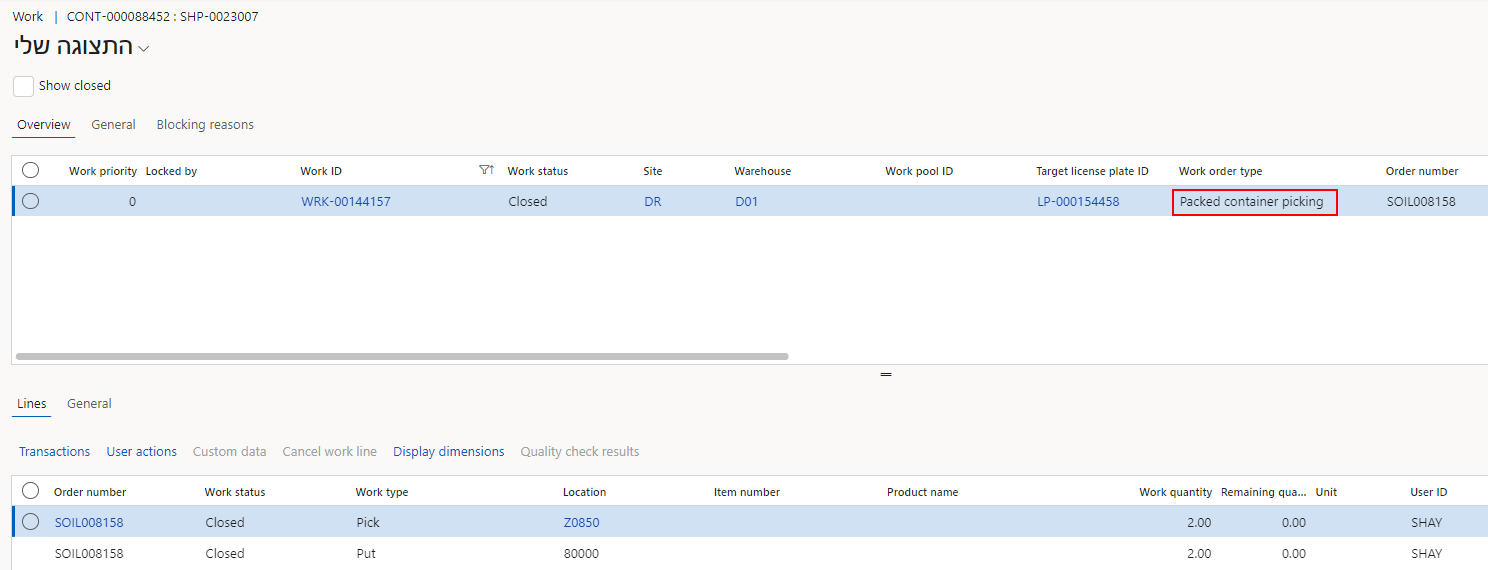
3. Cancel the Packed container picking work (through the cancel work screen) and then return the license plate /container 
4. /Reverse work/ on the load page
4. I checked warehouse settings and location settings but did not find a preventive setting
 
Does anyone have an idea other than Reduce picked quantity on the load page and doing all the processes (release to warehouse, pick, and pack)?
 
Example:
Containers 
Work 

thanks
I have the same question (0)
  • Suggested answer
    Hana Xue Profile Picture
    Microsoft Employee on at
    Hi,
    According to the error message, related work seems to be in progress, so reopening the container fails. Please try to complete or pause these processes before trying to reopen the container. In addition, you can also wait for support from other experienced people, because you have tried many methods, opening a ticket with Microsoft may resolve it faster.
    Best Regards,
    Hana
  • Laurens vd Tang Profile Picture
    4,623 Super User 2026 Season 1 on at
    Hi Ziv,
     
    Is the 'packed container type' work already in the status cancelled?
     
    Best regards,
     
    Laurens van der Tang
  • Community member Profile Picture
    5 on at
    Hi 
     
    thanks for your replay 

    Hana, I tried all the 5 scenarios I mentioned above. including closing the work and trying to move it back to the packing location and "reopen the container".  It didn't work unfortunately 

    Laurens, tried all the scenarios in the test environment so I have more examples. I tried scenarios in which I canceled work and scenarios in I didn't cancel it (I mean after the work had been closed) and I couldn't move it back to the packing location to "reopen container" and make changes 
     
    In my example 
    Z0850 - is the packing location 
    80000 - is the final shipping location
     
    Best regards,
    Ziv

Under review

Thank you for your reply! To ensure a great experience for everyone, your content is awaiting approval by our Community Managers. Please check back later.

Helpful resources

Quick Links

Introducing the 2026 Season 1 community Super Users

Congratulations to our 2026 Super Stars!

Meet the Microsoft Dynamics 365 Contact Center Champions

We are thrilled to have these Champions in our Community!

Congratulations to the March Top 10 Community Leaders

These are the community rock stars!

Leaderboard > Supply chain | Supply Chain Management, Commerce

#1
Mallesh Deshapaga Profile Picture

Mallesh Deshapaga 287

#2
Laurens vd Tang Profile Picture

Laurens vd Tang 212 Super User 2026 Season 1

#3
Syed Haris Shah Profile Picture

Syed Haris Shah 145 Super User 2026 Season 1

Last 30 days Overall leaderboard

Product updates

Dynamics 365 release plans
