web
You’re offline. This is a read only version of the page.
close
Skip to main content

Notifications

Announcements

No record found.

Community site session details

Community site session details

Session Id :
Microsoft Dynamics 365 | Integration, Dataverse...
Answered

Autopopulate lookup values coming from parent entity

(0) ShareShare
ReportReport
Posted on by 905

Hello everyone,

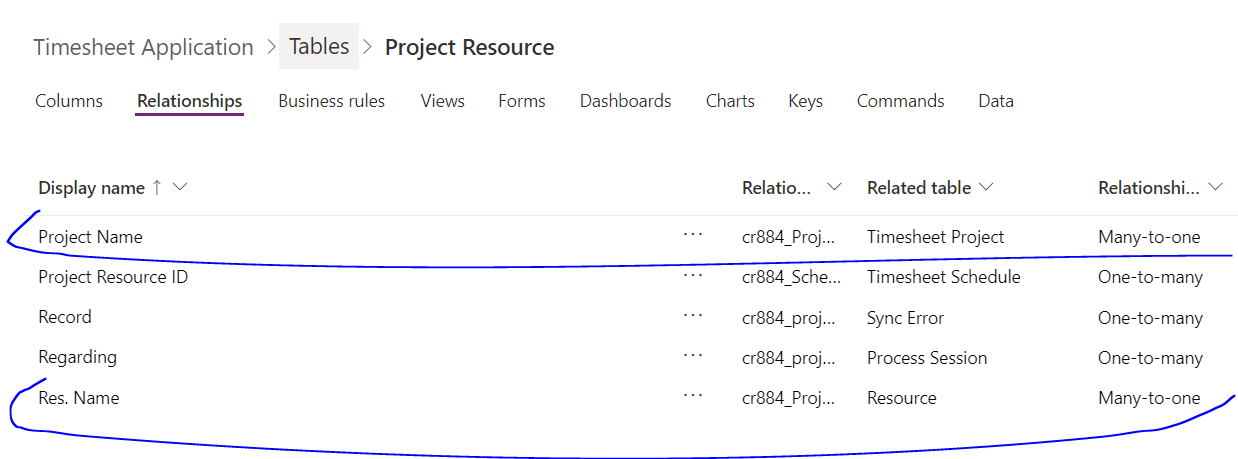
With reference to this post: (+) Set field value on another table automatically after record creation - Dynamics 365 General Forum Community Forum that was solved based on   assistance, I have two tables linked as (Project Resource Table (1:N)-> Schedule table).

What I want to achieve is the below:

  • When I click on a new item from the grid and from the Project resource table which is the parent entity, I would like to populate the project name and the resource name fields that are coming from the Project Resource ID field that is being populated automatically on the form of the schedule table which is the child entity and that Project Resource ID already has those two values assigned on the parent entity (Project Resource Table).
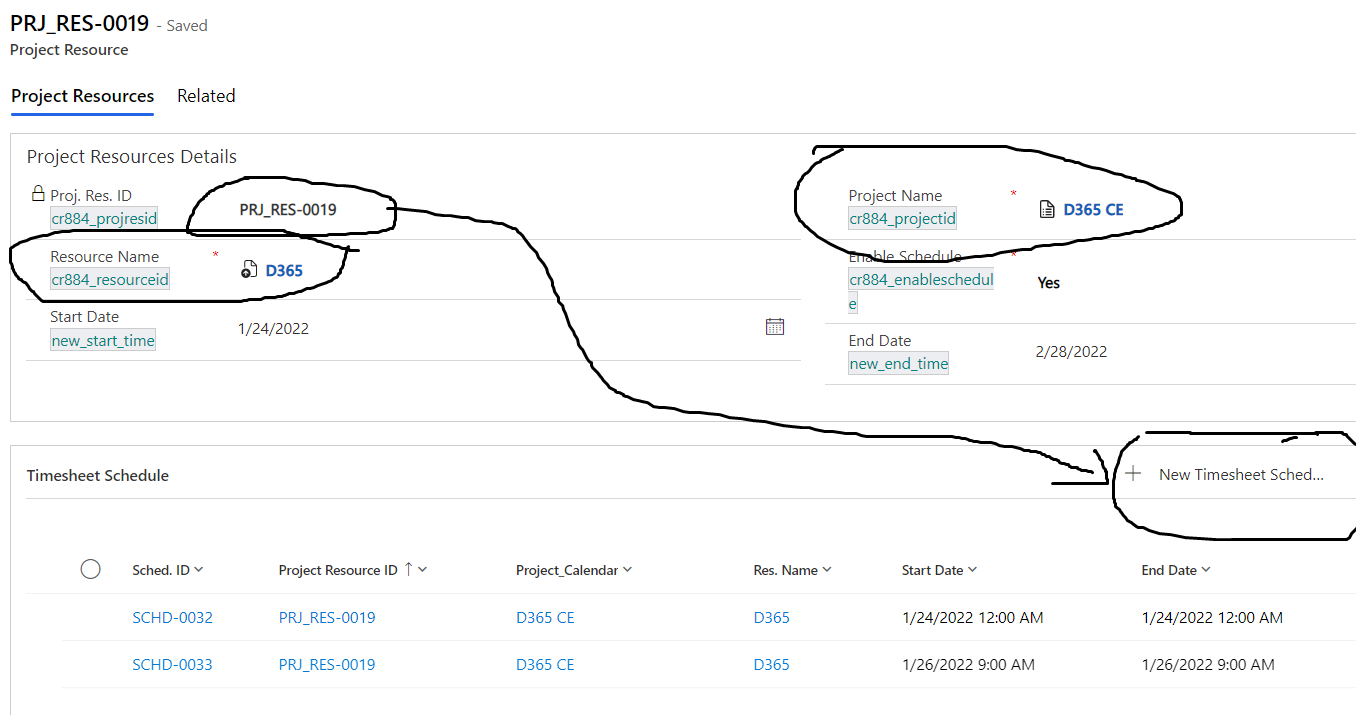
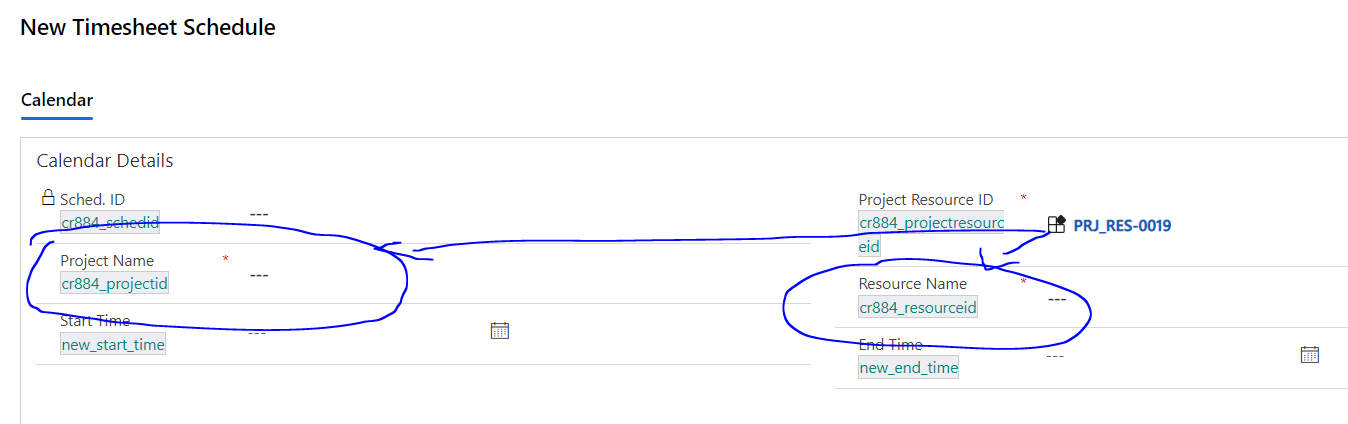
Table-Aa.PNGTable-B.PNG

RelationshipType.PNG

I have tried to filter the lookup field as below but it is not populating the values when I click new item directly from the sub-grid:
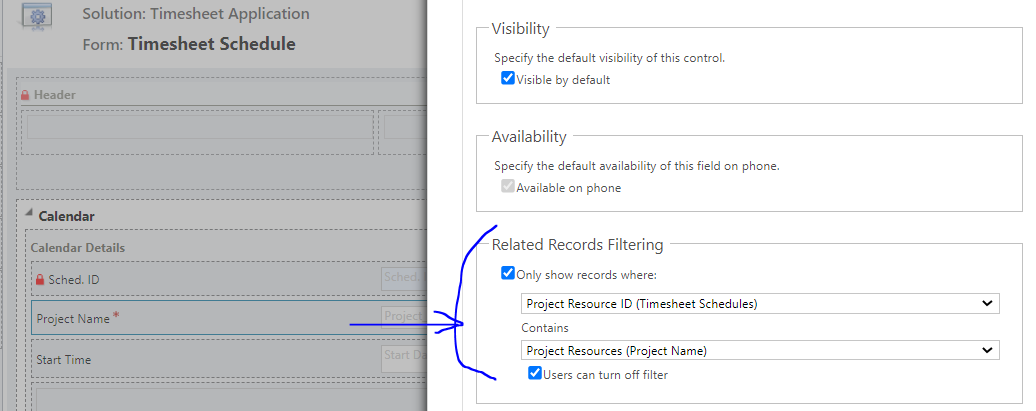
8357.Capture.PNG

What is the best way to achieve the above? I am doing something wrong or it should be done in a different way?

I would highly appreciate if you can provide an example.

Best regards,
EBMRay

I have the same question (0)
  • Verified answer
    a33ik Profile Picture
    84,331 Most Valuable Professional on at

    Hello,

    The easiest way for you is to use "Mapping". Check this post that can help you - www.marksgroup.net/.../

  • EBMRay Profile Picture
    905 on at

    Hi a33ik ,

    Thank you so much for providing this amazing post.

    I was able to achieve my requirements.

    Btw I am one of your followers and keep up the good work!

    Best regards,

    EBMRay

  • Verified answer
    Bipin D365 Profile Picture
    28,983 Moderator on at

    Hi,

    You can achieve your requirement with calculated field as well

    docs.microsoft.com/.../define-calculated-fields

    If mapping mentioned in above post does not work then try with calculated field. Also you can use Real Time Workflow to auto populate those fields value and you can mark read only on from.

    Please mark my answer verified if this is helpful!

    Regards,

    Bipin Kumar

    Follow my Blog: xrmdynamicscrm.wordpress.com/

Under review

Thank you for your reply! To ensure a great experience for everyone, your content is awaiting approval by our Community Managers. Please check back later.

Helpful resources

Quick Links

Responsible AI policies

As AI tools become more common, we’re introducing a Responsible AI Use…

Neeraj Kumar – Community Spotlight

We are honored to recognize Neeraj Kumar as our Community Spotlight honoree for…

Leaderboard > Microsoft Dynamics 365 | Integration, Dataverse, and general topics

#1
iampranjal Profile Picture

iampranjal 41

#2
Martin Dráb Profile Picture

Martin Dráb 36 Most Valuable Professional

#3
Satyam Prakash Profile Picture

Satyam Prakash 35

Last 30 days Overall leaderboard

Product updates

Dynamics 365 release plans