web
You’re offline. This is a read only version of the page.
close
Skip to main content

Notifications

Announcements

No record found.

Community site session details

Community site session details

Session Id :
Customer experience | Sales, Customer Insights,...
Suggested Answer

Dynamics365 Installation Error - No mapping between account names

(0) ShareShare
ReportReport
Posted on by 5

We are attempting to install Dynamics 365 (on-premises) version 9.0 into our lab environment however we get an error every time we attempt to do the installation.

We have a test lab domain controller with service accounts for D365 and we have another VM with IIS and SQL Server 2019 installed. The D365 installation is being done on the machine that contains SQL Server 2019 and IIS.

We have tried everything with service accounts, including giving all of them domain admin privileges just to get past the error we are experiencing during install. 

The error we keep getting is: Error| HResult=80004005 Install exception.System.Exception: Action Microsoft.Crm.Setup.Server.AssignRegistryPermissionsAction failed. ---> System.ComponentModel.Win32Exception: No mapping between account names and security IDs was done

Here is a screenshot as well.  Any ideas as to what specifically causes this issue in the Dynamics 365 (on-premises) version 9.0 installation?

Any help is greatly appreciated.
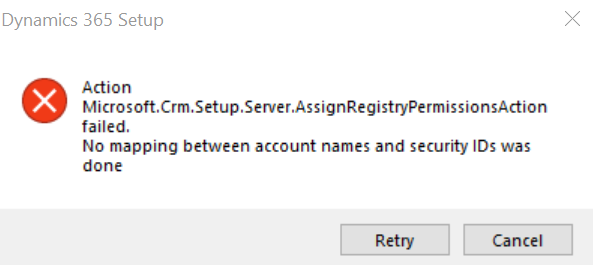

 d365_5F00_error_5F00_image.png

I have the same question (0)
  • Suggested answer
    XM-22040801-0 Profile Picture
    11 on at

    Hi,

    What account are you trying to install with? What are these rights?

    He must be a local administrator. To learn more about minimum required permissions: learn.microsoft.com/.../how-to-install-dynamics-crm-with-the-minimum-required-permissions

  • JMiller4043 Profile Picture
    5 on at

    Hi,

    Thank you for sharing the minimum permissions guide.

    I made sure that the account I am installing it with is a local administrator on the server its being installed on.

    Still getting that error.  I also am going to share screenshots of the AD Users and Computers (ADUC).  I have ensured all accounts shown in ADUC are part of Domain Admins and also part of the Security Groups shown in the pictures.

    It's worth adding I have largely been following this guide to getting it up and running in my lab environment...I am just using Server 2019 and SQL 2019. Installing Dynamics 365 v9 On Premise!

    Thank you again for your assistance in resolving this installation error.

    d365_5F00_error_5F00_image_5F00_full.png

    d365_5F00_ADUC_5F00_001.png

  • Suggested answer
    XM-22040801-0 Profile Picture
    11 on at

    Hi,

    Do you have log in event viewer ? Can you try to find the problematic account with this blog : www.rebeladmin.com/.../

  • JMiller4043 Profile Picture
    5 on at

    Couldn't find a log in the event viewer for this.

    I did previously find that article and tried what it says about ExtensionDebugLevel in the registry.  Unfortunately, the setup does not update the winlogon.log file when the setup fails with the error.

  • JMiller4043 Profile Picture
    5 on at

    I also wanted to add to this - I tried to see if we could get this up and running in Server 2016 and SQL Server 2016 SP2.  I encountered the same exact issue.

Under review

Thank you for your reply! To ensure a great experience for everyone, your content is awaiting approval by our Community Managers. Please check back later.

Helpful resources

Quick Links

Responsible AI policies

As AI tools become more common, we’re introducing a Responsible AI Use…

Neeraj Kumar – Community Spotlight

We are honored to recognize Neeraj Kumar as our Community Spotlight honoree for…

Leaderboard > Customer experience | Sales, Customer Insights, CRM

#1
Tom_Gioielli Profile Picture

Tom_Gioielli 108 Super User 2025 Season 2

#2
Jimmy Passeti Profile Picture

Jimmy Passeti 50 Most Valuable Professional

#3
Gerardo Rentería García Profile Picture

Gerardo Rentería Ga... 49 Most Valuable Professional

Last 30 days Overall leaderboard

Product updates

Dynamics 365 release plans
