web
You’re offline. This is a read only version of the page.
close
Skip to main content

Announcements

No record found.

News and Announcements icon
Community site session details

Community site session details

Session Id :
Finance | Project Operations, Human Resources, ...
Answered

how to display lookup in stringEdit form's control?

(0) ShareShare
ReportReport
Posted on by 932

hello , 

I want to add lookup in line details(accounts receivable> sales order >all sales order)
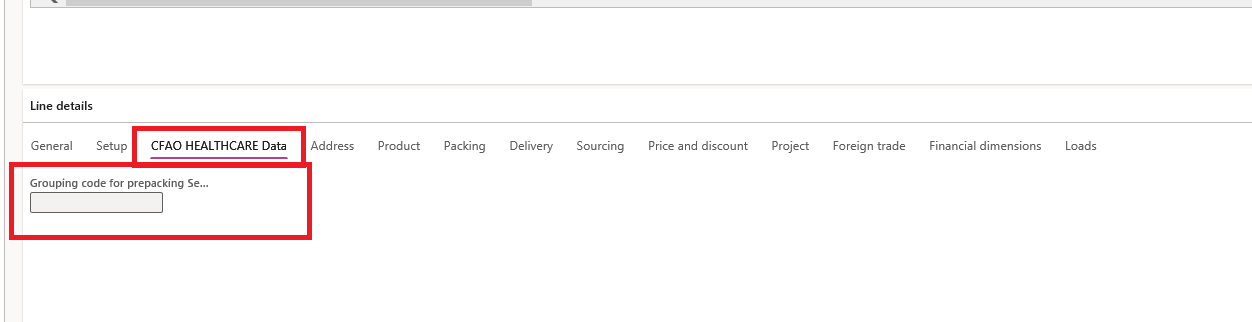
pastedimage1673428994100v1.png

this lookup displays data from cutomized table only for the current customer : 

this is the table : 
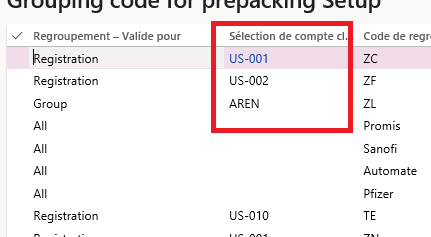
pastedimage1673429186310v2.png

I add new stringEdit control and i add this code in OnLookup event handler : 

[FormControlEventHandler(formControlStr(SalesTable, INTGroupingCode), FormControlEventType::Lookup)]
    public static void INTGroupingCode_OnLookup(FormControl sender, FormControlEventArgs e)
    {
        Query query = new Query();
        SalesTable salesTable = sender.formRun().dataSource("SalesTable").cursor();
        QueryBuildDataSource queryBuildDataSource;
        QueryBuildRange queryBuildRange;
        SysTableLookup sysTableLookup;
        sysTableLookup = SysTableLookup::newParameters(tableNum(INTGroupingCodeTable),sender);
        queryBuildDataSource = query.addDataSource(tableNum(INTGroupingCodeTable));
        queryBuildRange = queryBuildDataSource.addRange(fieldNum(INTGroupingCodeTable,CustomerAccount));
        queryBuildRange.value(queryValue(salesTable.custAccount));
        
        sysTableLookup.addLookupField(fieldNum(INTGroupingCodeTable,GroupingCode ),true);
        sysTableLookup.addLookupField(fieldNum(INTGroupingCodeTable, Description),true);
        
        sysTableLookup.parmQuery(query);
        sysTableLookup.performFormLookup();
    }

but I can't display data.

I have the same question (0)
  • GirishS Profile Picture
    27,833 Moderator on at

    Hi Basma,

    Can you elaborate more?

    What do you mean by I can't display data?

    Is there any error or lookup field is not editable?

    Thanks,

    Girish S.

  • BASMA Profile Picture
    932 on at

    hello,

    yes when I click on edit , the stringRdit is not editable : 

    pastedimage1673431987327v1.png

  • GirishS Profile Picture
    27,833 Moderator on at

    What is the purpose of this string edit control you added? Seems it's a DataSource unbound control

    From the screenshot there is no Sales order line created - Try creating new sales line and check whether its editable.

    Thanks,

    Girish S.

  • BASMA Profile Picture
    932 on at

    yes it's an unbound control ,

    the purpose is  :

    I have a customized table that contains codes for customer.

    I want to display on lookup , only codes for the current customer.

    there is no reltion between sales order lines and the lookup

  • Verified answer
    GirishS Profile Picture
    27,833 Moderator on at

    Okay, have you tried creating a new record on sales order lines?

    Just click on Add line button on sales order line tab and see whether the control is editable.

    Thanks,

    Girish S.

  • BASMA Profile Picture
    932 on at

    thanks Girish,

    When I create a new line , I show the data on lokkup.

  • Suggested answer
    GirishS Profile Picture
    27,833 Moderator on at

    But keep in mind that if you make this control as unbound - This value cannot be saved any where on the table and its just for viewing purpose only. User can select the value from the lookup and the value will be displayed - But you cannot get the selected value if you need that in any of the process later.

    Thanks,

    Girish S.

  • BASMA Profile Picture
    932 on at

    thanks for reply,

    yes I change this control, and i add new field in SalesLine

    then I add it in the form for save the value .

    also I add this field : 

    pastedimage1673538999799v1.png

    can I add also lookup in grid for the same field?

  • GirishS Profile Picture
    27,833 Moderator on at

    Yes, you can add a same lookup code where you have added for your unbound string control. Just copy the lookup event handler for the control you created - Paste the event handler in your custom class - Now copy the code you had written for unbound control and paste it in the lookup method.

    Thanks,

    Girish S.

  • BASMA Profile Picture
    932 on at

    I'm talking about the new fields that I added in SalesLine,

    I added it in 2 places (line details , grid) :

    pastedimage1673539560065v1.png

    I can use the same lookup ? 

Under review

Thank you for your reply! To ensure a great experience for everyone, your content is awaiting approval by our Community Managers. Please check back later.

Helpful resources

Quick Links

Introducing the 2026 Season 1 community Super Users

Congratulations to our 2026 Super Stars!

Congratulations to our 2025 Community Spotlights

Thanks to all of our 2025 Community Spotlight stars!

Leaderboard > Finance | Project Operations, Human Resources, AX, GP, SL

#1
André Arnaud de Calavon Profile Picture

André Arnaud de Cal... 509 Super User 2026 Season 1

#2
Giorgio Bonacorsi Profile Picture

Giorgio Bonacorsi 375

#3
Adis Profile Picture

Adis 268 Super User 2026 Season 1

Last 30 days Overall leaderboard

Product updates

Dynamics 365 release plans
