web
You’re offline. This is a read only version of the page.
close
Skip to main content

Announcements

Community site session details

Community site session details

Session Id :
Customer experience | Sales, Customer Insights,...
Answered

Trigger properties in customer journey - goal to send second email after x amount of days

(0) ShareShare
ReportReport
Posted on by 14

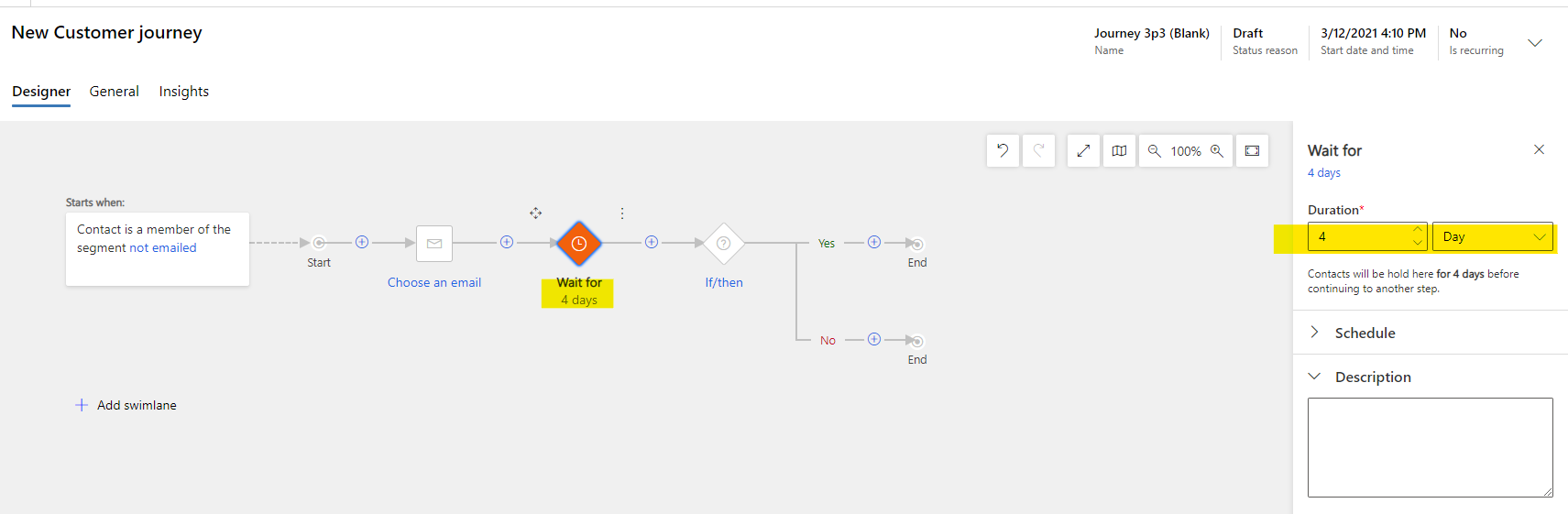
pastedimage1615471898910v1.png

pastedimage1615472588822v1.png

Hi Forum friends! 

I have created the above customer journey with the goal of the contact opening the first email then 4 days later receiving a second email. The properties section highlighted above says 4 days but when testing, I received the second email within an hour. 

Can anyone suggest what I am doing wrong please? 

There is a red asterisks beside the "wait up to" text but I cannot see what this is signposting me to.

Any help would be much obliged. 

Thank you,
Graham

I have the same question (0)
  • Suggested answer
    Nya Profile Picture
    29,060 on at

    Hi, Graham

    The “Wait up to” here for the if/ then means that the data that meet the condition of waiting until a certain time period go to the Yes branch, and those that do not go to the No branch.

    In your case, if you receive the first email within four days, you will be sent the second email, and if you don't receive it, you will go No branch after four days.


    So all you need to do is add a “Wait for” before the “if/ then” and set the “Wait for” time to 4 days.
     pastedimage1615531181879v2.png

    If this helped you, I'd appreciate it if you'd mark this as a Verified Answer, which may in turn help others as well.

    Best Regards,

    Nya

  • Graham McAdam Profile Picture
    14 on at

    Hi Nya,

    I have added the "wait for"" after "if/then" and it appears to have worked. Do you see any risks of having the "wait for" after "if/then"?

    Thanks very much for your answerr.

    Graham

  • Verified answer
    Nya Profile Picture
    29,060 on at

    Hi Graham,

    Do you mean adding the "wait for" in the branches of the "if/then"?

    It can achieve the same effect.

    However, if both branches of your "if/then" have corresponding processing steps, then when you add "wait for" after the "if/then", you need to add it in both branches.


    If this helped you, I'd appreciate it if you'd mark this as a Verified Answer, which may in turn help others as well.

    Best Regards,

    Nya

  • Graham McAdam Profile Picture
    14 on at

    Hi Nya,

    I haver added "wait for" after "if/then". So it is receive email / if opened / wait x days / send second email. It appears to have worked.

    Regards,

    Graham

  • Nya Profile Picture
    29,060 on at

    Hi Graham,

    It's great to hear that your problem has been solved.

    If this helped you, I'd appreciate it if you'd mark this as a Verified Answer, which may in turn help others as well.

    Best Regards,

    Nya

  • Graham McAdam Profile Picture
    14 on at

    Thanks very much, Nya.

    Regards,

    Graham

Under review

Thank you for your reply! To ensure a great experience for everyone, your content is awaiting approval by our Community Managers. Please check back later.

Helpful resources

Quick Links

Introducing the 2026 Season 1 community Super Users

Congratulations to our 2026 Super Stars!

Congratulations to our 2025 Community Spotlights

Thanks to all of our 2025 Community Spotlight stars!

Leaderboard > Customer experience | Sales, Customer Insights, CRM

#1
Tom_Gioielli Profile Picture

Tom_Gioielli 55 Super User 2026 Season 1

#2
Eugen Podkorytov Profile Picture

Eugen Podkorytov 49

#3
Jimmy Passeti Profile Picture

Jimmy Passeti 26 Most Valuable Professional

Last 30 days Overall leaderboard

Product updates

Dynamics 365 release plans
