web
You’re offline. This is a read only version of the page.
close
Skip to main content

Notifications

Announcements

No record found.

Community site session details

Community site session details

Session Id :
Microsoft Dynamics CRM (Archived)

Generate SSRS report using Plugin CRM on premise

(0) ShareShare
ReportReport
Posted on by 150

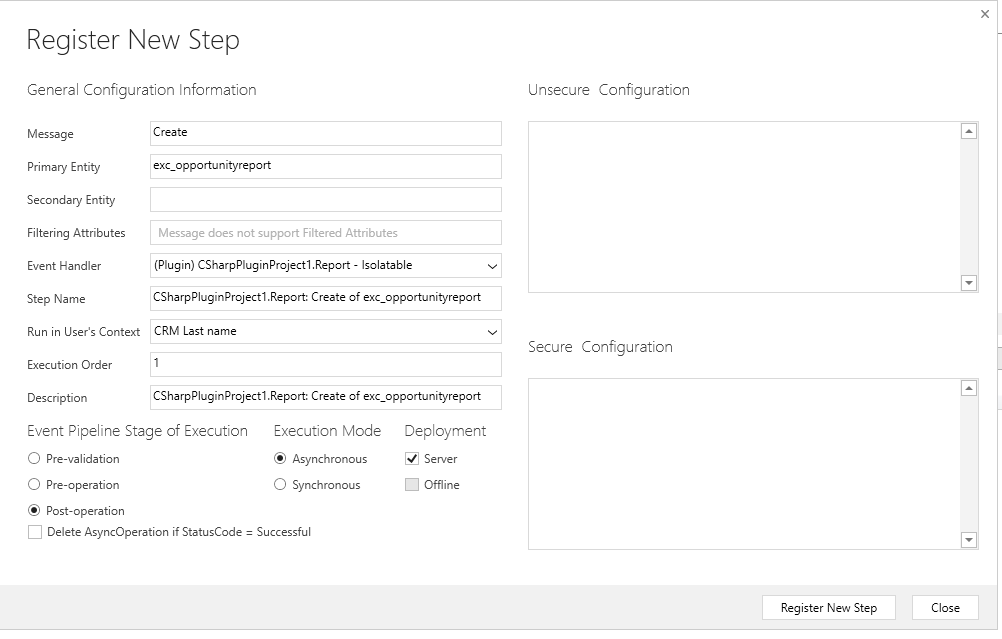
Hello,55563620.Capture.PNG

i'm creating a plugin to generate a CRM report using C# code on create event, then adding this report as attachment to a opportunity entity and send it by email.However, the report is empty!! the labels are well displayed but there is no data.

please find my code below:

public static Byte[] RenderReport(string ServiceURL, string ReportName, ParameterValue[] parameters)
        {
            byte[] result;
            string encoding;
            string mimeType;
            Warning[] warnings = null;
            string[] streamids;
            string extension;

            BasicHttpBinding binding = new BasicHttpBinding(BasicHttpSecurityMode.TransportCredentialOnly);
            binding.Security.Message.ClientCredentialType = BasicHttpMessageCredentialType.UserName;
            binding.Security.Mode = BasicHttpSecurityMode.TransportCredentialOnly;
            binding.Security.Transport.ClientCredentialType = HttpClientCredentialType.Ntlm;
            binding.Security.Transport.ProxyCredentialType = HttpProxyCredentialType.None;
            binding.Security.Transport.Realm = string.Empty;
            binding.MaxReceivedMessageSize = 2147483647;
            string deviceInfo = @"<DeviceInfo><Toolbar>False</Toolbar></DeviceInfo>";
            EndpointAddress endpoint = new EndpointAddress(ServiceURL);

            ReportExecutionServiceSoapClient client = new ReportExecutionServiceSoapClient(binding, endpoint);

            client.ClientCredentials.Windows.AllowedImpersonationLevel = TokenImpersonationLevel.Impersonation;


            ExecutionInfo execInfo = new ExecutionInfo();
            ExecutionHeader execHeader = new ExecutionHeader();
            ServerInfoHeader serverInfoHeader;

            ExecutionInfo executionInfo;
            ExecutionHeader executionHeader = client.LoadReport(null, ReportName, null, out serverInfoHeader, out executionInfo);
            // Attach Report Parameters
            //executionHeader.ExecutionID = executionInfo.ExecutionID;
            if (parameters != null)
                client.SetExecutionParameters(executionHeader, null, parameters, null, out executionInfo);
            ServerInfoHeader Info = client.Render(executionHeader, null, "PDF", deviceInfo, out result, out extension, out mimeType, out encoding, out warnings, out streamids);

            return result;
        }

55563620.Capture.PNG

Can you advise please

*This post is locked for comments

I have the same question (0)
  • Suggested answer
    Mahadeo Matre Profile Picture
    17,021 on at

    Hi,

    Check your report executing from opportunity record directly.. if it is working then need to check parameters you are passing has correct name (might be case sensitive) and parameter correct values you are passing.

  • Suggested answer
    Aric Levin - MVP Profile Picture
    30,190 Moderator on at

    This is a little old article, but might be useful:

    www.akaes.com/.../ms-dynamics-crm-2013-generating-ssrs-report-as-pdf-using-plugin

    Hope this helps.

  • HML Profile Picture
    25 on at

    Is the report otherwise working for the user and only the one in email is empty?

    I have no competence to comment your code, but I have seen blank reports multiple times. 

    Apparently the report is being run under user context, so this seems like a privileges error. Please check that he users has sufficient security roles to get the data.

    Is the report built with SQL or FetchXML? You could also paste your query here.

    If you are using SQL you will need to query filtered views instead of the actual tables, eg. select * from FilteredAccount instead of Account.  

    Filtered views use the Microsoft Dynamics CRM security model, so data shown in a report using a filtered view would only contain the data the users can view in CRM.

    In this case I am guessing you are querying the tables directly and the users don't have any access to read them, thus no data.

    https://docs.microsoft.com/en-us/previous-versions/dynamicscrm-2016/reporting-analytics-dynamics-365/dn531161(v=crm.8)

    https://crmbusiness.wordpress.com/2015/03/13/crm-2015-why-filtered-views-are-useful/

  • Suggested answer
    Dynamics365 Rocker Profile Picture
    7,755 on at

    Make sure following:

    Parameters are correct.

    User who is generating report from plugin should have read privileges on all entities of report query.

Under review

Thank you for your reply! To ensure a great experience for everyone, your content is awaiting approval by our Community Managers. Please check back later.

Helpful resources

Quick Links

Responsible AI policies

As AI tools become more common, we’re introducing a Responsible AI Use…

Neeraj Kumar – Community Spotlight

We are honored to recognize Neeraj Kumar as our Community Spotlight honoree for…

Leaderboard > 🔒一 Microsoft Dynamics CRM (Archived)

#1
SA-08121319-0 Profile Picture

SA-08121319-0 4

#1
Calum MacFarlane Profile Picture

Calum MacFarlane 4

#3
Alex Fun Wei Jie Profile Picture

Alex Fun Wei Jie 2

Last 30 days Overall leaderboard

Featured topics

Product updates

Dynamics 365 release plans



